
When searching for reliable bot detection JavaScript libraries on GitHub, the key question is: which tools provide effective, easy-to-integrate protection without overwhelming user experience or performance? JavaScript-based bot detection is critical for guarding web apps against fake registrations, scraping, credential stuffing, and other automated attacks. Fortunately, several open-source and SaaS-backed options offer various detection strategies and integration styles, enabling developers to choose what fits their technical and security needs.
What Makes Bot Detection JavaScript Solutions on GitHub Viable?
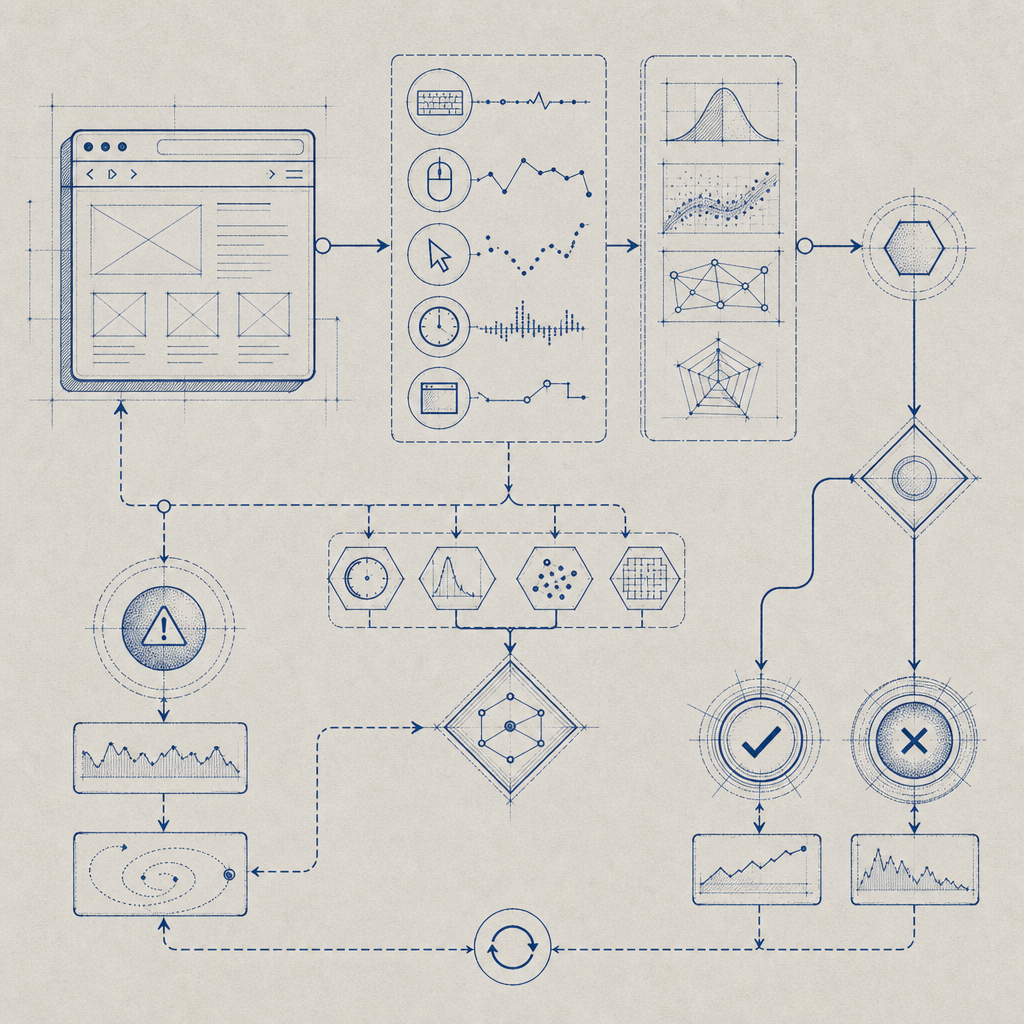
Bot detection libraries or scripts typically analyze behavioral patterns, browser fingerprinting, interaction signals, or challenge-response tests to tell humans and automated bots apart. GitHub hosts many repositories covering a broad spectrum of approaches:
- Fingerprint-based: Collects device properties, canvas data, fonts, and other hints to recognize suspicious clients.
- Challenge tokens: Issues cryptographic challenges or captchas that machines struggle to solve.
- Interaction monitoring: Tracks mouse movements, keystroke dynamics, and delays that indicate human activity.
For bot detection to succeed with JavaScript, it must balance:
- Accuracy: Detect bots while minimizing false positives.
- Performance: Load quickly and run efficiently on client devices.
- Privacy: Avoid over-collecting personal data or violating regulations.
- Flexibility: Work with diverse frontends (React, Vue, plain JS).
Many GitHub projects are experimental or lack ongoing maintenance, whereas SaaS providers like CaptchaLa offer mature SDKs and continuous improvements, including low-latency loaders, global CDN hosting, and multi-language support.
Key Bot Detection JavaScript GitHub Projects & Their Features
Here’s a brief overview of some popular bot detection JavaScript-related projects available on GitHub—including standalone libraries and SDKs you can augment with backend validation.
| Project Name | Approach | Integration Type | Status | Notable Feature |
|---|---|---|---|---|
| FingerprintJS | Browser/device fingerprint | JS library + SaaS | Active | Large community and accuracy |
| BotD by fingerprintjs | Bot detection addon | JS module/library | Maintained | Behavioral signals detection |
| Puppeteer Detector | Bot/Headless detection | JS snippet | Limited updates | Detect headless browser usage |
| syn-bouncer | Challenge/Behavioral | Node + JS client | Moderate | Invisible challenges |
| CaptchaLa SDK | Challenge-response + heuristic | SDK + loader script | Actively supported | Multi-language UI, server SDKs |
Projects like FingerprintJS lead in fingerprinting but require server-side logic to interpret signals thoroughly. CaptchaLa combines JavaScript loaders with backend validation, simplifying integration while supporting eight UI languages and native SDKs (Web, iOS, Android, Flutter, Electron). You can embed it via a single loader script:
// Load CaptchaLa client and run a challenge
(function() {
  var script = document.createElement("script");
  script.src = "https://cdn.captcha-cdn.net/captchala-loader.js";
  script.async = true;
  script.onload = function() {
    CaptchaLa.init({
      appKey: "YOUR_APP_KEY",
      onSuccess: function(passToken) {
        // Validate the pass token server-side
        fetch("https://apiv1.captcha.la/v1/validate", {
          method: "POST",
          headers: {
            "Content-Type": "application/json",
            "X-App-Key": "YOUR_APP_KEY",
            "X-App-Secret": "YOUR_APP_SECRET"
          },
          body: JSON.stringify({ pass_token: passToken, client_ip: "USER_IP" })
        }).then(response => response.json())
          .then(result => {
            if (result.success) {
              console.log("User verified as human");
            } else {
              console.warn("Bot suspected");
            }
          });
      }
    });
  };
  document.head.appendChild(script);
})();
This snippet shows how you can seamlessly integrate bot detection with client-server token validation, a strategy effective in preventing falsified reports from bots trying to spoof interactions.
Comparing CaptchaLa with Other Popular Bot Detection Services
Many developers consider SaaS CAPTCHA providers like reCAPTCHA, hCaptcha, or Cloudflare Turnstile when evaluating bot detection options. Here’s a neutral comparison focusing on JavaScript integration and developer experience:
| Feature / Provider | reCAPTCHA | hCaptcha | Cloudflare Turnstile | CaptchaLa |
|---|---|---|---|---|
| JS Integration | Script snippet + callbacks | Script snippet + callbacks | Lightweight snippet | Loader script + SDK |
| Challenge Type | Image / checkbox / invisible | Image / checkbox | Invisible challenge | Adaptive heuristic + CAPTCHA |
| Privacy Focus | Google-hosted; collects data | Privacy-oriented | Privacy first | First-party data only |
| Multi-language UI | ~50+ languages | 30+ languages | Limited | 8 languages native |
| SDK Support | Limited beyond Web | Limited | Limited | Full Web + mobile + desktop |
| Free tier (per month) | Unlimited (quota-managed) | Free with limits | Free depending on traffic | 1000 free; paid tiers scale |
While reCAPTCHA and hCaptcha dominate in adoption, CaptchaLa emphasizes first-party data usage, transparent privacy, and SDK versatility. This includes native bindings for popular frameworks (Vue, React) and mobile platforms, easing the integration burden for modern apps.
Best Practices for Using Bot Detection JavaScript on GitHub
Integrating a JavaScript bot detection solution is not just copy-pasting code. Follow these recommendations to maximize effectiveness:
- Combine client and server checks: JavaScript signals are purely client-reported; verify with backend APIs to prevent token spoofing.
- Implement fallback measures: Design challenges or progressive friction after suspicious behavior improves bot detection without degrading UX.
- Respect user privacy: Avoid over-collecting data. Use services compliant with privacy norms like GDPR.
- Monitor false positives: Tune thresholds or heuristics frequently based on traffic analytics.
- Regularly update SDKs/scripts: Bot developers evolve methods; staying current reduces vulnerabilities.
For example, CaptchaLa provides ongoing SDK updates on GitHub and a well-documented API to manage challenge issuance and result validations. The public CaptchaLa docs outline how to customize security levels and UI language preferences.

Conclusion: Choosing the Right JavaScript Bot Detection Strategy for Your Project
Selecting bot detection tools from GitHub depends primarily on the balance between your security needs, ease of integration, and ongoing maintenance capabilities. Open-source libraries can jumpstart detection but may require significant backend customization. SaaS SDKs like CaptchaLa simplify this by offering turnkey client-server integration, multi-platform SDKs, and attention to privacy and user experience.
If your goal is to combine effective bot detection with flexible SDK options and transparent pricing plans, exploring CaptchaLa alongside established systems like reCAPTCHA or Cloudflare Turnstile is worthwhile.
Where to go next? Check out the detailed Documentation or review the Pricing to find a plan that fits your startup or enterprise needs.