
Bot detection JavaScript is the client-side layer that helps you tell real browsers from automated traffic before abuse reaches your forms, logins, signup flows, or APIs. Used well, it adds a lightweight signal that complements server-side checks, session validation, and rate limiting; used poorly, it becomes a nuisance for users and easy work for attackers.
At a practical level, the job is not to “block all bots” with one script. The job is to collect trustworthy signals, issue a challenge when needed, and hand your backend a verifiable token it can trust. That way, you can make risk-based decisions instead of forcing every visitor through the same hurdle.
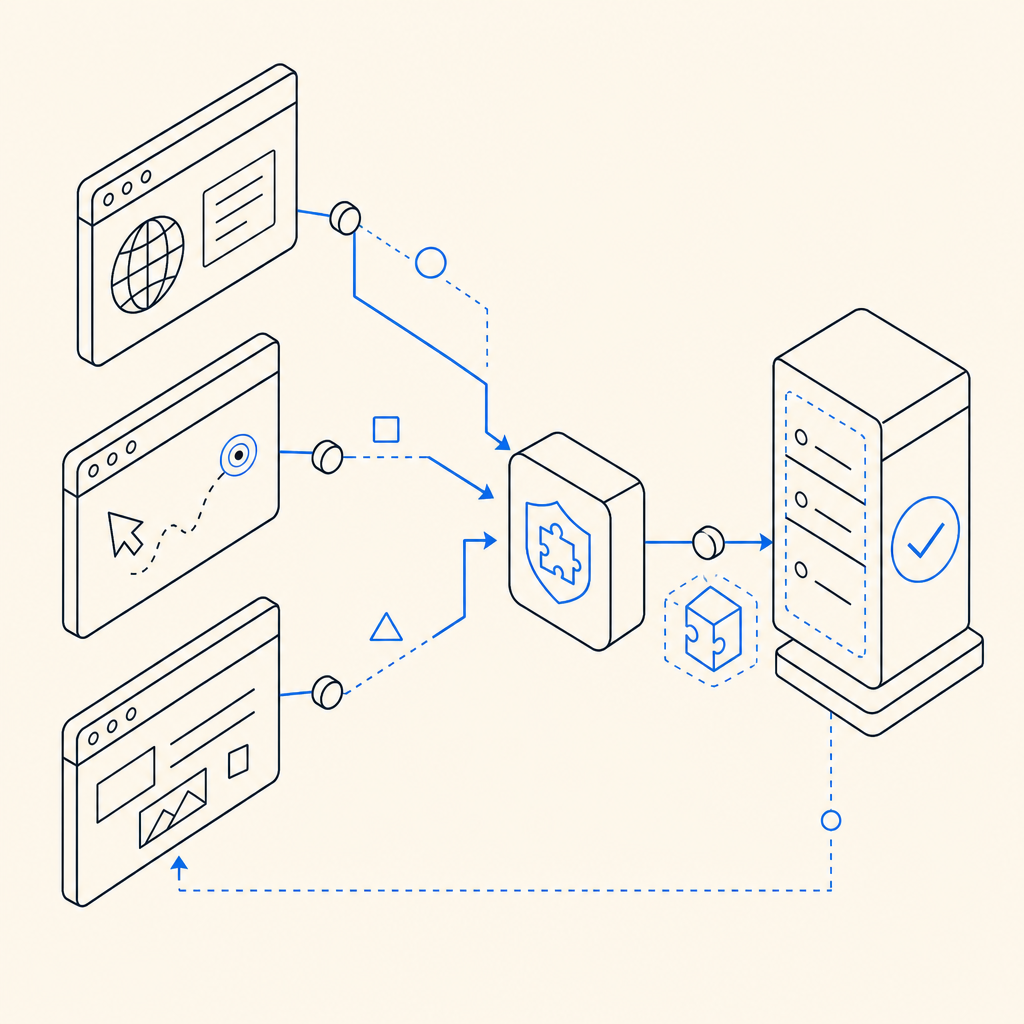
What bot detection JavaScript actually does
A good bot-detection script runs in the browser and focuses on three things:
Recognizing the client environment
It can look for execution context, timing patterns, missing browser features, abnormal input behavior, and whether expected JS flows complete normally.Issuing or coordinating a challenge
Instead of blocking immediately, many systems show a puzzle, proof-of-work, or invisible verification step when risk rises.Returning a token your server can verify
The browser should never be the final authority. The front end collects evidence; the backend validates it.
That last point matters. JavaScript is useful because it can observe the browser, but it is not a trust boundary by itself. Treat it as an evidence collector.
A typical flow looks like this:
// Load the challenge script early in the page lifecycle
const script = document.createElement("script");
script.src = "https://cdn.captcha-cdn.net/captchala-loader.js";
script.async = true;
document.head.appendChild(script);

// After the user completes the challenge, send the token to your backend
async function submitProtectedForm(passToken) {
  const response = await fetch("/api/checkout", {
    method: "POST",
    headers: {
      "Content-Type": "application/json"
    },
    body: JSON.stringify({
      pass_token: passToken,
      client_ip: "derived on server"
    })
  });

  return response.json();
}
If you use CaptchaLa, this split between browser challenge and server validation is built into the workflow, which helps keep the client side lightweight and the trust decision on your backend.
What to look for in a modern implementation
Not every bot-detection setup is equally useful. When you evaluate bot detection JavaScript, focus on specifics rather than marketing language.
1) Signal quality
Good signals are hard for automation to fake consistently. Examples include:
- interaction timing across multiple events
- browser execution consistency
- DOM and environment integrity checks
- token freshness
- challenge completion patterns
A single signal is easy to mimic. A layered set of signals is more reliable.
2) Server verification
The browser should submit a pass token to your server, and your server should verify it with a private key. A solid validation flow might look like:
- browser completes challenge
- browser sends
pass_tokento your backend - backend calls a validation endpoint
- backend decides whether to proceed
For CaptchaLa, the validation endpoint is:
POST https://apiv1.captcha.la/v1/validate
with a body like:
{
  "pass_token": "token-from-browser",
  "client_ip": "203.0.113.10"
}
and headers including X-App-Key and X-App-Secret.
That server-side check is what makes the client script meaningful. Without it, a token is just another string in transit.
3) Low-friction UX
The best friction is often invisible. For low-risk traffic, users should pass without noticing. For elevated risk, the challenge should be understandable, fast, and accessible.
This is one reason teams compare tools like reCAPTCHA, hCaptcha, and Cloudflare Turnstile. Each has a different balance of visibility, UX, deployment style, and ecosystem fit. The right choice depends on your product, compliance posture, and tolerance for user interruption.
4) Integration surface
A mature solution should fit your stack, not force a rewrite. CaptchaLa supports:
- Web: JS, Vue, React
- iOS, Android, Flutter, Electron
- eight UI languages
- server SDKs for
captchala-phpandcaptchala-go
That matters if you have mixed web and mobile flows or want one bot-defense policy across product surfaces.
Client-side patterns that work well
If you are implementing bot detection JavaScript yourself or integrating a provider, a few patterns are worth keeping in mind.
Use a layered risk model
Do not challenge every visitor equally. A better model is:
- low risk: silent pass
- medium risk: lightweight verification
- high risk: stricter challenge or server-side review
This reduces abandonment while still protecting sensitive endpoints.
Place challenges near the protected action
The closer the challenge is to the action, the less chance a token will go stale. For example:
- signup form submit
- password reset request
- checkout confirmation
- comment posting
- login after repeated failures
Keep tokens short-lived
Short-lived tokens limit replay value. Your backend should reject stale or reused values and treat token age as part of the decision.
Validate on the backend first, then proceed
A token should not unlock business logic until your server has checked it. That means the sequence should be:
- receive request
- validate pass token
- apply business rules
- write data or issue session
If you reverse that order, you create avoidable risk.
Prefer first-party data handling where possible
If privacy and data governance matter to your organization, first-party handling can simplify reviews and reduce uncertainty. CaptchaLa positions itself around first-party data only, which some teams will prefer when they are scrutinizing where verification data flows.
Choosing between common CAPTCHA approaches
Here is a practical comparison of widely used options.
| Tool | Typical strength | UX style | Integration note |
|---|---|---|---|
| reCAPTCHA | Familiar, broad adoption | Often visible or semi-visible | Good ecosystem support, but can feel heavier |
| hCaptcha | Strong bot pressure in many cases | Usually challenge-based | Often chosen for monetization and control preferences |
| Cloudflare Turnstile | Low-friction, invisible-first | Often minimal interaction | Attractive when you want less user interruption |
| CaptchaLa | Challenge + verification flow | Flexible across web/mobile | SDKs for web, mobile, Electron, and server validation |
The right choice depends less on brand and more on how your traffic behaves. If you have a lot of login abuse, coupon abuse, or signup spam, you want a system that can adapt quickly and validate reliably on the backend.
For teams deploying fast, docs matter as much as the SDK. docs should answer the operational questions: where to load the script, how to validate the token, how to handle failure, and how to tune your challenge flow.

A simple implementation checklist
If you are adding bot detection JavaScript to an existing app, use this checklist as a sanity pass:
Load the client script early, but not in a way that blocks rendering.
- Prefer async loading for noncritical paths.
- Ensure the challenge library is available before protected actions.
Protect only the actions that need it.
- Signup, login, password reset, checkout, comments, and scraping-sensitive endpoints are common targets.
- Do not over-challenge harmless browsing.
Send the pass token to your backend.
- Never trust a client-only pass.
- Keep the validation request private.
Verify server-side with the provider endpoint.
- For CaptchaLa, use
POST https://apiv1.captcha.la/v1/validate. - Include
pass_tokenandclient_ip. - Authenticate with
X-App-KeyandX-App-Secret.
- For CaptchaLa, use
Handle failure cleanly.
- Show a retry path.
- Log validation errors separately from normal application errors.
- Avoid generic “something went wrong” dead ends.
Measure the outcomes.
- Track challenge pass rate
- Track false positives
- Track conversion impact
- Track abuse reduction
If you need server-side issuance for a challenge flow, CaptchaLa also exposes:
POST https://apiv1.captcha.la/v1/server/challenge/issue
That can be useful when your backend wants to initiate the challenge itself rather than relying entirely on the browser.
Where bot detection JavaScript fits in your stack
Bot detection JavaScript is strongest when it is part of a broader defense plan. It should sit alongside:
- rate limiting
- IP reputation checks
- account-level anomaly detection
- device/session fingerprinting where appropriate
- backend rules for repeat offenders
That combination is much harder to abuse than a single front-end check. It also gives you more control over false positives. If one signal looks suspicious but the rest of the request is normal, you can step up verification instead of blocking outright.
Pricing also matters when you are scaling protection across multiple endpoints. pricing can help you map expected volume to plan size, especially if you are comparing a free tier, mid-scale growth, or higher-volume production traffic. CaptchaLa’s published tiers include 1,000/month on free, 50K-200K on Pro, and 1M on Business.
The main idea is simple: bot detection JavaScript should make abuse expensive without making honest users miserable. The better your implementation, the less your users notice it and the more your server can trust the result.
Where to go next: read the docs for implementation details, or review pricing if you want to estimate volume for your app.