
Bot detection is live when your challenge flow is deployed, your validation endpoint is answering, and real traffic is being classified instead of guessed. That does not mean the job is finished; it means you now have evidence to tune, compare, and harden.
The most common mistake after launch is treating “enabled” as “done.” A live bot-defense layer should be checked like any other security control: confirm the token flow, watch failure modes, segment by route, and make sure humans are not getting caught in the net. If you are using CaptchaLa, that also means verifying the client loader, the server-side validation call, and whatever analytics or logging you depend on for incident review.
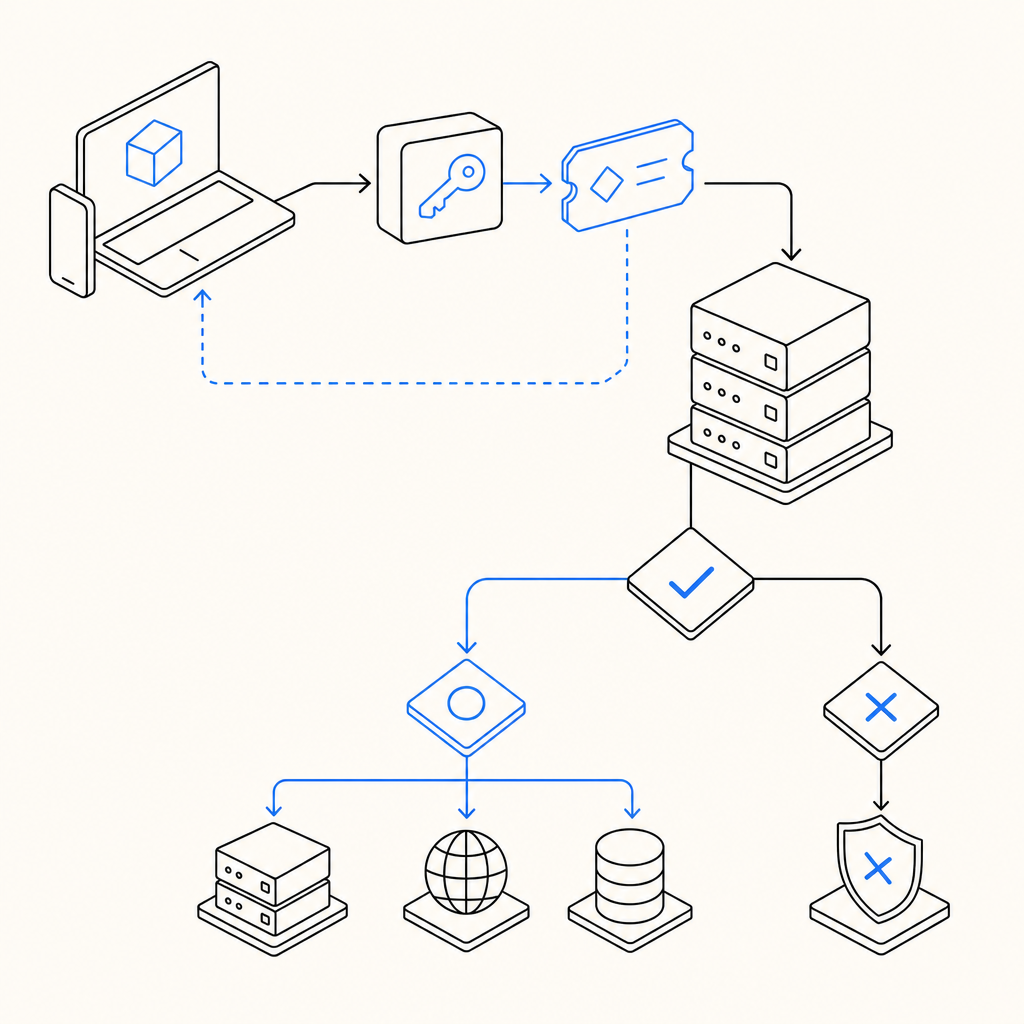
What “live” should mean operationally
A bot-detection system is truly live when three things are happening at once:
- The client can request or receive a challenge token without breaking the user journey.
- Your server can validate that token on every protected action.
- You can observe the outcome and adjust rules without redeploying the whole app.
That sounds simple, but each layer can fail independently. A script can load but never validate. A backend can validate correctly but ignore IP context. A challenge can work on desktop while mobile users experience delays or localization issues.
If you want a quick health check, verify the basics in this order:
- The loader is reachable from your front end.
- The token is present on protected requests.
- Your server sends the expected validation payload.
- Failed validations are logged with enough context to debug.
- You have a rollback path if a route gets overblocked.
For CaptchaLa, client-side delivery uses the loader at https://cdn.captcha-cdn.net/captchala-loader.js, and server validation is a POST to https://apiv1.captcha.la/v1/validate with pass_token and client_ip, authenticated by X-App-Key and X-App-Secret. That is the kind of detail that matters once the system is live; “works on my machine” is not a security strategy.
A practical validation checklist
Use this as a deployment checklist for the first 24 hours after turning detection on:
- Confirm the challenge is rendered only where intended.
- Capture a successful token from a normal user session.
- Send that token to your validation endpoint.
- Verify the backend returns a clear allow/deny result.
- Test expired, missing, and malformed tokens.
- Check rate spikes on the validation endpoint itself.
- Review whether retries are creating duplicate events.
- Confirm your logs include route, decision, and timestamp.

Compare the common bot-defense paths
Different providers solve slightly different problems. reCAPTCHA, hCaptcha, Cloudflare Turnstile, and CaptchaLa all sit in the same broad category, but the tradeoffs matter if you are evaluating what “live” should mean for your stack.
| Product | Typical emphasis | Integration shape | Notes |
|---|---|---|---|
| reCAPTCHA | Risk scoring and challenge familiarity | Front-end widget plus server verification | Widely recognized, but can feel heavy in some flows |
| hCaptcha | Challenge-based friction and privacy positioning | Front-end widget plus server verification | Often chosen where puzzle-based interaction is acceptable |
| Cloudflare Turnstile | Low-friction verification | Front-end token flow with backend check | Good fit when you want minimal user interruption |
| CaptchaLa | Bot defense with first-party data only | Web, mobile, desktop SDKs plus server validation | Supports JS/Vue/React, iOS, Android, Flutter, Electron |
Objectively, the right option depends on your product surface. If your app is mostly browser-based, a widget flow may be enough. If you have mobile apps, desktop clients, or mixed environments, native SDK coverage can reduce glue code and improve consistency. CaptchaLa exposes native support for Web, iOS, Android, Flutter, and Electron, plus server SDKs for PHP and Go, which matters when you want the same decision logic across channels.
There is also a privacy and data-governance angle. CaptchaLa’s model uses first-party data only, which may align better with teams that are minimizing cross-domain dependency. That does not make other products wrong; it just changes the compliance and architecture conversation.
How to validate without creating friction
Once bot detection is live, your goal is not to maximize challenges. Your goal is to reduce abuse while preserving legitimate conversion. That means tuning the decision points, not just the widget.
A healthy implementation usually has the following shape:
- Anonymous traffic gets a lightweight challenge or passive check.
- Higher-risk actions require token validation.
- Sensitive endpoints re-check context before execution.
- Fail-closed behavior is reserved for high-value operations.
- Low-risk paths degrade gracefully when validation is unavailable.
Here is a simple server-side pattern for a protected endpoint:
# English comments only
def protect_request(request):
    pass_token = request.form.get("pass_token")
    client_ip = request.headers.get("X-Forwarded-For", request.remote_addr)

    payload = {
        "pass_token": pass_token,
        "client_ip": client_ip
    }

    # Send the token to the validation API
    result = post_json(
        "https://apiv1.captcha.la/v1/validate",
        json=payload,
        headers={
            "X-App-Key": APP_KEY,
            "X-App-Secret": APP_SECRET
        }
    )

    # Allow only validated requests
    if result.get("valid") is True:
        return allow()
    return deny()
A few technical details are easy to miss:
- Validate as close to the protected action as possible.
- Do not rely on the client to tell you whether it “passed.”
- Log validation latency, because slow verification can become a user-experience issue.
- Keep token lifetime short enough to reduce replay value.
- Make sure retries do not accidentally resubmit the same token in ways that confuse your logs.
If you are using a mobile or desktop client, the native SDKs can simplify token acquisition. CaptchaLa publishes packages such as Maven la.captcha:captchala:1.0.2, CocoaPods Captchala 1.0.2, and pub.dev captchala 1.3.2, which can help standardize the flow across platforms without inventing parallel implementations.
Where issues usually show up after launch
Once traffic is real, the failures are often not dramatic. They are subtle.
1. Edge cases in browsers and networks
Ad blockers, corporate proxies, slow DNS, and privacy-focused browsers can all affect loader behavior. If a challenge never appears, the app may still seem “fine” until you notice a drop in protected conversions. Watch for:
- loader fetch failures
- token timeouts
- cross-origin script restrictions
- stale cached assets after deploys
2. Overblocking valuable users
A bot system that is too strict can penalize legitimate users who share IP space, switch networks, or move between devices. This is especially important on checkout, login, and account recovery flows. The answer is usually not to disable the system; it is to segment your rules.
3. Underblocking high-volume abuse
If your validation endpoint is live but your app only checks it on one route, automated abuse will move somewhere else. Bots tend to seek the softest edge. Protect the actions that matter most, then expand coverage from there.
4. Operational blind spots
A live system needs metrics. At minimum, track:
- validation success rate
- validation failure rate
- median and p95 validation latency
- route-level challenge volume
- friction rate by device or locale
If you do not already have this wired up, docs is the place to confirm the exact request/response shape, and pricing is useful if you are estimating volume tiers like Free at 1000/month, Pro at 50K-200K, or Business at 1M.
The real goal after launch
The point of saying “bot detection is live” is not to celebrate completion. It is to start a tighter feedback loop between abuse patterns, user experience, and backend enforcement.
That feedback loop usually improves in three stages:
- Instrument the flow and verify the tokens.
- Measure where legitimate users struggle.
- Tighten checks only where abuse actually occurs.
If you do that well, you get a system that feels almost invisible to normal users and annoying only to automation you do not want. That is the balance worth optimizing for.
Where to go next: review the implementation details in the docs or compare plan fit on pricing.