
A bot detection image is a visual challenge designed to separate humans from automation by making image recognition, interpretation, or interaction slightly harder for scripts than for people. Used well, it becomes one signal in a broader defense system rather than a standalone gate.
The important part is not whether the image looks “hard,” but whether it reliably produces a pass/fail signal that is difficult to fake at scale while staying fast and accessible for real users. That balance is what separates a useful CAPTCHA-style control from a frustrating one.
What a bot detection image actually does
A bot detection image can take many forms: object selection, image rotation, point-and-click tasks, dragging items into place, or choosing the image that matches a prompt. From the defender’s point of view, the image is less about “catching AI” and more about creating a friction point that automation cannot cheaply solve across millions of attempts.
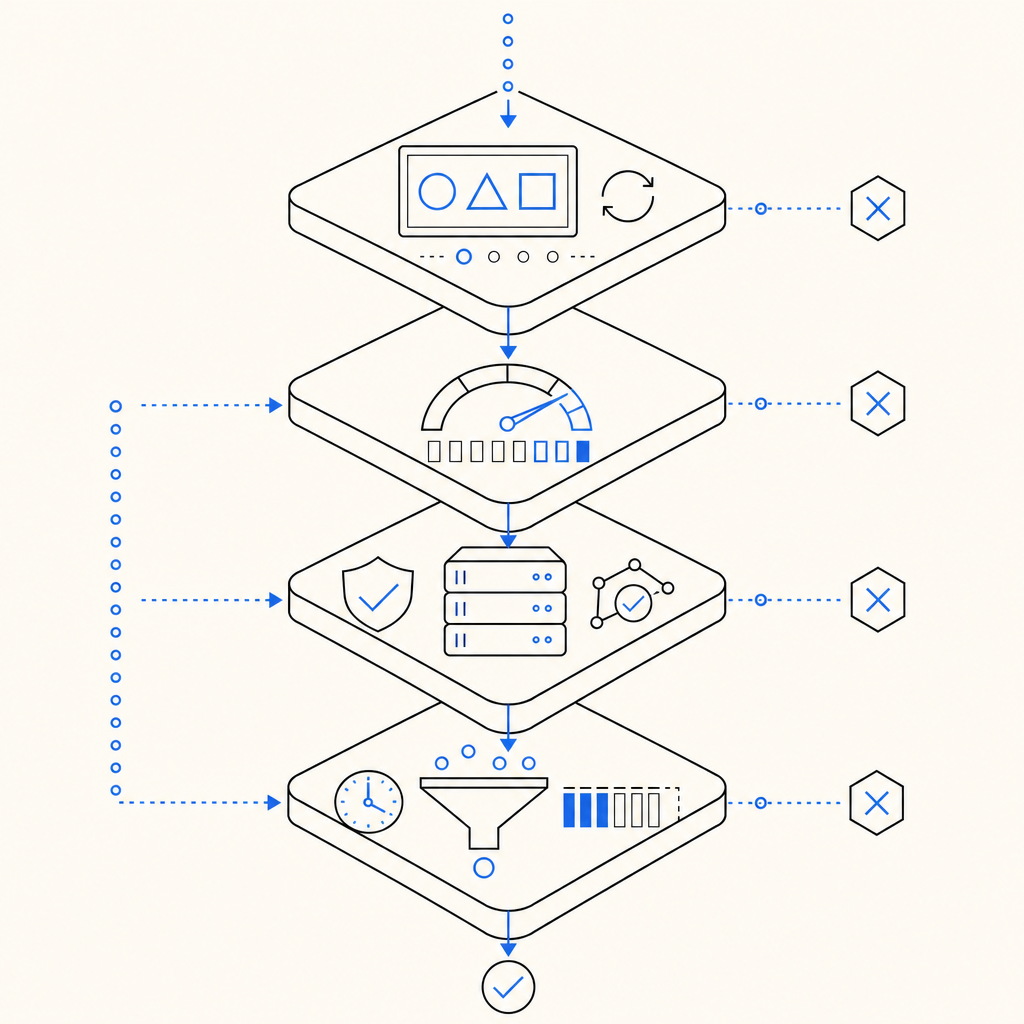
The core idea is to combine a visual task with telemetry. A script may try to mimic clicks, but the full decision usually depends on more than the answer itself:
- Timing patterns, such as how quickly the challenge opens, is viewed, and is submitted.
- Pointer or touch behavior, including path shape, dwell time, and correction patterns.
- Session context, such as client IP, device fingerprinting signals, and prior request history.
- Challenge integrity, including whether the browser fetched the loader and whether the token was issued and validated correctly.
That means the “image” is only one layer in a system that can include front-end loading, server-issued tokens, and backend validation. If you are building for real traffic, you want the image to be just visible enough to be usable, but not so predictable that automation can learn a fixed template.
Why images still matter
Text-only checks are easy to automate, and purely invisible checks can miss some abuse patterns or become opaque to users. A bot detection image gives you a middle ground: it adds a human-recognizable task while still allowing the backend to analyze the surrounding signal.
That said, image challenges are not universally appropriate. They work best when you need an interactive challenge for suspicious traffic, not as the only barrier on every page load. For low-friction environments, a lighter signal such as Cloudflare Turnstile may be enough. For other cases, reCAPTCHA or hCaptcha may fit operationally depending on your policies and UX constraints.
Designing a strong image challenge
A good bot detection image should be easy to understand, hard to game, and respectful of accessibility. That sounds obvious, but it pushes the design in practical ways.
1) Keep the task simple enough for humans
The prompt should be clear in one reading. If users need to interpret a riddle before they can begin, you are measuring patience more than authenticity. Good challenges usually ask for one thing: select, rotate, drag, or compare.
2) Avoid fixed templates
Static layouts help automation. Vary:
- image composition
- object placement
- asset sets
- instruction phrasing
- number of required interactions
This does not mean randomness for its own sake. It means the same challenge should not appear identical across sessions, regions, or device classes.
3) Tie the image to server-side state
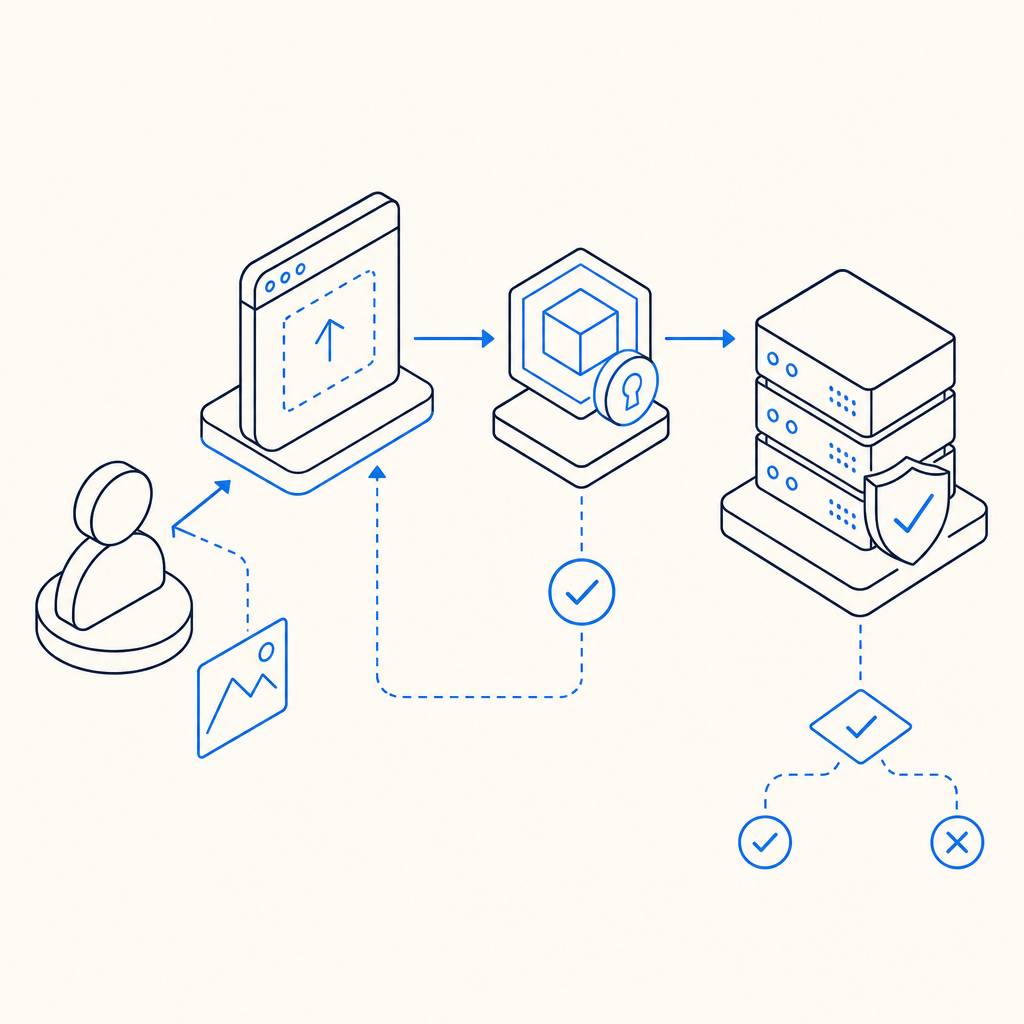
A bot detection image becomes much more useful when the challenge can be issued and validated as part of a session-bound flow. For example, a server can request a challenge token, the browser loads the image challenge, and the backend later validates the response along with request metadata.
A simple architecture might look like this:
Browser loads challenge loader
  -> Challenge is rendered with session context
  -> User interacts with image
  -> Client receives pass_token
  -> Backend validates token + client_ip
  -> Request is allowed or challenged again
If you are using CaptchaLa, the loader is served from https://cdn.captcha-cdn.net/captchala-loader.js, and backend validation happens by POSTing to https://apiv1.captcha.la/v1/validate with {pass_token, client_ip} plus X-App-Key and X-App-Secret. That separation keeps the trust decision on the server side where it belongs.
Comparing image challenges with other bot defenses
No single control solves every fraud pattern. A bot detection image is one tool in a layered stack, and it helps to compare it with other common options.
| Approach | Primary strength | Main tradeoff | Best fit |
|---|---|---|---|
| Bot detection image | Human-recognizable interactive challenge | Adds friction and accessibility considerations | Suspicious signups, checkout abuse, credential attacks |
| reCAPTCHA | Broad familiarity and mature ecosystem | User experience can vary; privacy and policy considerations | General abuse prevention on consumer sites |
| hCaptcha | Flexible challenge formats and anti-bot posture | Can still introduce friction for users | High-abuse public endpoints |
| Cloudflare Turnstile | Low-friction verification | Less visual challenge feel | Sites prioritizing minimal user interruption |
The right choice depends on the risk you are managing. If a form is under mild abuse, a low-friction control may be enough. If the endpoint is being hit by scripted signups or automated checkout attempts, a visible image challenge can force the automation to spend more time and compute on each attempt.
It is also worth considering deployment constraints. CaptchaLa supports 8 UI languages and native SDKs for Web (JS, Vue, React), iOS, Android, Flutter, and Electron, plus server SDKs like captchala-php and captchala-go. That makes it easier to keep the challenge flow consistent across client types without inventing a separate integration for each platform.
How to validate without leaking trust to the client
The front-end should display the bot detection image, but it should not be the final authority. The server needs to verify the response and make the decision.
With CaptchaLa, a typical validation flow is:
- Render the challenge in the client.
- Receive a
pass_tokenafter the interaction. - Send the token and
client_ipto your backend. - Have your server call the validation endpoint.
- Allow, rate-limit, step-up challenge, or deny based on the result.
That flow matters because it lets you enforce policy consistently, even if the client environment is partially compromised.
If you issue a server token first, you can also bind the challenge more tightly to your application context using the server-token endpoint: POST https://apiv1.captcha.la/v1/server/challenge/issue. This is especially useful for flows like signup, password reset, promo abuse prevention, or card testing protection where challenge state should be short-lived and session-aware.
Here is a compact server-side sketch:
// English comments only
async function verifyChallenge(passToken, clientIp) {
  const response = await fetch("https://apiv1.captcha.la/v1/validate", {
    method: "POST",
    headers: {
      "Content-Type": "application/json",
      "X-App-Key": process.env.CAPTCHALA_APP_KEY,
      "X-App-Secret": process.env.CAPTCHALA_APP_SECRET
    },
    body: JSON.stringify({
      pass_token: passToken,
      client_ip: clientIp
    })
  });

  if (!response.ok) {
    throw new Error("Challenge validation failed");
  }

  return await response.json();
}
The key point is that the client can participate, but it should never get to decide for itself that it passed.
Practical deployment tips
If you are adding a bot detection image to a production flow, a few implementation details tend to matter more than the challenge art itself:
- Start with a risk-based trigger rather than showing the challenge to every visitor.
- Measure completion time, abandonment rate, and downstream fraud rate.
- Rotate challenge types if the same endpoint is targeted repeatedly.
- Keep keyboard and screen-reader paths in mind.
- Use first-party data only, especially if your policy or compliance posture depends on minimizing data sharing.
CaptchaLa’s pricing structure can help teams start small: there is a free tier for 1,000 validations per month, then Pro plans for 50K-200K, and Business at 1M. That makes it easier to test a challenge strategy before committing to a larger rollout. If you want to compare integration details, the docs are the best place to start, and the pricing page is useful for estimating volume.
Conclusion
A bot detection image works best when it is treated as part of a layered anti-abuse system: clear for humans, variable for automation, and validated on the server. The visual challenge gets attention, but the real protection comes from combining it with session binding, token validation, and request context.
Where to go next: review the docs for integration details, or check pricing if you are planning a rollout.