
If you’re repeatedly seeing the message “CAPTCHA keeps saying try again,” it usually means the CAPTCHA system is not recognizing your responses as valid. This can happen for a variety of reasons such as bot-detection errors, network problems, or browser issues. The key to overcoming this frustrating loop is understanding the underlying causes and applying practical fixes to improve both user experience and security.
Common Reasons Why CAPTCHA Keeps Saying Try Again
CAPTCHAs are designed to distinguish human users from bots, but when they trigger too many false negatives, users get stuck. Here are the main causes:
- Incorrect or Imprecise Responses: Visual or audio prompts in CAPTCHAs can be ambiguous or difficult, causing users to fail repeated attempts.
- Browser Settings and Extensions: Privacy tools, ad blockers, or JavaScript disabling can interfere with CAPTCHA functionality.
- Network & IP Address Issues: Frequent CAPTCHA failures can happen if your IP looks suspicious — e.g., if it’s part of a VPN, shared proxy, or flagged dynamically.
- Server-Side Validation Problems: Sometimes validation calls to the CAPTCHA backend timeout or experience errors, causing false failures.
- Accessibility Limitations: Users with disabilities may struggle with challenges that aren’t well adapted.
Many popular CAPTCHA providers like Google's reCAPTCHA, hCaptcha, and Cloudflare Turnstile aim for a balance between security and ease of access, but each can still produce “try again” loops under certain conditions.
How CAPTCHA Validation Works — A Quick Overview
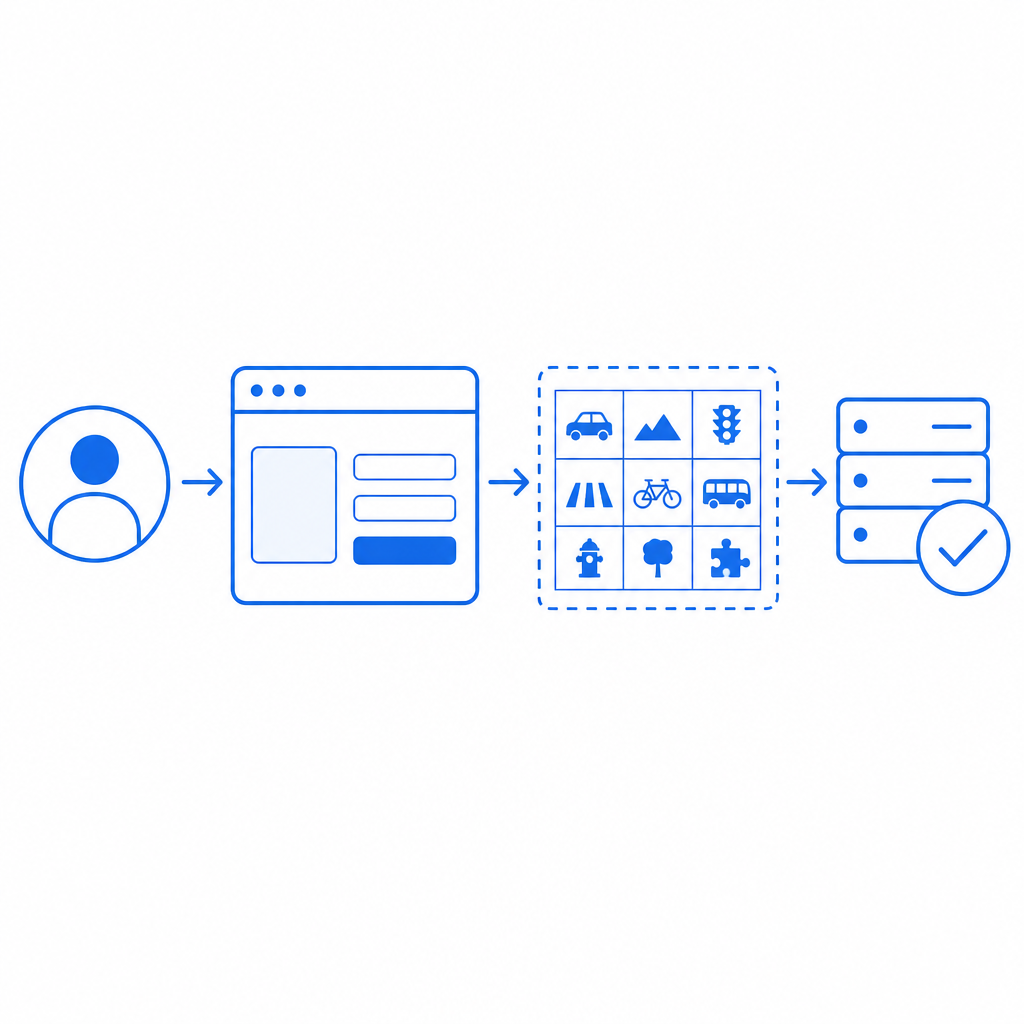
Understanding the CAPTCHA validation flow can clarify why errors might occur. When you solve a CAPTCHA challenge, your client sends a token to the server for verification. The server then validates this token against the CAPTCHA service via an API call.
Here’s a simplified flow:
- User completes CAPTCHA challenge in browser.
- Client generates a pass_token.
- Client sends POST request to verification endpoint with
{ pass_token, client_ip }. - Server responds with success or failure.
If the token is tampered with, expired, or the server cannot verify it (due to network or config issues), the CAPTCHA returns “try again.”
Sample Server Validation Request (Pseudo-code)
// Validate CAPTCHA verification
POST https://apiv1.captcha.la/v1/validate
Headers:
X-App-Key: YOUR_APP_KEY
X-App-Secret: YOUR_APP_SECRET
Body:
{
"pass_token": "TOKEN_FROM_CLIENT",
"client_ip": "USER_IP_ADDRESS"
}
Response:
- success: true or false
- message: error details
Ensuring your server correctly sends and interprets this request is vital for avoiding erroneous “try again” prompts.
Practical Steps to Fix “CAPTCHA Keeps Saying Try Again”
Here’s a checklist of technical fixes and best practices that can reduce or eliminate this message:
Clear Your Browser Cache and Cookies
Old cookies or corrupted cache data can interfere with challenge completion. Refresh your session completely.Enable JavaScript and Disable Ad Blockers Temporarily
CAPTCHA widgets rely on JavaScript for rendering and communication. Whitelist the CAPTCHA provider domain in your ad blocker.Avoid VPNs or Proxies That Obfuscate IP
Frequent IP changes or suspicious IP addresses are often flagged. Access directly if possible.Check Network Stability
Intermittent connections can cause validation timeouts. A stable internet link ensures reliable CAPTCHA checks.Update or Switch Browsers
Some CAPTCHA engines work better on modern browsers. Using Chrome, Firefox, or Edge with the latest updates often helps.Implement Backend Retry Logic Carefully
If your server receives false failures, add a retry mechanism for validation calls with exponential backoff to handle transient errors gracefully.Use Accessible CAPTCHA Options
Providers like CaptchaLa support audio prompts and multiple languages to minimize user error.
Comparing Popular CAPTCHA Services
Here’s a quick comparison of key aspects that influence “try again” errors and user experience:
| Feature | reCAPTCHA | hCaptcha | Cloudflare Turnstile | CaptchaLa |
|---|---|---|---|---|
| Challenge Types | Image, audio | Image, audio | Invisible, simple check | Image, audio; 8 languages |
| False Negative Rate | Moderate | Moderate to high | Low | Low |
| Native SDKs | Web, mobile | Web | Web | Web (JS/Vue/React), iOS, Android, Flutter, Electron |
| Privacy Focus | Google data collection | Privacy-focused | Privacy-focused | First-party data only |
| Pricing | Free (limited usage), paid | Paid | Included in Cloudflare | Free tier + scalable plans pricing |
Each solution has trade-offs in balancing difficulty and false failures. CaptchaLa’s focus on flexible SDKs and first-party data validation helps reduce unnecessary retries while preserving bot defense.
How CaptchaLa Helps Address CAPTCHA “Try Again” Issues
CaptchaLa’s architecture includes:
- A consistent API endpoint (
https://apiv1.captcha.la/v1/validate) that can be integrated server-side with SDKs for Go, PHP, etc., reducing server validation errors. - Multi-language UI and accessible challenge options to lower error rates among diverse user bases.
- Built-in retry and validation best practices detailed in the docs to help developers implement robust logic.
- A free tier for testing that allows easy troubleshooting without commitment.
By integrating CaptchaLa correctly, site owners can minimize user frustration due to repeated “try again” prompts while maintaining strong bot protection.
Summary and Where to Go Next
When a CAPTCHA keeps saying “try again,” it’s usually a symptom of validation, network, or user input issues rather than outright failure. Following the steps above—clearing cache, enabling JavaScript, checking your IP, and properly implementing server-side validation—will solve most problems. If you’re building or upgrading your CAPTCHA solution, exploring CaptchaLa’s flexible SDKs and validation APIs is worth considering for a smoother user experience and fewer false retries.
For developer guidance, detailed integration instructions, and pricing tiers, visit CaptchaLa’s documentation and pricing page. Getting familiar with the platform’s mechanics can help you tailor your CAPTCHA implementation to reduce “try again” messages effectively.