
When looking for the best captcha extension, the core question is: which solution effectively blocks bots while keeping user friction low? A strong CAPTCHA extension should integrate seamlessly into your site or app, support multiple platforms, and reliably distinguish humans from automated abuse. It should also be flexible, respecting privacy and adaptability across use cases.
This article breaks down what to consider when picking a CAPTCHA extension, compares several popular options, and highlights how independent solutions like CaptchaLa fit into this landscape.
What Makes the Best CAPTCHA Extension?
Not all CAPTCHAs are created equal. The ideal extension balances four key aspects:
- Security against bots: The extension must resist increasingly sophisticated bot techniques, including automated script attacks and credential stuffing.
- User experience: Friction should be minimal—CAPTCHAs that frustrate users or falsely flag humans reduce engagement.
- Integration ease: Developers want well-documented SDKs and simple APIs that work across web and mobile platforms.
- Privacy and data handling: Given increased scrutiny on user data, privacy-conscious solutions are favored.
Many plugins or browser extensions advertise CAPTCHA solving or user-facing challenges. However, from the defender's side (site owners, app developers), the "best" extension carefully balances security with usability and respects user privacy.
Handling Complexity Behind the Scenes
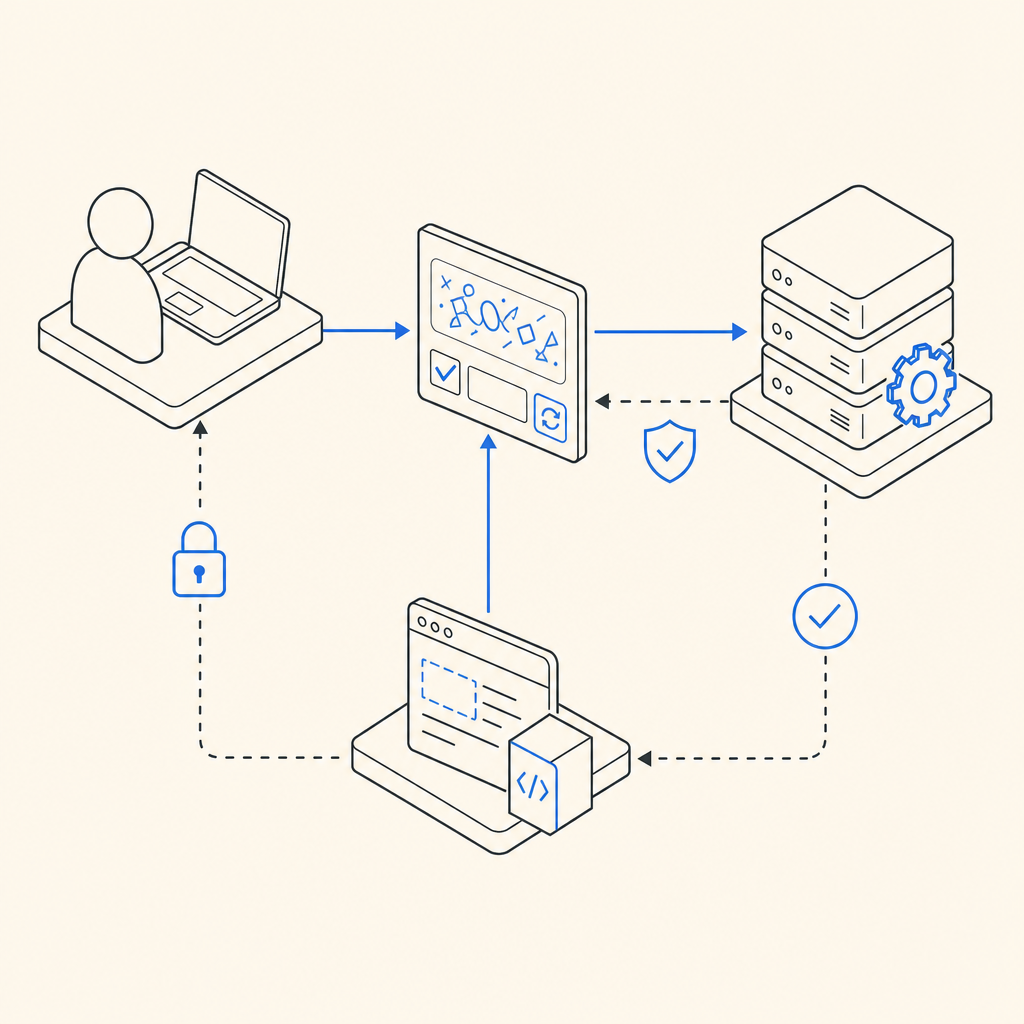
Behind the widget seen on a page lies complex logic to issue challenges (like image selections or behavior analysis), validate answers, and adapt difficulty dynamically. These processes should be transparent to the end user yet tough for bots.
An extension that can leverage server-side token issuance and verification reduces front-end exposure and risks of bypass. For example, CaptchaLa offers dedicated server APIs like issuing challenges (POST https://apiv1.captcha.la/v1/server/challenge/issue) and validation endpoints that ensure requests stem from genuine human interactions.
Comparing Popular CAPTCHA Extensions
Below is a comparison of some well-known CAPTCHA services and extensions, focusing on key criteria for bot defense and developer experience:
| Feature / Provider | Google reCAPTCHA | hCaptcha | Cloudflare Turnstile | CaptchaLa |
|---|---|---|---|---|
| Challenge Types | Image/audio puzzles | Image puzzles, quizzes | Invisible, behavior-based | Behavior + image challenges |
| Privacy Focus | Collects user data | Emphasizes privacy | Minimal data collected | First-party data only |
| Integration | Web + mobile SDKs | Web + mobile SDKs | Web-focused | Web + iOS, Android, Flutter, Electron SDKs |
| Languages Supported | 40+ languages | 20+ languages | Multi-language | 8 UI languages native |
| Server APIs | Yes | Yes | Yes | Yes, with dedicated REST APIs |
| Free Tier | Yes | Yes | Yes | 1000/month free, Pro up to 200K/month |
| Pricing Model | Usage-based | Usage-based | Included in Cloudflare | Tiered: Free, Pro, Business |
Each of these has particular strengths. Google's reCAPTCHA benefits from a large data set and behavioral analysis, but it gathers considerable user telemetry, leading some sites to explore alternatives. hCaptcha focuses on privacy and monetization, issuing image challenges with lower data collection. Cloudflare Turnstile is lightweight and invisible, but mostly web-focused and tied to Cloudflare’s broader services.
CaptchaLa is competitive due to its strong emphasis on developer-friendly SDKs and privacy-first data handling. With native clients for JavaScript frameworks, mobile platforms, and several server SDKs including PHP and Go, it supports diverse implementation scenarios. Its free tier allows low-volume testing with no hidden telemetry.
Developer-Friendly Features to Consider
When selecting a CAPTCHA extension, here are five specific technical factors to evaluate:
Native SDK Availability: Does it provide frameworks and language-specific SDKs for easy integration? CaptchaLa supports JavaScript (Vue, React), iOS, Android, Flutter, and Electron, simplifying multi-platform support.
Server-Side Validation: Is there a robust server API for validation separate from the client widget? This strengthens security by verifying tokens on the backend.
Customization Options: Can you customize the widget appearance or challenge difficulty? Some extensions expose configuration to improve UX.
Localization and Internationalization: Support for multiple languages improves accessibility, especially in global markets—CaptchaLa offers 8 UI languages natively.
Load Performance: Does the extension load asynchronously or use a lightweight loader script? CaptchaLa uses a CDN-hosted loader (
https://cdn.captcha-cdn.net/captchala-loader.js) for optimized loading.
// Example: Client-side JavaScript initialization of a CAPTCHA using CaptchaLa loader
// Load script asynchronously, then initialize with site key

const loaderScript = document.createElement('script');
loaderScript.src = 'https://cdn.captcha-cdn.net/captchala-loader.js';
loaderScript.async = true;
loaderScript.onload = () => {
  Captchala.init({
    siteKey: 'your-site-key',
    containerId: 'captcha-container',
    language: 'en'
  });
};
document.head.appendChild(loaderScript);
Balancing Security and User Experience
While security is essential, aggressive challenge mechanisms can alienate users. Solutions like CaptchaLa and Cloudflare Turnstile offer invisible or low-friction modes that analyze behavior instead of forcing repetitive puzzles.
Other CAPTCHA providers frequently update challenge styles based on threat intelligence, adjusting challenge strictness according to risk heuristics. For developers, having control over these parameters via APIs or dashboards is critical.
In practical terms, a good CAPTCHA extension should:
- Provide multiple challenge types (image, audio, invisible risk-based)
- Detect suspicious IPs or clients without always requiring interaction
- Allow whitelisting trusted sources or users when justified
- Respect privacy norms—using only essential data and localizing UI text

Why Consider CaptchaLa as an Option?
Independent CAPTCHA providers like CaptchaLa offer a flexible alternative to mainstream players. With transparent REST API endpoints, multilingual UI support, and SDKs tailored for modern web and mobile apps, CaptchaLa suits developers who value control and privacy.
It supports first-party data use only, meaning no data sharing with third parties. The tiered pricing and free monthly quota of 1000 validations enable small and growing projects to test effectively. Detailed documentation helps integration without surprises.
Conclusion
Choosing the best CAPTCHA extension depends on your priorities: is privacy paramount, or is minimizing user friction your top goal? Do you need deep SDK support for mobile apps or prefer a simple web widget? Understanding each provider's trade-offs can help you pick the right tool for your bot defense.
Independent SaaS providers like CaptchaLa combine versatility, privacy focus, and technical maturity in a package worth exploring. Whichever extension you choose, ensure it fits your architecture and is actively maintained to keep pace with evolving bot threats.
Ready to explore integration options and pricing tiers? Visit CaptchaLa Pricing or start with the comprehensive CaptchaLa docs to learn how to get started.