
Captcha integration in PHP is straightforward once you separate the browser step from the server verification step: render the challenge on the client, receive a pass token, then verify that token on your PHP backend before accepting the request. That split matters because the real security decision should happen server-side, not in the browser.
If you are protecting login forms, account creation, password reset, checkout, or contact forms, the same pattern applies. The frontend collects a token; your PHP app validates it with your secret credentials; only then do you trust the request. That’s the core of a robust bot-defense flow.
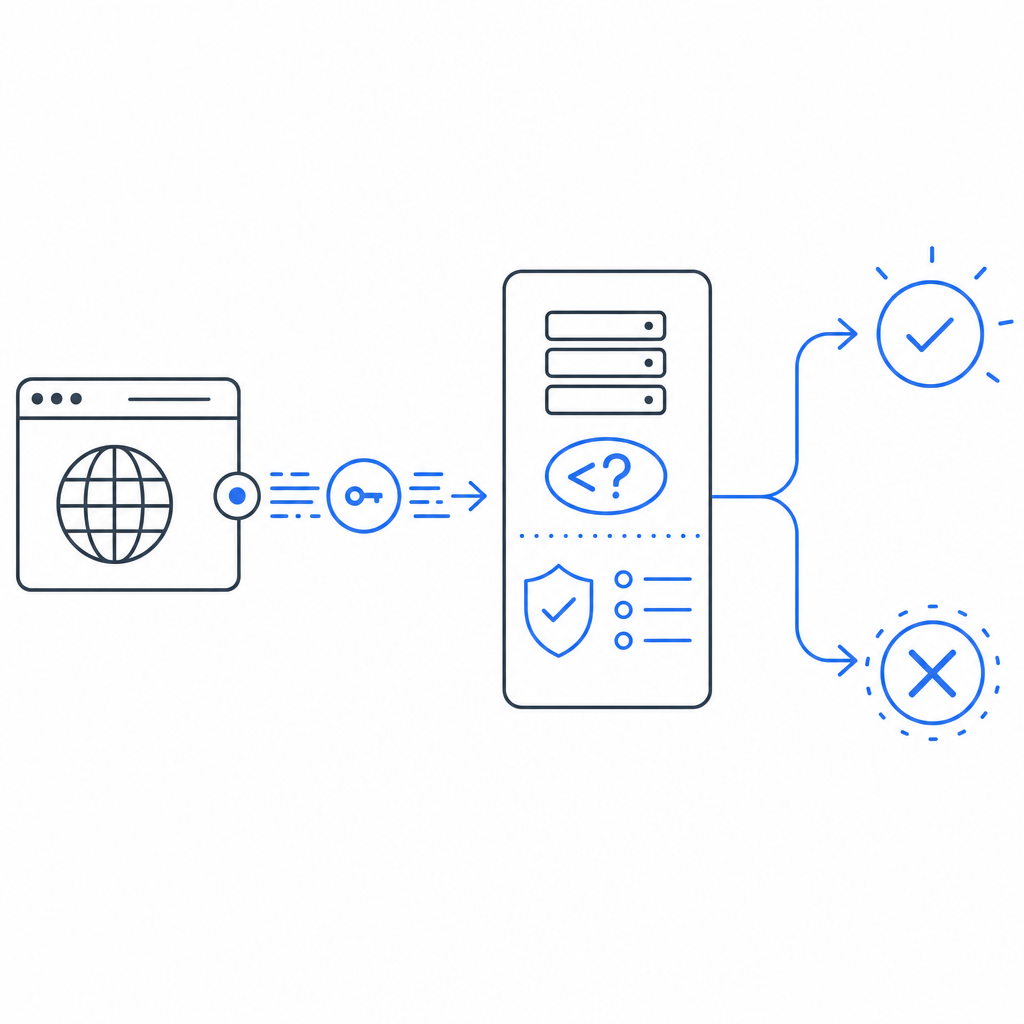
The PHP integration pattern that actually matters
The goal of captcha integration in PHP is not just “show a widget.” It is to make sure your backend can confidently tell a human-like interaction from automated abuse. The cleanest setup has three parts:
Client-side rendering
- Load the captcha client script in the browser.
- Present the challenge or verification step to the user.
- Receive a short-lived pass token after successful completion.
Form submission
- Include the token in the POST body along with your usual form fields.
- Optionally include contextual fields like IP address from your app logs or reverse proxy headers.
Server-side validation
- Your PHP endpoint sends the token to the provider’s validation API.
- The provider checks the token and returns whether it is valid.
- Your app proceeds only if validation passes.
This approach is common across providers, whether you use CaptchaLa, reCAPTCHA, hCaptcha, or Cloudflare Turnstile. The implementation details vary, but the architecture is the same.
For CaptchaLa, the client loader is delivered from:
https://cdn.captcha-cdn.net/captchala-loader.jsOn the backend, validation is performed with a POST request to:
https://apiv1.captcha.la/v1/validateusing X-App-Key and X-App-Secret, and a body that includes:
{
  "pass_token": "token-from-browser",
  "client_ip": "203.0.113.42"
}
A practical PHP server-side example
The server side is where your security really lives. Below is a simple PHP example using cURL to validate a token before accepting the request.
<?php
// Validate captcha token before processing the form

$passToken = $_POST['pass_token'] ?? '';
$clientIp = $_SERVER['REMOTE_ADDR'] ?? '';

if ($passToken === '') {
    http_response_code(400);
    echo json_encode(['ok' => false, 'error' => 'Missing captcha token']);
    exit;
}

$payload = json_encode([
    'pass_token' => $passToken,
    'client_ip' => $clientIp,
]);

$ch = curl_init('https://apiv1.captcha.la/v1/validate');

curl_setopt_array($ch, [
    CURLOPT_POST => true,
    CURLOPT_RETURNTRANSFER => true,
    CURLOPT_HTTPHEADER => [
        'Content-Type: application/json',
        'X-App-Key: YOUR_APP_KEY',
        'X-App-Secret: YOUR_APP_SECRET',
    ],
    CURLOPT_POSTFIELDS => $payload,
    CURLOPT_TIMEOUT => 10,
]);

$response = curl_exec($ch);

if ($response === false) {
    http_response_code(502);
    echo json_encode(['ok' => false, 'error' => 'Captcha validation failed']);
    exit;
}

$httpCode = curl_getinfo($ch, CURLINFO_HTTP_CODE);
curl_close($ch);

$result = json_decode($response, true);

if ($httpCode !== 200 || empty($result['valid'])) {
    http_response_code(403);
    echo json_encode(['ok' => false, 'error' => 'Captcha check failed']);
    exit;
}

// Continue with the protected action here
echo json_encode(['ok' => true]);
A few implementation notes worth keeping in mind:
- Keep
X-App-Secreton the server only. - Treat token validation as a required gate, not a warning.
- Validate as close to the protected action as possible.
- If you run behind a proxy or load balancer, make sure
client_ipreflects the real user IP according to your infrastructure rules. - Return generic errors to the client; do not reveal why a specific token failed.
If you prefer a more structured setup, CaptchaLa docs cover the same validation pattern and other SDK options.
Choosing the right integration style for your stack
You can integrate captcha into PHP in a few different ways depending on how your app is built. The right choice depends on whether you need a simple form guard, a SPA-style frontend, or a multi-platform product.
| Option | Frontend work | Backend work | Good for | Notes |
|---|---|---|---|---|
| Manual HTTP validation | Low | Low | Traditional PHP forms | Fastest path if you only need server verification |
| SDK-assisted integration | Medium | Low | Teams using shared app logic | Useful when you want cleaner abstractions |
| Mixed web + mobile flows | Medium | Medium | Products with multiple clients | Helpful if your backend serves web and app traffic |
For PHP teams, the manual flow is often enough: render the loader, collect the token, validate on submit, and deny requests that fail. If your product also ships mobile apps, CaptchaLa’s native SDK support for iOS, Android, Flutter, and Electron can help keep the user experience consistent across platforms. It also supports 8 UI languages, which is handy if your product serves a broad audience.
Compared with reCAPTCHA or hCaptcha, the main consideration is usually operational fit: developer ergonomics, privacy posture, how much UI friction you want, and how the verification endpoint fits into your existing backend. Cloudflare Turnstile is another common option when teams want a low-friction flow. None of these is universally “right”; the best choice is the one that aligns with your traffic patterns and compliance needs.
Production details that prevent avoidable mistakes
A captcha can look “working” in development and still fail under real traffic if you miss some basics. These are the details that matter most in production:
Bind verification to the current request
- Validate the token on the same request that submits the protected action.
- Do not cache or reuse tokens across users or sessions.
Use clear failure handling
- If validation times out, fail closed for sensitive actions.
- For low-risk forms, you may choose a retry path, but do not silently bypass validation.
Protect the secret
- Store
X-App-Secretin environment variables or a secret manager. - Never expose it in frontend code, logs, or client-side config.
- Store
Log enough to investigate abuse
- Record validation results, timestamps, route names, and IP metadata.
- Avoid storing unnecessary personal data.
Test the entire flow
- Confirm token generation in the browser.
- Confirm server validation on success and failure.
- Test expired or missing tokens.
- Test what happens when the validation endpoint is temporarily unavailable.
CaptchaLa’s server-side validation and first-party data approach make it easier to keep this flow simple: the browser presents the challenge, your backend decides whether to trust the request, and you keep the decision logic under your control.

How to think about pricing and scaling
For low-volume sites, a free tier is often enough to get started. CaptchaLa offers a free tier at 1,000 checks per month, which is useful for internal tools, small communities, and prototypes. As traffic grows, paid tiers become more relevant: Pro is designed for roughly 50K–200K checks, while Business is aimed at around 1M.
That scaling conversation matters because captcha is usually not a standalone feature; it is part of your larger abuse-prevention stack. When you compare providers, look beyond the widget itself and ask:
- How easy is backend validation?
- Does the product support your frontend frameworks?
- Can it fit both web and app clients?
- How much data does the provider collect?
- Is the failure mode predictable for your PHP application?
If you are evaluating options today, pricing and documentation are the right places to compare your expected traffic with the plan structure.
Where to go next
If you are implementing captcha integration in PHP right now, start by wiring up one protected endpoint, validate tokens server-side, and then expand the pattern to login, signup, and password reset forms. For implementation details, see the docs, or compare usage and tiers on the pricing page.