
If you're looking to add a CAPTCHA to your website using HTML and JavaScript, you’re aiming to balance user convenience with security by stopping bots while not disrupting users. Simply put, a captcha in HTML and JS is a challenge-response test embedded in your web pages that verifies if a user is human, preventing automated abuse. Implementing this commonly involves including a JavaScript widget or script in your HTML and then verifying the user's response via your backend server.
Understanding how to integrate captchas effectively helps protect forms, registrations, logins, and other web interactions without compromising user experience.
What Is Captcha HTML JS and Why Use It?
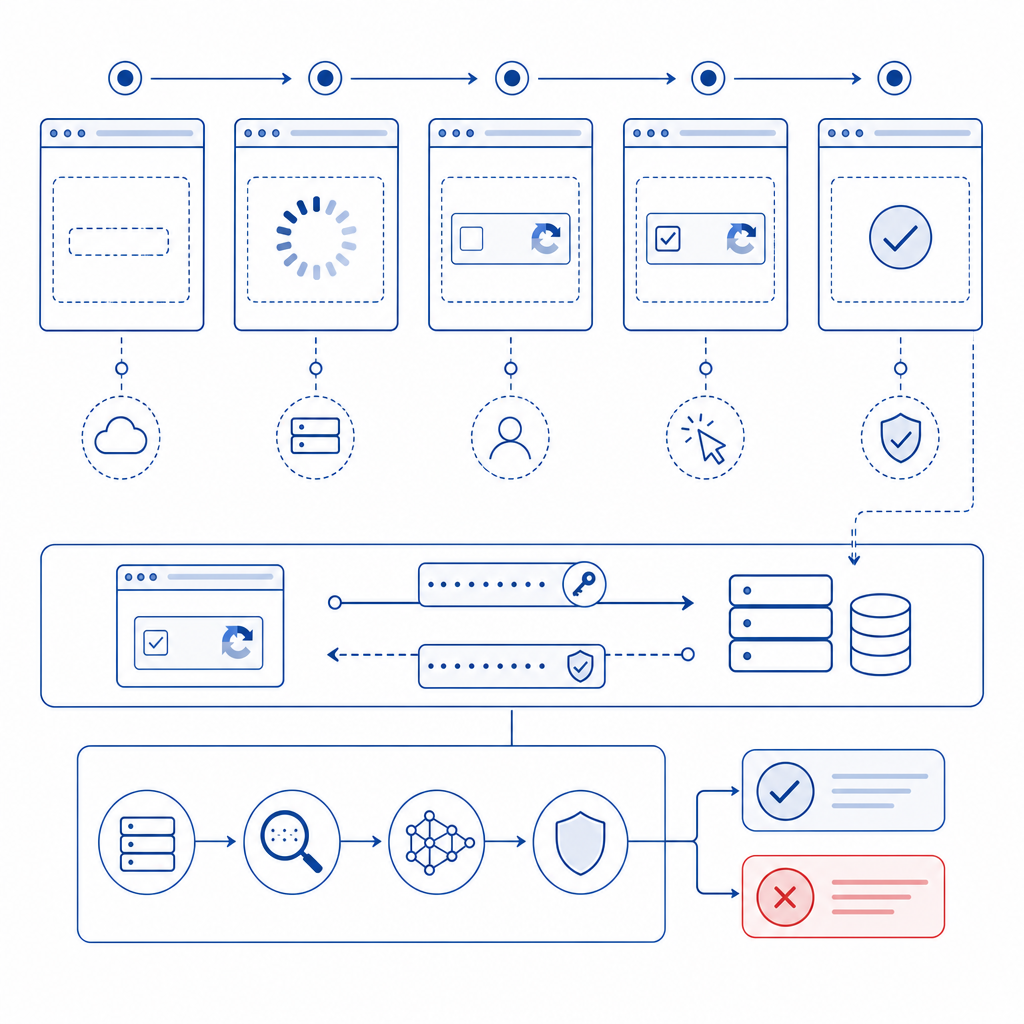
A CAPTCHA is usually delivered via HTML markup combined with JavaScript to render interactive challenges such as image selection, puzzles, or invisible checks. The JavaScript handles loading the widget on the client side and communicates with backend APIs to validate user responses. This client-server interaction ensures the challenge was solved legitimately before allowing form submission or granting access.
Why not rely solely on server-side techniques? Injecting it at the frontend (HTML/JS) allows for seamless user interaction, dynamic challenges, and integration with modern front-end frameworks like React or Vue.
Popular services like Google’s reCAPTCHA, hCaptcha, Cloudflare Turnstile, and CaptchaLa all provide JavaScript SDKs that let developers embed captchas with minimal effort. However, differences in privacy, ease of use, and customization exist which you might want to weigh.
Advantages of HTML + JS Captchas
- Real-time challenge rendering on the client
- Support for multiple challenge types including invisible or user-friendly modes
- Easy integration with front-end frameworks and single-page apps
- Immediate UX feedback before form submission
How to Implement a Basic Captcha Using HTML and JavaScript
Let's walk through a typical integration example using a generic captcha approach similar to those many providers support.
Step 1: Include the Captcha JS Loader
<!-- Include the captcha provider's JavaScript SDK -->
<script src="https://cdn.captcha-cdn.net/captchala-loader.js" async defer></script>
Including the loader script initializes the captcha system, ready to render your widget on designated containers.
Step 2: Add Captcha Container in HTML
<form id="signupForm" action="/submit" method="POST">
  <!-- Other form fields -->

  <div id="captcha-container"></div>

  <button type="submit">Submit</button>
</form>
You’ll specify a <div> or similar element where the captcha widget will appear.
Step 3: Initialize the Captcha with JavaScript
// Initialize captcha on page load
window.onload = function() {
  // 'captcha-container' is where the widget mounts
  CaptchaLa.init({
    container: 'captcha-container',
    siteKey: 'your-site-key',  // unique key from provider
    callback: function(token) {
      // Captcha solved, token received
      document.getElementById('signupForm').dataset.captchaToken = token;
    }
  });
};
Here, we tell the CaptchaLa widget where to render and what to do once the user solves the challenge by sending back a token.
Step 4: Validate the Captcha Token Server-Side
When the form submits, include the captcha token and validate it with the API:
// Example PHP server-side validation snippet
$token = $_POST['captcha_token'];
$clientIp = $_SERVER['REMOTE_ADDR'];

$response = file_get_contents('https://apiv1.captcha.la/v1/validate', false, stream_context_create([
  'http' => [
    'method' => 'POST',
    'header' => "Content-Type: application/json\r\nX-App-Key: YOUR_APP_KEY\r\nX-App-Secret: YOUR_APP_SECRET\r\n",
    'content' => json_encode(['pass_token' => $token, 'client_ip' => $clientIp])
  ]
]));

$result = json_decode($response, true);

if ($result['success']) {
  // Captcha passed, proceed with form handling
} else {
  // Captcha failed, reject or ask to retry
}
Summary of Implementation Steps
- Add provider loader script to your HTML.
- Insert a container element for the widget.
- Initialize the captcha in your JS with site key and callback.
- On form submit, forward the token to your backend.
- Validate token server-side via provider API.
Comparing Popular Captcha Solutions: reCAPTCHA, hCaptcha, Turnstile, and CaptchaLa
When choosing captcha HTML JS solutions, consider factors like privacy, customization, ease of integration, pricing, and user experience.
| Feature | reCAPTCHA (Google) | hCaptcha | Cloudflare Turnstile | CaptchaLa |
|---|---|---|---|---|
| Privacy Focus | Moderate | High | High | High, first-party data only |
| UI Customization | Limited | Moderate | Moderate | Extensive, multiple UI langs |
| Pricing | Free / Enterprise | Free & Paid tiers | Free | Free tier + Pro & Business |
| SDK Support | JS, mobile SDKs | JS, mobile SDKs | JS only | JS, React, Vue, iOS, Android, Flutter, Electron |
| Validation API | Yes | Yes | Yes | Yes |
| Invisible Mode | Yes | Yes | Yes | Yes |
| Data Ownership | Google controlled | Varies by vendor | Cloudflare controlled | Fully first-party (no user data leakage) |
CaptchaLa stands out for providing native SDKs across many platforms and a pricing model friendly to startups and enterprises alike. Unlike some alternatives, CaptchaLa emphasizes no third-party user data sharing which is increasingly important for privacy-conscious applications.
Best Practices for Captcha HTML JS Implementation
To make the most out of your captcha integration:
- Use asynchronous loading — Load captcha JS asynchronously to avoid blocking page rendering.
- Optimize user experience — Consider invisible captchas or user-friendly modes to reduce friction.
- Verify server-side — Never trust client-side results alone; always validate tokens on your backend.
- Localize UI — Leverage multi-language support like CaptchaLa’s 8 UI languages to serve diverse audiences.
- Monitor success/failure rates — Track captcha challenge outcomes to tune sensitivity and usability.

Conclusion
Adding captcha HTML JS components to your website protects critical paths against bot abuse while maintaining a smooth user experience when done correctly. Whether you choose CaptchaLa, reCAPTCHA, hCaptcha, or Cloudflare Turnstile, understanding the full integration flow and server validation process is vital.
For those looking for a privacy-focused, multi-platform friendly solution with straightforward API references and starter tiers, CaptchaLa offers a compelling choice. Explore the docs for detailed integration guides or check out the pricing plans to find what fits your project size.
Taking time to implement and monitor your captcha solution ensures your site stays accessible to users while deterring automated threats effectively.