
Automating captcha using Python involves interacting programmatically with captcha challenges to streamline verification or testing tasks. While captchas are designed to distinguish human users from bots, automation here focuses on legitimate use cases such as testing captcha implementations, integrating bot-defense services, or validating user interaction results without manual effort.
In this post, we’ll explore Python approaches to work with captchas responsibly, compare popular services, and provide practical tips using the CaptchaLa API to help you automate captcha handling effectively.
Understanding Captcha and Automation Challenges
Captchas (Completely Automated Public Turing tests to tell Computers and Humans Apart) are inherently meant to block automated access. Therefore, automating captcha solving runs into ethical and technical barriers—most services actively defend against automation to prevent abuse. Instead, automation is commonly applied in two key scenarios:
- Testing and Development: Automating captcha completion during software tests or web scraping simulations to validate workflows
- Server-Side Validation: Automating requests to captcha verification endpoints after a user solves the captcha on their end
Python, with its rich HTTP and browser automation libraries like requests and Selenium, enables developers to interact with captcha services in these contexts, but it’s important to align with the captcha provider’s policies and respect user privacy/security.
Popular CAPTCHA Services and Python Integration
Several leading captcha providers offer APIs and SDKs that can be integrated with Python for validation and challenge issuance:
| Provider | Python-Friendly Features | Notes |
|---|---|---|
| CaptchaLa | Server SDKs (captchala-php, captchala-go), REST API with Python HTTP clients | Open API, flexible validation, multilingual |
| Google reCAPTCHA | REST API for verification via HTTP, Python clients available | Widely used, requires frontend challenge |
| hCaptcha | Server-side siteverify API usable via Python HTTP calls | Privacy-focused alternative to reCAPTCHA |
| Cloudflare Turnstile | Simple API verification, supports multiple platforms | Lightweight, frictionless captcha option |
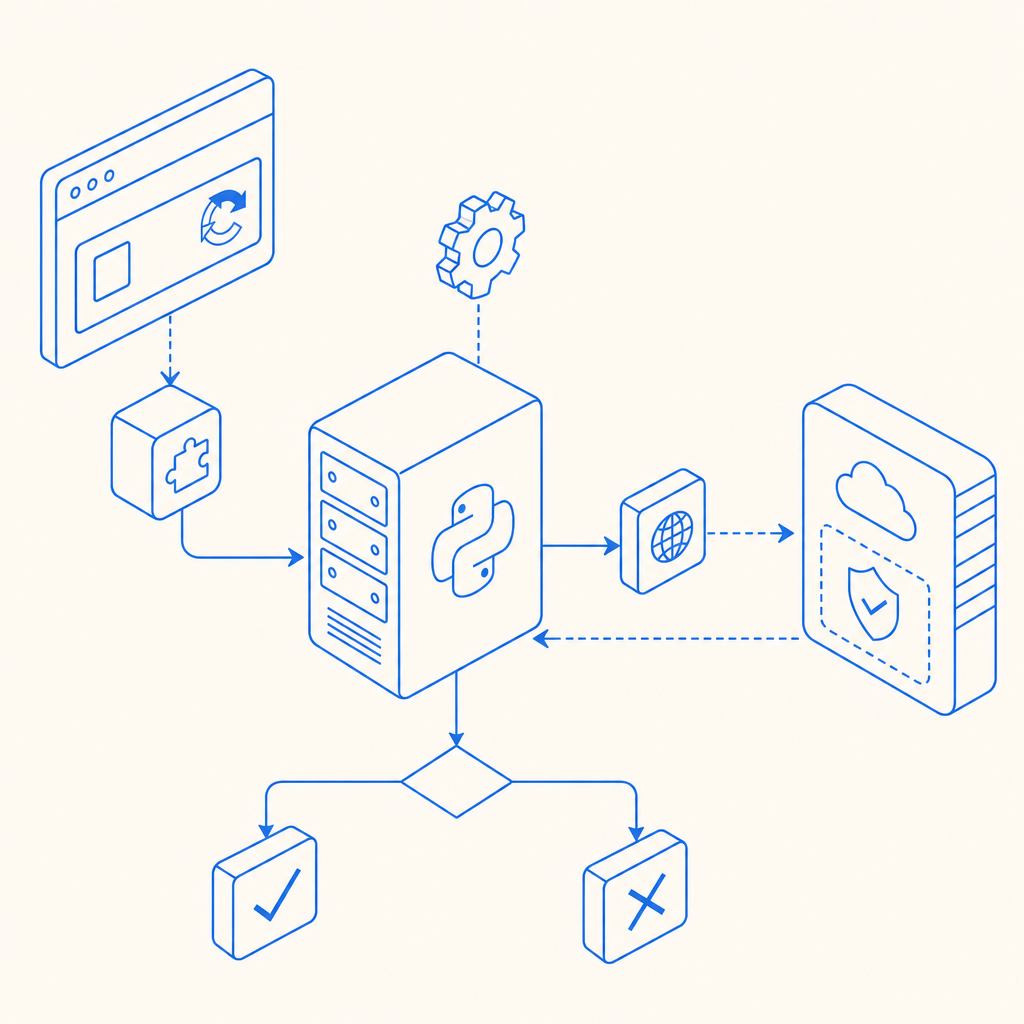
For Python automation purposes, you’ll primarily interact with the server-side validation API these providers expose. The typical flow is:
- User completes captcha widget in frontend
- Frontend sends token to backend
- Backend uses Python code to call captcha validation API
- Backend receives response confirming human/bot
This backend verification is key because it ensures the server trusts only valid tokens, preventing bypass or replay attacks.
Automating Captcha Validation Using Python and CaptchaLa
CaptchaLa offers a straightforward REST API and server SDKs that work well with Python. Here’s a concise guide to automate backend validation checks:
Step 1: Collect the Pass Token
After the user completes the captcha challenge on the frontend, your site receives a pass_token representing the solved captcha.
Step 2: Send Validation Request
Use Python requests to validate the token with CaptchaLa's API endpoint.
import requests

# Replace with your app key and secret from CaptchaLa dashboard
APP_KEY = "your_app_key_here"
APP_SECRET = "your_app_secret_here"

def validate_captcha(pass_token, client_ip):
    url = "https://apiv1.captcha.la/v1/validate"
    headers = {
        "X-App-Key": APP_KEY,
        "X-App-Secret": APP_SECRET,
        "Content-Type": "application/json"
    }
    payload = {
        "pass_token": pass_token,
        "client_ip": client_ip
    }

    response = requests.post(url, json=payload, headers=headers)
    result = response.json()

    # result will include success status and other metadata
    return result

# Example usage:
token_from_client = "token_received_from_frontend"
user_ip = "192.168.1.1"

validation_result = validate_captcha(token_from_client, user_ip)
print(validation_result)
Step 3: Handle the Response
The response indicates whether the captcha was successfully solved and is valid for the given IP and session context. You can use this to allow or deny access accordingly.
Optional: Issuing Server Challenges
For advanced use, CaptchaLa allows issuing server-generated captcha challenges via API. This can be incorporated into Python backend workflows requiring challenge issuance.
def issue_server_challenge():
    url = "https://apiv1.captcha.la/v1/server/challenge/issue"
    headers = {
        "X-App-Key": APP_KEY,
        "X-App-Secret": APP_SECRET,
        "Content-Type": "application/json"
    }
    response = requests.post(url, headers=headers)
    return response.json()
This feature helps customize bot-defense flows beyond standard client-side widgets.
Tools and Libraries Supporting Captcha Automation in Python
Here are some common tools used when automating captcha tasks with Python:
- Requests – Simplifies HTTP calls to captcha validation APIs
- Selenium/WebDriver – Automates browser interaction; useful for testing captcha UI flows, though solving captchas automatically violates terms of many providers
- CaptchaLa SDKs – While official Python SDK may be limited, CaptchaLa supports easy integration via REST APIs and other server SDKs in Go or PHP that can interact with Python services
- Async Libraries (like
aiohttp) – For efficient concurrent captcha validation in high-load systems
While these tools facilitate interaction with captcha services, it’s essential to focus on validation rather than attempting unauthorized solving.
Ethical and Practical Considerations
Automating captcha should be done responsibly. Captchas exist to prevent malicious bots, credential stuffing, scraping abuse, and spam. Trying to circumvent captchas is against the terms of service of many providers like Google reCAPTCHA and hCaptcha, and can lead to legal or account penalties.
Automation is best applied to:
- Test captcha handling in staging environments
- Automate backend verification steps after user interaction
- Integrate bot defense services while respecting first-party data and user privacy
CaptchaLa’s approach, with a clear API and first-party data focus, supports this responsible automation model well.

Conclusion
Automating captcha using Python is feasible primarily on the backend to validate user challenge completions or issue server-side challenges. Tools like Python’s requests library make integration straightforward, and services like CaptchaLa provide open APIs for clean automation workflows.
When compared to popular players like reCAPTCHA, hCaptcha, or Cloudflare Turnstile, CaptchaLa stands out for transparent API access, multi-platform SDKs, and a flexible, developer-friendly approach—a solid choice when building your pythonic bot-defense system.
To get started with CaptchaLa automation in Python, explore the full API and SDK documentation, or check out service details on CaptchaLa pricing.
Where to go next? Visit CaptchaLa docs for detailed guides and API references, or review the available plans on the CaptchaLa pricing page to scale your bot-defense with confidence.