
If you’re looking for a captcha html5 solution, the short answer is: it’s a browser-friendly challenge flow built on HTML5 capabilities that helps verify a human user before your form, login, signup, or API action goes through. In practice, the important part is not the visual puzzle itself, but how the client challenge, token exchange, and server-side validation fit into your app safely.
For most teams, “HTML5 CAPTCHA” really means a modern widget that renders cleanly in the browser, works across devices, and sends back a pass token your backend can verify. That makes it much easier to integrate than older image-based systems that fought with mobile layouts, accessibility, and inconsistent browser behavior.
What “captcha html5” usually means
HTML5 CAPTCHA is less a formal standard and more a practical label for browser-native challenge delivery. The goal is to use current web capabilities to present a challenge, capture an interaction result, and produce a token that your server can trust.
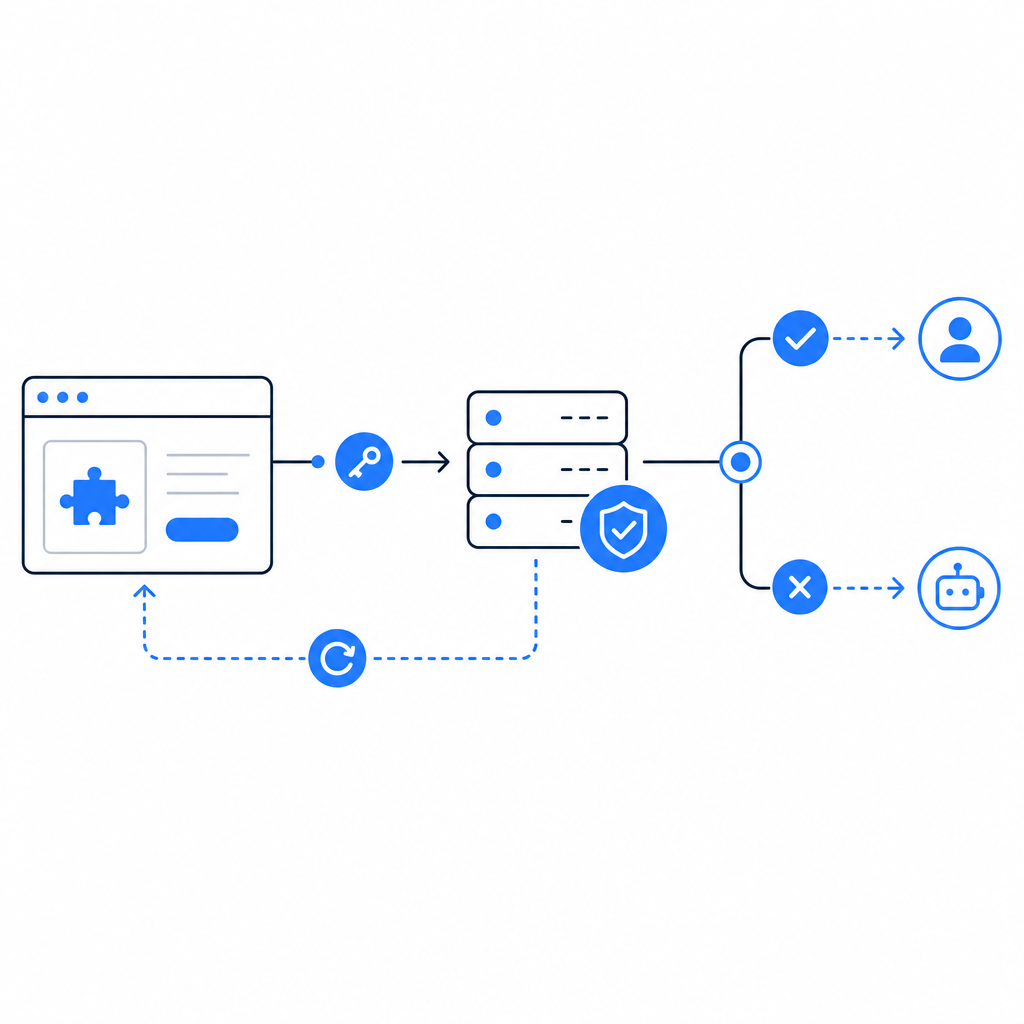
A useful mental model is:
- The browser loads a lightweight challenge script or widget.
- The user completes the challenge.
- The widget returns a pass token.
- Your backend validates that token with a secret key.
- Your app either allows the action or blocks it.
That last step matters most. If the browser says “passed” but the server never verifies the token, you don’t really have bot defense; you have a UI hint.
HTML5-style implementations tend to be attractive because they can fit into modern front-end stacks without forcing a page reload. They also play better with responsive layouts and can be adapted for apps that need a consistent experience across web, mobile web, and hybrid shells.
How server validation should work
The most common mistake with CAPTCHA integrations is treating the client as authoritative. The browser is where the interaction happens, but the backend is where trust should be established.
A standard validation flow looks like this:
- Client gets a pass token after completing the challenge.
- Client sends that token to your backend with the protected form or action.
- Backend validates the token with the CAPTCHA service using secret credentials.
- Backend checks the response and decides whether to proceed.
With CaptchaLa, the validation endpoint is POST https://apiv1.captcha.la/v1/validate, and the request body includes pass_token and client_ip. Authentication uses X-App-Key and X-App-Secret. That gives your backend the authority to decide whether the token is valid for the request in front of it.
A simple backend pattern:
// English comments only
async function verifyCaptcha(passToken, clientIp) {
  const res = await fetch("https://apiv1.captcha.la/v1/validate", {
    method: "POST",
    headers: {
      "Content-Type": "application/json",
      "X-App-Key": process.env.CAPTCHALA_APP_KEY,
      "X-App-Secret": process.env.CAPTCHALA_APP_SECRET
    },
    body: JSON.stringify({
      pass_token: passToken,
      client_ip: clientIp
    })
  });

  if (!res.ok) {
    return { ok: false };
  }

  const data = await res.json();
  return { ok: data.valid === true, data };
}
The exact implementation will differ by framework, but the rule is consistent: validate on the server before you create the account, accept the payment, send the email, or reveal the protected resource.
Choosing an HTML5 CAPTCHA approach
Not every CAPTCHA product solves the same problem. Some teams want a mostly invisible experience. Others want stronger friction only when risk is elevated. Some need SDKs for apps beyond the browser.
Here’s a practical comparison of common options:
| Option | Browser experience | Integration style | Good fit | Notes |
|---|---|---|---|---|
| reCAPTCHA | Familiar, often low-friction | JS widget + server verification | Large web forms, broad ecosystem | Widely used; UX and privacy tradeoffs vary by deployment |
| hCaptcha | Flexible challenge flow | JS widget + server verification | Sites wanting a CAPTCHA alternative with configurable friction | Often chosen for bot defense with a similar model to reCAPTCHA |
| Cloudflare Turnstile | Usually low-friction | JS widget + server verification | Sites already using Cloudflare or wanting minimal user friction | Best when you want a lighter user interaction |
| HTML5-focused CAPTCHA widget | Depends on provider | JS/widget + backend validation | Modern web apps, responsive UI, app ecosystems | Focuses on browser-native delivery and clean integration |
If your app is purely web-based, the browser widget and backend verification are usually enough. If you also ship mobile or desktop apps, look for SDK coverage so you don’t end up with one approach for the website and a different one for everything else.
CaptchaLa supports 8 UI languages and native SDKs for Web (JS, Vue, React), iOS, Android, Flutter, and Electron. It also offers server SDKs for PHP and Go, which can reduce glue code if your stack uses those languages. For developers who want the current package names, the published artifacts include Maven la.captcha:captchala:1.0.2, CocoaPods Captchala 1.0.2, and pub.dev captchala 1.3.2.
Implementation details that matter in production
An HTML5 CAPTCHA may look simple at the surface, but production reliability depends on small technical choices.
1. Load the widget asynchronously
Use a lightweight loader so the challenge doesn’t block initial page rendering. CaptchaLa provides a loader at https://cdn.captcha-cdn.net/captchala-loader.js, which lets you defer the challenge until the form is visible or the user reaches a protected step.
2. Keep validation strictly server-side
Never trust only a client callback. The browser can be modified, scripts can be replayed, and forms can be forged. Your server should validate every pass token before it accepts the request.
3. Send the client IP when required
Some validation flows use the client IP as part of the verification request. If your app sits behind a proxy or CDN, make sure you are extracting the real client IP correctly and consistently.
4. Match the CAPTCHA to the risk level
Not every action needs the same friction. A newsletter signup and a password reset request do not have identical threat models. A well-tuned implementation can challenge suspicious traffic more aggressively while keeping low-risk users moving quickly.
5. Test accessibility and fallback behavior
HTML5 does not automatically mean accessible. Check keyboard navigation, screen reader behavior, and fallback messaging. If a challenge fails to load, your app should explain what happened rather than silently dead-ending the user.

When to use CAPTCHA, and when to combine it with other controls
CAPTCHA is one layer, not a complete anti-abuse strategy. It works best alongside rate limiting, device or session signals, email verification, IP reputation, and anomaly detection.
A few examples:
- Signup forms: CAPTCHA helps slow disposable account creation.
- Login pages: CAPTCHA can be triggered after repeated failures instead of on every attempt.
- Checkout or ticketing flows: CAPTCHA can reduce automated abuse without disrupting all users.
- Public API endpoints: CAPTCHA may be useful for user-facing request flows, but server-side abuse controls still matter.
If your app has a mix of public and authenticated actions, it helps to think in terms of thresholds. For example, only challenge when velocity exceeds a limit, when a request pattern looks scripted, or when a session lacks normal browsing signals. That keeps friction targeted.
CaptchaLa’s published tiers include a Free tier for 1,000 monthly requests, Pro for 50K–200K, and Business for 1M. That kind of tiering is useful when you want to start small, then scale protection as traffic grows. The service also notes first-party data only, which may matter for teams reviewing data handling and vendor footprint.
Putting it together
A solid captcha html5 setup is straightforward: load the widget asynchronously, collect a pass token, validate it on your server, and gate the protected action only after verification succeeds. If you need browser, mobile, and desktop support, make SDK coverage part of the decision instead of an afterthought.
If you’re comparing options like reCAPTCHA, hCaptcha, or Cloudflare Turnstile, the right choice usually comes down to your UX goals, stack, and operational needs rather than a single universal winner. What matters is whether the integration is dependable, maintainable, and aligned with your risk model.
Where to go next: read the docs for integration details, or check pricing if you want to estimate usage for your traffic.