
If you're looking for captcha help, you want straightforward ways to protect your website from automated bots while keeping user friction low. Captchas—those tests designed to separate real humans from bots—serve as a frontline defense against spam, fraud, and abuse across web forms, login pages, comment sections, and more. They help verify that a visitor is legitimately interacting with your site rather than using scripts to break rules or overwhelm systems.
This post explores how captcha help works, the technical options available, and how solutions like CaptchaLa compare to popular competitors such as reCAPTCHA, hCaptcha, and Cloudflare Turnstile. Whether you’re a developer or site owner, you'll learn practical insights on integrating and optimizing captchas to maintain security without frustrating genuine users.
Understanding Captcha Help: What It Does and Why It Matters
At its core, captcha help involves multiple layers:
- Verification: Confirming the user is human through challenge-response tests like image identification or behavior analysis.
- Bot Filtering: Blocking automated scripts and crawlers from submitting forms or accessing sensitive endpoints.
- Adaptive Security: Adjusting difficulty or challenges based on user context to minimize unnecessary friction.
Without captcha help, websites risk spam, credential stuffing attacks, fake account creation, automated ticket scalping, and other automated abuse scenarios that disrupt user experience and revenue.
Many modern captcha systems go beyond simple distorted text and implement invisible or user-friendly mechanisms, such as mouse movement analysis or simple checkbox interactions, to minimize user disruption while still filtering bots effectively.
Key Technical Features of Captcha Solutions
When choosing captcha help services, technical capabilities vary widely. Here are vital factors to consider:
1. Multi-Platform SDK Support
Effective captcha help offers SDKs across platforms to easily integrate and customize protection:
| SDK Type | Examples |
|---|---|
| Web | JavaScript, Vue, React |
| Mobile | iOS, Android, Flutter |
| Desktop/Other | Electron |
| Server Validation | PHP, Go |
CaptchaLa provides native SDKs for Web (JS/Vue/React), iOS, Android, Flutter, and Electron, alongside server-side libraries like captchala-php and captchala-go.
2. Validation API
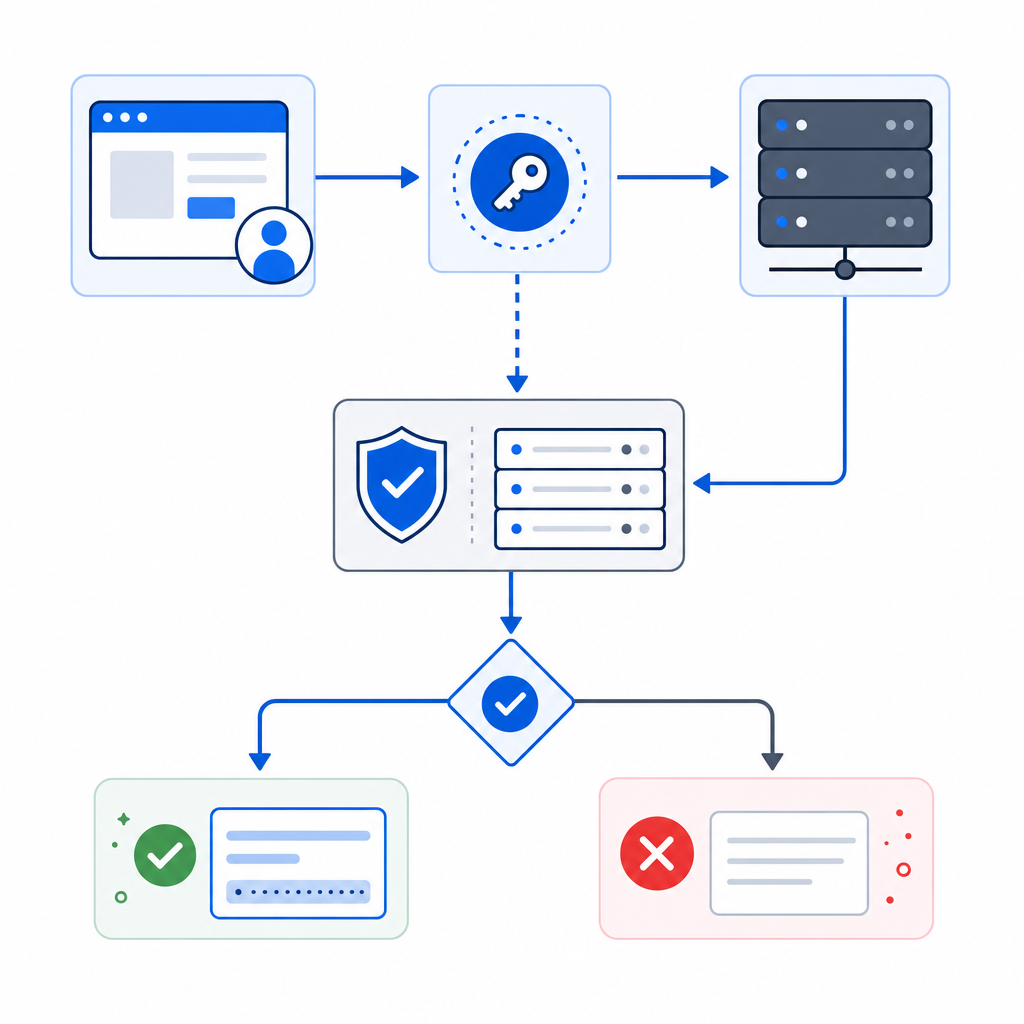
Server-side validation is crucial to confirm tokens received from the client are genuine and unaltered. This usually involves:
- Receiving a pass token from the client after challenge success
- Sending a POST request to a verification endpoint with authentication headers
- Validating user IP alongside the token to reduce replay or forged attempts
CaptchaLa’s API endpoint, https://apiv1.captcha.la/v1/validate, expects the pass token and client IP alongside your app keys to perform real-time validation securely.
3. Usability and Language Support
Reducing user friction improves conversion rates. Captchas that offer multiple UI languages (CaptchaLa currently supports 8), invisible modes, or simple checkbox styles can be preferable for global audiences.
4. Data Privacy and First-Party Data
Some solutions rely heavily on third-party data tracking, raising privacy concerns. CaptchaLa emphasizes first-party data usage only, enhancing compliance with regulations like GDPR and CCPA.
5. Pricing Flexibility
Freemium tiers allow for initial testing, with scalable plans for larger traffic:
| Plan | Monthly Captchas | Ideal For |
|---|---|---|
| Free | 1,000 | Small sites, basic testing |
| Pro | 50,000 - 200,000 | Growing businesses |
| Business | 1,000,000 | High-volume or enterprise |
You can explore detailed options on the CaptchaLa pricing page.

Comparing CaptchaLa to Other Popular Captcha Providers
Here’s an objective comparison highlighting key differences:
| Feature | CaptchaLa | reCAPTCHA (Google) | hCaptcha | Cloudflare Turnstile |
|---|---|---|---|---|
| SDKs | Web, iOS, Android, Flutter, Electron | Web primarily | Web, mobile SDKs available | Web-focused |
| Languages Supported | 8 UI languages | Multiple, but fewer locally customized | Limited | Limited |
| Privacy Focus | First-party data only | Data used for Google services | Data monetization component | Privacy-conscious, no ads |
| Challenge Types | Customizable puzzles, invisible modes | Mainly image puzzles, checkbox | Similar to reCAPTCHA | Invisible, minimal friction |
| Pricing | Free + tiers; transparent | Free but with usage limits | Pay-per-demand pricing | Free with Cloudflare services |
| Server Validation | Yes, via API | Yes, via API | Yes | Yes |
While reCAPTCHA remains widely adopted, concerns about Google’s data policies and occasional friction have led many to evaluate alternatives. hCaptcha offers monetization but adds complexity. Cloudflare Turnstile emphasizes usability but requires Cloudflare integration. CaptchaLa provides an independent, privacy-focused, multi-platform approach suited for developers wanting control and compliance.
Best Practices for Implementing Captcha Help on Your Site
To maximize the benefits of captcha help:
Choose the right challenge type
Use invisible or simple checkbox captchas on low-risk forms and more robust challenges where abuse risks are higher.Integrate client and server validation
Always validate tokens server-side after client-side challenge completion to prevent token spoofing.Monitor and adjust sensitivity
Analyze failed challenges and user feedback to balance security with user experience.Use SDKs and loaders
Utilize official SDKs or loaders like CaptchaLa’s CDN script (https://cdn.captcha-cdn.net/captchala-loader.js) for smoother integration.Plan for scalability and privacy
Select providers offering transparent pricing and clear data practices that fit your user volume and compliance needs.
Below is a basic example of server-side token validation using CaptchaLa's PHP SDK:
<?php
// Example: CaptchaLa PHP server-side verification

require 'captchala-php/autoload.php';

use Captchala\ApiClient;

$appKey = 'YOUR_APP_KEY';
$appSecret = 'YOUR_APP_SECRET';

$client = new ApiClient($appKey, $appSecret);

$passToken = $_POST['pass_token'];
$clientIp = $_SERVER['REMOTE_ADDR'];

$response = $client->validate($passToken, $clientIp);

if ($response->success) {
    // The captcha was solved by a human
    // Proceed with form processing
} else {
    // Validation failed - possible bot or invalid token
    // Reject the request or ask for retry
}
?>
Where to Go Next
If you’re seeking captcha help to enhance your website’s defenses, solutions like CaptchaLa offer flexible, multilingual SDKs and a privacy-respecting approach to bot detection. For more details and to get started, check the CaptchaLa documentation and review the pricing options to find the right plan for your needs. Ensuring effective captcha help is a foundational step toward protecting your digital properties from automated threats without compromising user experience.