
A captcha gif is usually just an animated CAPTCHA challenge: a moving visual prompt used to verify that a real person is interacting with your site or app. The “gif” part points to the animation style, but the underlying idea is broader than the file type — it’s about making automated abuse harder without turning every visitor into a detective.
That matters because animated challenges can improve attention and sometimes frustrate simple bots, but they also need to be designed carefully. If the animation is too subtle, it adds friction without much protection; if it’s too noisy, humans get annoyed. The real question is not “should I use a captcha gif?” but “what problem am I solving, and is animation the right signal?”

What a captcha gif actually does
A captcha gif is an animation used as part of a challenge-response flow. It might show moving shapes, shifting text, rotating objects, or a simple motion cue that a user must interpret or interact with. The goal is to create a task that is easy for a person and less trivial for a scripted client.
From a defender’s point of view, the animation is rarely the security mechanism by itself. It’s one signal in a larger system that can include:
- Session context
- Risk scoring
- Device or browser signals
- Token validation
- Rate limiting and abuse detection
If you only rely on the visual trick, automated systems will eventually adapt. If you combine the challenge with server-side validation, the attacker has a much harder time turning UI interaction into reusable abuse.
A useful way to think about it:
| Approach | Human experience | Bot resistance | Operational notes |
|---|---|---|---|
| Static image CAPTCHA | Medium friction | Low to medium | Familiar, but easier to automate |
| Animated CAPTCHA / captcha gif | Medium friction | Medium | Better than static prompts for some abuse patterns |
| Invisible or risk-based challenge | Low friction | Medium to high | Needs good telemetry and backend validation |
| Fully managed bot defense | Low to medium | High | Often reduces challenge frequency |
Animated challenges are especially common when a product wants a lightweight gate on signups, comment forms, polls, or referral flows. They’re not ideal for every case, though. For high-risk operations like account recovery or payment changes, a captcha gif alone is usually too shallow.
When an animated challenge helps, and when it doesn’t
A captcha gif can be useful when the primary threat is low-effort automation: form spam, scripted signups, or repeated endpoint probing. Animation can make certain template-based solvers less reliable, and it can also serve as a visual cue that slows down casual abuse.
But there are tradeoffs.
Good fits
- Public forms that attract spam but not high-value account takeover attempts
- Temporary campaigns with bursty traffic
- Simple “are you human?” gates before deeper checks
- Experiences where a small amount of friction is acceptable
Poor fits
- Accessibility-sensitive workflows
- Mobile-first flows with tiny screens
- Critical security checkpoints
- Products with international audiences and varied device performance
Accessibility deserves special attention. Motion can be hard for some users to perceive, and animated content can be distracting or unpleasant for others. If you choose a captcha gif, pair it with accessible alternatives, keyboard support, and a path that doesn’t depend solely on visual interpretation.
It also helps to ask whether the animation is actually doing work. If the challenge merely looks different but is validated the same way as a static image, the UX cost may exceed the gain. A meaningful challenge should be tied to server-side verification, abuse telemetry, or both.
How to build it without weakening your app
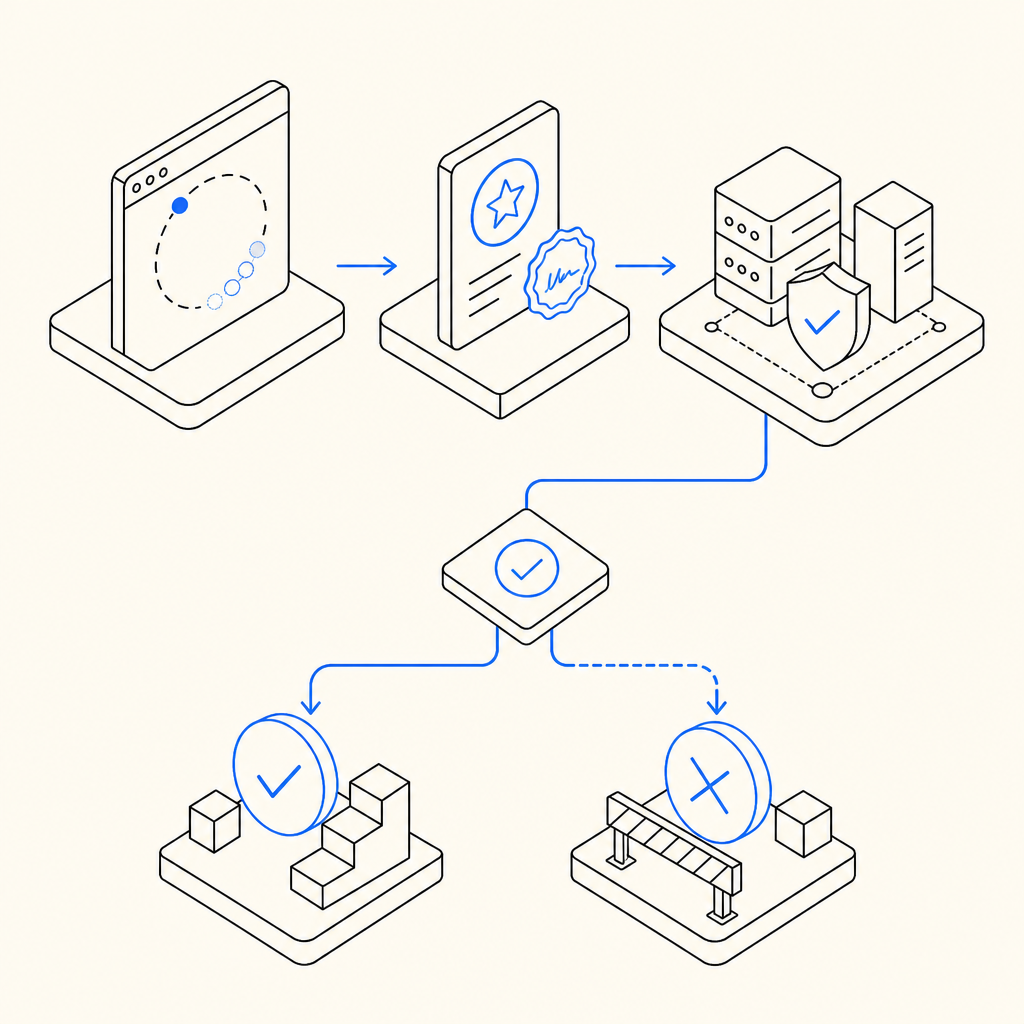
The safest way to use a captcha gif is to treat the animation as the front end of a signed challenge flow. The browser shows the challenge, but the server decides whether the response is valid.
A typical flow looks like this:
- The client loads the challenge asset or widget.
- The user completes the animated interaction.
- The client receives a pass token.
- Your backend submits that token to the verification API.
- The backend receives an allow/deny result and proceeds accordingly.
A compact validation example:
// English comments only
async function verifyCaptcha(passToken, clientIp) {
  const response = await fetch("https://apiv1.captcha.la/v1/validate", {
    method: "POST",
    headers: {
      "Content-Type": "application/json",
      "X-App-Key": process.env.CAPTCHALA_APP_KEY,
      "X-App-Secret": process.env.CAPTCHALA_APP_SECRET
    },
    body: JSON.stringify({
      pass_token: passToken,
      client_ip: clientIp
    })
  });

  return response.json();
}
That pattern keeps secrets off the client and makes replay harder. It also gives your backend a clean place to enforce policy: allow the request, ask for a stronger challenge, throttle the session, or send the interaction to a fraud queue.
If you’re using CaptchaLa, the product supports this server-side approach directly. The loader is served from https://cdn.captcha-cdn.net/captchala-loader.js, and validation happens over POST https://apiv1.captcha.la/v1/validate with pass_token and client_ip plus X-App-Key and X-App-Secret. That design keeps the trust decision on your server, which is where it belongs.
Choosing between captcha gif, modern widgets, and invisible checks
Animated CAPTCHA is only one option. Depending on your abuse profile, you may prefer a more adaptive system.
| Solution | User friction | Typical use case | Notes |
|---|---|---|---|
| captcha gif | Medium | Lightweight public forms | Simple and familiar, but not always enough |
| reCAPTCHA | Low to medium | Broad web abuse protection | Well known; many teams evaluate it for baseline coverage |
| hCaptcha | Low to medium | Forms and signup protection | Often chosen for similar reasons to reCAPTCHA |
| Cloudflare Turnstile | Low | Low-friction verification | Good when you want fewer interruptions |
| Token-based flow with backend validation | Variable | Custom product workflows | Best when you need control and auditability |
The right choice depends on what you can tolerate: more user friction, more implementation complexity, or more fraud risk. For example, if you have a consumer signup page and a comment form, you may not need the same challenge style on both. You can reserve the stronger gate for actions that cost you money or create downstream moderation work.
CaptchaLa’s native SDK coverage is also broad enough to fit several app surfaces: Web with JS, Vue, and React; iOS; Android; Flutter; and Electron. If your product is multi-platform, that matters because consistency is easier when the same verification model applies across clients. On the server side, there are SDKs for captchala-php and captchala-go, which can simplify integration where those stacks are already in place.
For package managers and platform-specific installs, the published versions are:
- Maven:
la.captcha:captchala:1.0.2 - CocoaPods:
Captchala 1.0.2 - pub.dev:
captchala 1.3.2
Those details are useful if you’re standardizing across teams and need a dependable implementation path rather than a one-off widget experiment.
Practical guidance for teams shipping a captcha gif
If you decide animated verification is appropriate, keep the implementation disciplined:
- Use animation to support the challenge, not replace validation.
- Limit the challenge to risky traffic, not every request.
- Validate tokens server-side on every protected action.
- Log challenge outcomes for tuning and abuse analysis.
- Provide accessible fallback paths and readable error states.
- Test on slow devices, small screens, and low-bandwidth connections.
- Revisit the challenge regularly; what slows one bot may not slow the next.
One last operational note: keep your data collection narrow. CaptchaLa’s approach is first-party data only, which is a good fit for teams trying to reduce unnecessary data sharing while still getting effective verification. That’s especially relevant when the anti-abuse layer sits close to authentication, onboarding, or purchase flows.
If you want to inspect the implementation details, the docs are the quickest place to start. If you’re estimating usage levels, the pricing page shows the free tier and higher-volume plans. Free covers 1,000 validations per month, while Pro and Business tiers scale for larger traffic patterns.
Where to go next: if you’re deciding whether a captcha gif fits your product, start with the docs for the integration flow, or check pricing if you already know your monthly validation volume.