
If you’re deciding how an api captcha cloudflare setup should work, the short answer is: let Cloudflare handle network-layer filtering and put CAPTCHA validation at the application boundary. That gives you defense in depth without turning every request into a puzzle. For most teams, the right pattern is to challenge only suspicious traffic, validate a token server-side, and keep the user experience as close to invisible as possible.
That division matters because Cloudflare and CAPTCHA solve different problems. Cloudflare can absorb volumetric abuse, bot spikes, and basic reputation filtering at the edge. A CAPTCHA service validates that a real user completed a challenge and sends your backend a proof you can trust. When those two layers cooperate, you can protect signup, login, checkout, password reset, or API abuse flows without blocking legitimate users who just happen to be on a strict network or privacy-focused browser.
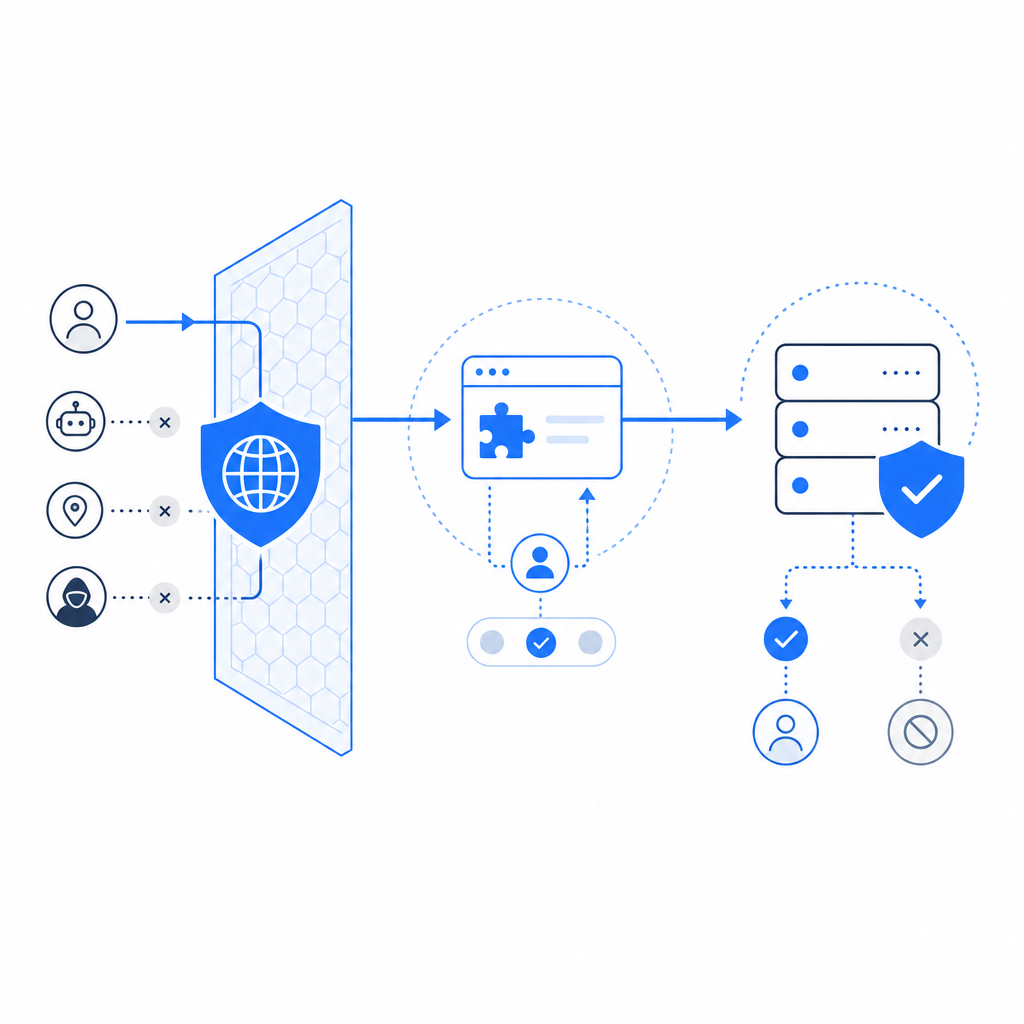
What “API CAPTCHA on Cloudflare” actually means
In practice, the phrase can describe a few different setups:
Cloudflare first, CAPTCHA second
Cloudflare filters bad traffic and only passes likely-real requests to your app. Your app then issues a CAPTCHA challenge when a flow becomes risky.CAPTCHA first, Cloudflare as a gatekeeper
Your frontend loads a challenge widget, the user completes it, and your backend validates the result before allowing the action. Cloudflare still protects the origin and can rate-limit or WAF-trigger on abusive patterns.Conditional challengeing
Most requests go straight through. Only high-risk events — new account creation, repeated login failures, suspicious form submits, or API bursts — trigger a challenge.
For application teams, the most important point is that validation belongs on your server, not in the browser. The browser can collect a token; your backend decides whether that token is valid, unexpired, and tied to the current request context.
A good mental model is:
- Cloudflare reduces noise at the perimeter.
- CAPTCHA reduces account takeover, form abuse, and scripted submissions.
- Your origin makes the final authorization decision.
If you’re using a CAPTCHA product like CaptchaLa, that separation is straightforward because the client only needs a loader and token exchange, while your server validates with authenticated API calls. That keeps the trust boundary where it belongs.
A clean integration pattern
The simplest reliable flow looks like this:
- The frontend loads the CAPTCHA widget or challenge script.
- The user completes the challenge and gets a
pass_token. - Your backend receives the form or API request with that token.
- Your backend validates the token with the CAPTCHA service.
- Only if validation succeeds does the app continue.
Here is a compact backend example using the validation endpoint:
# Send the user token to your backend, not directly to the browser.
curl -X POST https://apiv1.captcha.la/v1/validate \
  -H "Content-Type: application/json" \
  -H "X-App-Key: your_app_key" \
  -H "X-App-Secret: your_app_secret" \
  -d '{
    "pass_token": "token_from_client",
    "client_ip": "203.0.113.10"
  }'
A few implementation notes matter here:
pass_tokenshould come from the client after challenge completion.client_iphelps the validation layer correlate the request context.X-App-KeyandX-App-Secretstay on the server only.- Your application should reject reused, expired, or malformed tokens.
- Validation should happen before any sensitive business action is executed.
CaptchaLa’s loader is served from https://cdn.captcha-cdn.net/captchala-loader.js, and the platform supports 8 UI languages plus native SDKs for Web (JS, Vue, React), iOS, Android, Flutter, and Electron. That can be useful if you’re standardizing across web and mobile rather than stitching together separate anti-bot tools per platform.
Where Cloudflare fits, and where it doesn’t
Cloudflare is often the right place to stop obvious abuse early, but it is not a replacement for application-level challenge verification. Cloudflare can:
- rate-limit repeated requests,
- absorb spikes and volumetric attacks,
- enforce WAF rules,
- inspect request patterns,
- add friction to suspicious traffic at the edge.
It generally should not be expected to prove that a human completed your business-specific challenge. That proof belongs to the CAPTCHA service and your backend.
Here’s a practical comparison.
| Layer | Primary job | Strengths | Typical blind spots |
|---|---|---|---|
| Cloudflare | Edge filtering and traffic control | DDoS absorption, WAF, rate limiting, global network | Doesn’t know your app’s exact human-check logic |
| CAPTCHA | Human verification | Validates interaction and challenge completion | Not enough by itself for volumetric attacks |
| Application backend | Final authorization | Knows business rules and risk context | Needs correct integration to avoid gaps |
A common mistake is to treat any one of these as complete protection. For example, a site may enable Cloudflare bot settings but leave a signup endpoint open to repeated credential stuffing. Or it may add CAPTCHA on a form but forget to validate the token server-side, which makes the whole check easy to bypass with a forged client request. Defense works best when each layer does one job well.
Technical specifics to keep in mind
For a production rollout, these details are worth pinning down early:
Token lifecycle
Decide how long apass_tokenremains valid, whether it is single-use, and what happens after a failed validation.Request binding
Validate with the user’s IP when appropriate, but be careful with proxies and mobile networks. Your app should use the same client-IP logic consistently.Challenge triggers
Don’t challenge every request. Trigger only on sensitive endpoints or suspicious behavior, such as rapid retries, abnormal user agents, or unusual geographies.Failure behavior
If validation fails, return a clear but non-revealing error. Avoid telling attackers whether the username, password, or token was the problem.Observability
Log validation outcomes, challenge rates, and endpoint-level risk metrics so you can tune friction over time.
If you use CaptchaLa server SDKs, the package names are available for common stacks, including captchala-php and captchala-go. For mobile and cross-platform teams, the published artifacts include Maven la.captcha:captchala:1.0.2, CocoaPods Captchala 1.0.2, and pub.dev captchala 1.3.2.
Choosing between reCAPTCHA, hCaptcha, and Cloudflare Turnstile
There is no universal winner here; the right choice depends on your privacy, UX, and infrastructure preferences.
- reCAPTCHA is widely recognized and heavily used, especially in older integrations.
- hCaptcha is popular where publishers want a different privacy and monetization model.
- Cloudflare Turnstile fits naturally if your stack already lives inside Cloudflare and you want low-friction challenge experiences.
When you compare them, ask:
- Does the service support your frontend frameworks and mobile clients?
- Can your backend validate tokens cleanly with one API call?
- Are the logs and outcomes easy to observe in production?
- Does the solution fit your data handling and privacy requirements?
- Can you challenge only a subset of traffic?
For teams that want a straightforward token-validation flow and first-party data only, the operational simplicity can matter more than brand familiarity. That’s also why some teams evaluate CaptchaLa alongside the more established names: the deciding factor is often integration fit, not feature count. If you want to inspect setup details before committing, the docs are the right starting point, and the pricing page is useful for matching volume to cost.
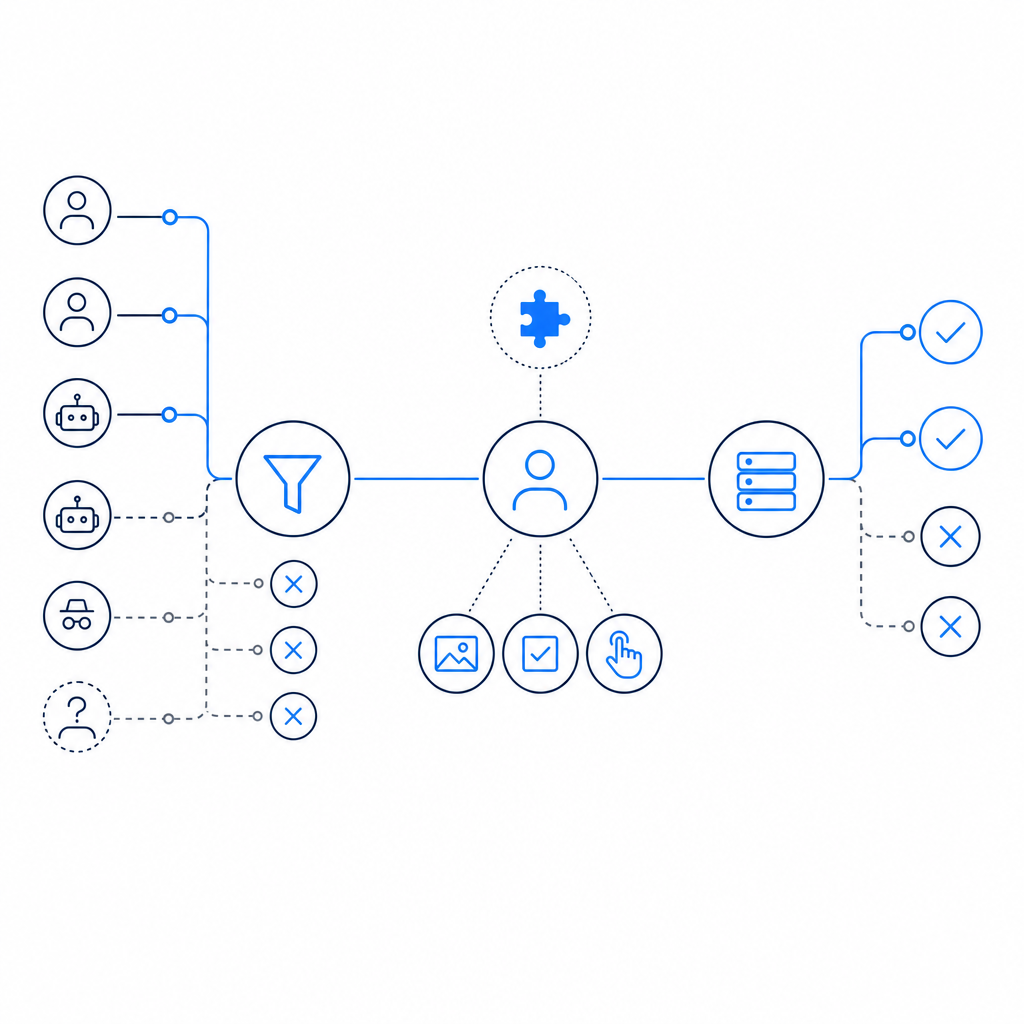
Implementation checklist for production
Before shipping, make sure these items are in place:
- The frontend only loads challenge code from the expected CDN.
- The backend owns validation secrets and never exposes them to the browser.
- Validation happens before account creation, checkout, password reset, or API mutation.
- Cloudflare WAF/rate limiting rules cover obvious abuse patterns.
- You have a fallback plan if the CAPTCHA service is temporarily unreachable.
- You can monitor challenge volume by endpoint and segment.
- You have tested normal users on mobile, desktop, and low-bandwidth connections.
If you are planning volume, CaptchaLa’s tiers are simple enough to map to traffic: free tier at 1,000 validations per month, Pro at 50K–200K, and Business at 1M. That makes it easier to estimate whether you need CAPTCHA only on a few high-risk forms or across a larger share of your traffic.
The broader goal is not to “stop bots” in the abstract. It is to protect specific user journeys with the least possible friction. Cloudflare handles the noisy edge. CAPTCHA confirms a human. Your app makes the final decision. When those responsibilities stay separate, the system is easier to reason about and much easier to maintain.
Where to go next: if you want to wire this into a real flow, start with the docs or compare tiers on pricing.