
Anti-scraping technology is a set of controls that detect, slow down, challenge, or block automated collection of web content. The goal is not to stop every request; it is to make large-scale scraping expensive enough, noisy enough, or unreliable enough that legitimate users keep working normally.
That distinction matters. Good defenses treat scraping as a risk signal, not a binary crime scene. They combine client-side checks, server-side validation, rate controls, behavior analysis, and progressive challenges so humans can move through quickly while automation gets less predictable outcomes.
If you run a site with pricing pages, inventory, login flows, search, or public APIs, anti-scraping technology is less about “hiding” content and more about controlling abuse. Done well, it protects uptime, data quality, and margins without making your product feel hostile.
What anti-scraping technology actually does
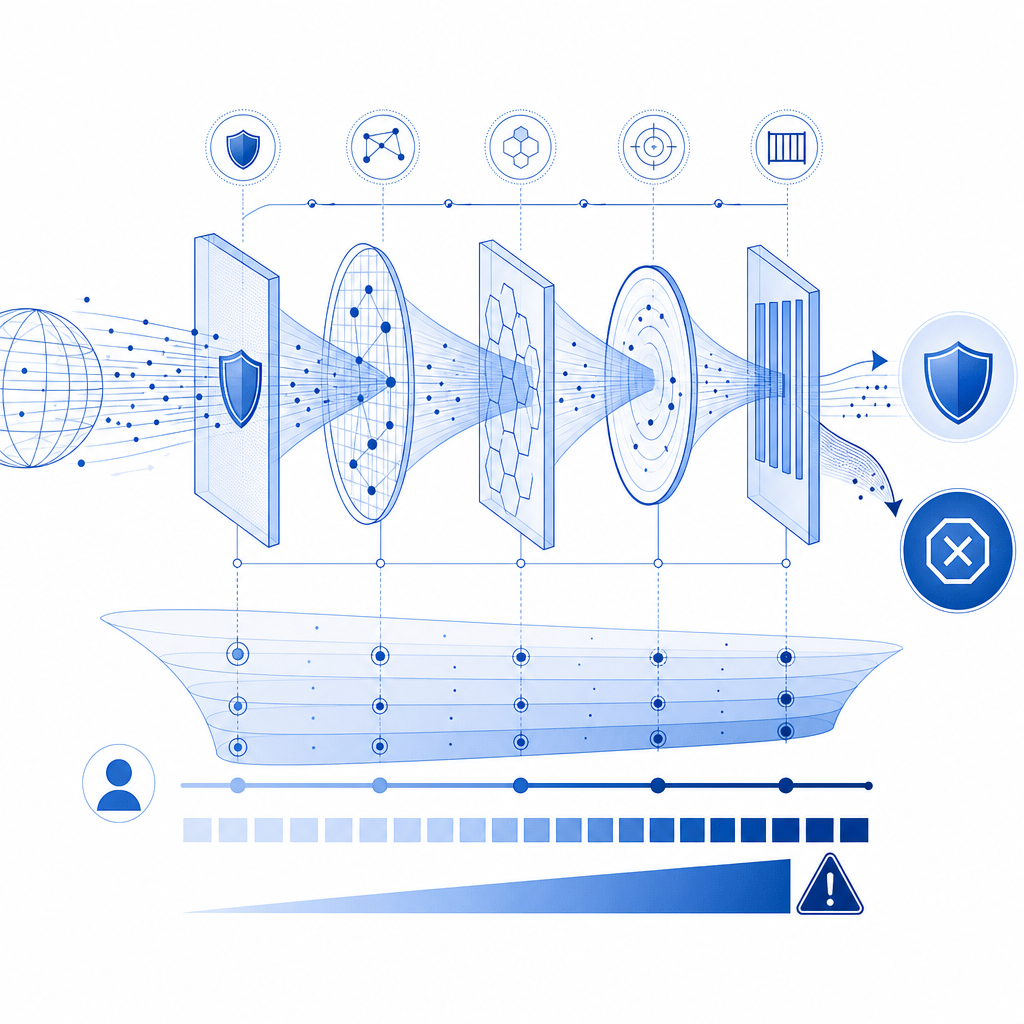
Most scraping defenses work across three layers:
Identify automation signals
- Request bursts from the same ASN, subnet, or device fingerprint
- Repeated navigation patterns that ignore normal user flow
- Headless browser artifacts, missing browser APIs, or inconsistent timing
- Unusual header order, cookie handling, or session reuse
Increase cost for suspicious traffic
- Adaptive challenges
- Session binding and token validation
- Per-route throttling
- Temporary friction on high-risk actions
Preserve the human path
- Let low-risk visitors pass with minimal delay
- Use step-up checks only when needed
- Keep fallbacks accessible across devices and locales
A strong anti-scraping system usually combines edge enforcement and application-layer validation. Client signals are useful, but they should not be trusted alone. Server-side verification is what turns a “looks human” claim into something your backend can enforce.
Common signals defenders look for
A practical implementation often evaluates:
- IP reputation and request velocity
- Session continuity
- Browser integrity and challenge completion
- Time between page load and form submit
- Geo and language consistency
- Repeated access to the same endpoints, especially search or catalog pages
None of these signals is perfect by itself. Their value comes from combining them into a score or policy decision.
Comparing the main anti-scraping options
Different products emphasize different layers of defense. Here’s a simple way to think about the common choices.
| Tool | Primary strength | Typical tradeoff | Best fit |
|---|---|---|---|
| reCAPTCHA | Familiar challenge flow and broad adoption | Can add friction and accessibility concerns | Sites that want a recognizable challenge pattern |
| hCaptcha | Flexible challenge system and monetization options | Still a visible challenge for some users | Teams that want challenge-based bot mitigation |
| Cloudflare Turnstile | Low-friction verification and strong edge integration | Works best when your stack is already aligned with Cloudflare | Sites already using Cloudflare infrastructure |
| Custom anti-scraping stack | Maximum control over rules and signals | More engineering and maintenance | Products with unique abuse patterns |
| CaptchaLa | Multi-platform challenge and validation flow with SDKs and server checks | Requires integration work like any other defense layer | Teams wanting app-level control across web and mobile |
That comparison is intentionally objective. There is no universal winner. The right choice depends on where your abuse happens, what channels you support, and how much control you need over the validation path.
If your traffic is mostly web and you want consistent enforcement across frontend and backend, a solution with native SDKs and a server validation API can be simpler to reason about than stitching together multiple ad hoc controls.
How to design a defense that scales
A scalable anti-scraping design usually follows a few technical rules.
1) Verify server-side, not just in the browser
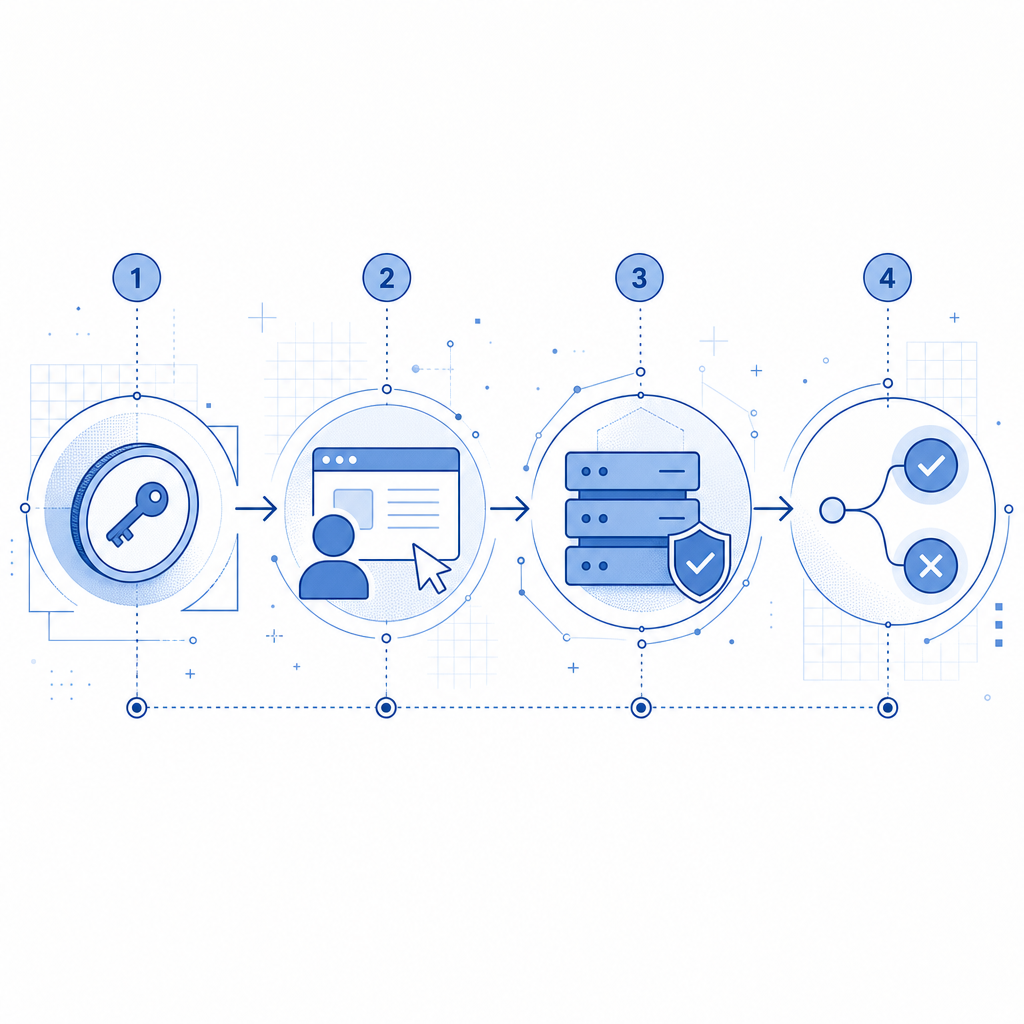
Never rely only on a client-side success flag. A challenge should produce a token that your backend validates before granting access. With CaptchaLa, the validation flow is straightforward:
Client completes challenge
    -> receives pass_token
Backend posts token to validation endpoint
    -> backend decides whether to allow the request
For server validation, the core endpoint is:
POST https://apiv1.captcha.la/v1/validateThe body includes:
{
  "pass_token": "string",
  "client_ip": "string"
}
And the request uses X-App-Key plus X-App-Secret headers.
That pattern is important because it keeps the trust decision on your infrastructure, not in the browser.
2) Use progressive friction
Not every suspicious request deserves the same response. A better pattern is:
- Allow known-good sessions with no extra step.
- Flag moderate risk and require a lightweight challenge.
- Escalate to stricter checks for repeated failures.
- Rate-limit or temporarily block persistent automation.
This keeps conversion high for real users and makes scraping more expensive over time.
3) Bind the challenge to the session and route
A pass token should be relevant to the specific action it protects. For example:
- A login challenge should not automatically validate a bulk-search endpoint.
- A checkout challenge should not unlock account changes.
- A catalog challenge should not approve password reset.
This limits token replay and reduces the value of stolen or reused artifacts.
4) Collect only first-party data
The most maintainable defenses are built on first-party data: your own request logs, your own session events, your own app state. That keeps your policy clearer and avoids unnecessary dependency on third-party behavioral profiles.
It also makes tuning easier. When your signals are tied to actual product flows, false positives become easier to investigate and reduce.
A simple backend decision flow
// English comments only
async function allowRequest(req) {
  // Check whether the route needs protection
  if (!isProtectedRoute(req.path)) {
    return true;
  }

  // Validate challenge result with the backend API
  const result = await validatePassToken({
    pass_token: req.body.pass_token,
    client_ip: req.ip,
    app_key: process.env.APP_KEY,
    app_secret: process.env.APP_SECRET,
  });

  // Only allow if the token is valid and not expired
  return result.valid === true;
}
That is the basic idea behind most practical anti-scraping technology: inspect, challenge when needed, validate server-side, and keep the user experience as smooth as possible.
Deployment considerations that teams often miss
Anti-scraping systems fail when they are hard to deploy, hard to localize, or hard to maintain. A few details matter more than people expect.
Multi-platform support matters
If your product spans web, mobile, and desktop, you want consistent behavior across environments. CaptchaLa supports 8 UI languages and native SDKs for Web (JS, Vue, React), iOS, Android, Flutter, and Electron. It also provides server SDKs for captchala-php and captchala-go, which helps teams keep validation logic close to the application code they already maintain.
For mobile apps, the native packaging details can save time:
- Maven:
la.captcha:captchala:1.0.2 - CocoaPods:
Captchala 1.0.2 - pub.dev:
captchala 1.3.2
That matters because many scraping problems are no longer just “web bot” problems. Abuse often moves into signup, login, referral, inventory, and content endpoints that exist behind multiple clients.
Edge delivery and loader placement
If you are embedding a challenge on the web, the delivery path should be simple and fast. CaptchaLa’s loader is served from:
https://cdn.captcha-cdn.net/captchala-loader.jsA lightweight loader can reduce integration complexity, especially when you want to attach challenges to specific forms or routes without rebuilding your frontend architecture.
Challenge issuance vs validation
There are two separate operations to understand:
- Issue a server token when you need to create a challenge flow:
POST https://apiv1.captcha.la/v1/server/challenge/issue
- Validate the pass token after the user completes it:
POST https://apiv1.captcha.la/v1/validate
Keeping issue and validate distinct makes the system easier to audit. One endpoint creates the challenge context; the other confirms the result.
What to measure after rollout
A defense is only as good as the metrics you watch. After deployment, track:
- Challenge pass rate by device and region
- False positive rate on logged-in users
- Request volume per protected route
- Repeat failures from the same IPs or sessions
- Conversion impact on signups, checkouts, or searches
- Time-to-detect when a new abuse pattern appears
If your pass rate is high but abuse continues, your signals may be too weak. If abuse drops but conversions fall, your challenge is probably too intrusive or too broad.
A useful rollout strategy is to start with a narrow set of routes:
- login
- signup
- password reset
- search
- pricing or inventory pages
Then expand based on evidence, not guesswork.
For teams that want to test these patterns without overcommitting, a free tier can be enough to learn the traffic shape before scaling. CaptchaLa’s published tiers include Free at 1000/month, Pro at 50K–200K, and Business at 1M, which gives smaller and larger teams room to start with the same validation model.
Where anti-scraping technology is heading
The trend is not toward more visible puzzles; it is toward better judgment. Modern defenses are moving toward:
- lower-friction checks for ordinary users
- tighter backend verification
- route-specific policies
- better localization and device support
- simpler integration across web and mobile
That is why “anti-scraping technology” is best thought of as a policy system, not a single widget. The challenge is only one part of the stack. The real value comes from how well it fits your application, your traffic, and your tolerance for friction.
Where to go next: if you want to compare plans or read integration details, start with the docs or review pricing.