
A captcha free api usually means a CAPTCHA service with a free tier or free usage window, not a permanently unlimited public API. If you’re evaluating one, the real question is whether the free plan gives you enough traffic, SDK support, validation security, and operational clarity to ship without surprises.
That matters because CAPTCHA is not just a widget decision. It affects bot defense, UX, server-side verification, privacy posture, and how easily your app scales when traffic grows. A free plan can be a great starting point, but only if you understand the limits and the integration model before you wire it into production.
What “captcha free api” usually means
When teams search for a captcha free api, they’re often looking for one of three things:
- A service with a free tier for low-volume production use.
- A developer API that can be tested without immediate payment.
- A self-serve integration that does not require a sales call before trying it.
Those are different. A free tier may still have monthly limits, usage-based pricing above that threshold, or required server-side checks. That’s normal. The important part is whether the plan is transparent enough to let you plan for growth.
For example, CaptchaLa offers a free tier at 1,000 validations per month, with Pro and Business tiers for larger traffic patterns. That makes it easier to start small and later scale into a higher-volume plan without changing your integration pattern.
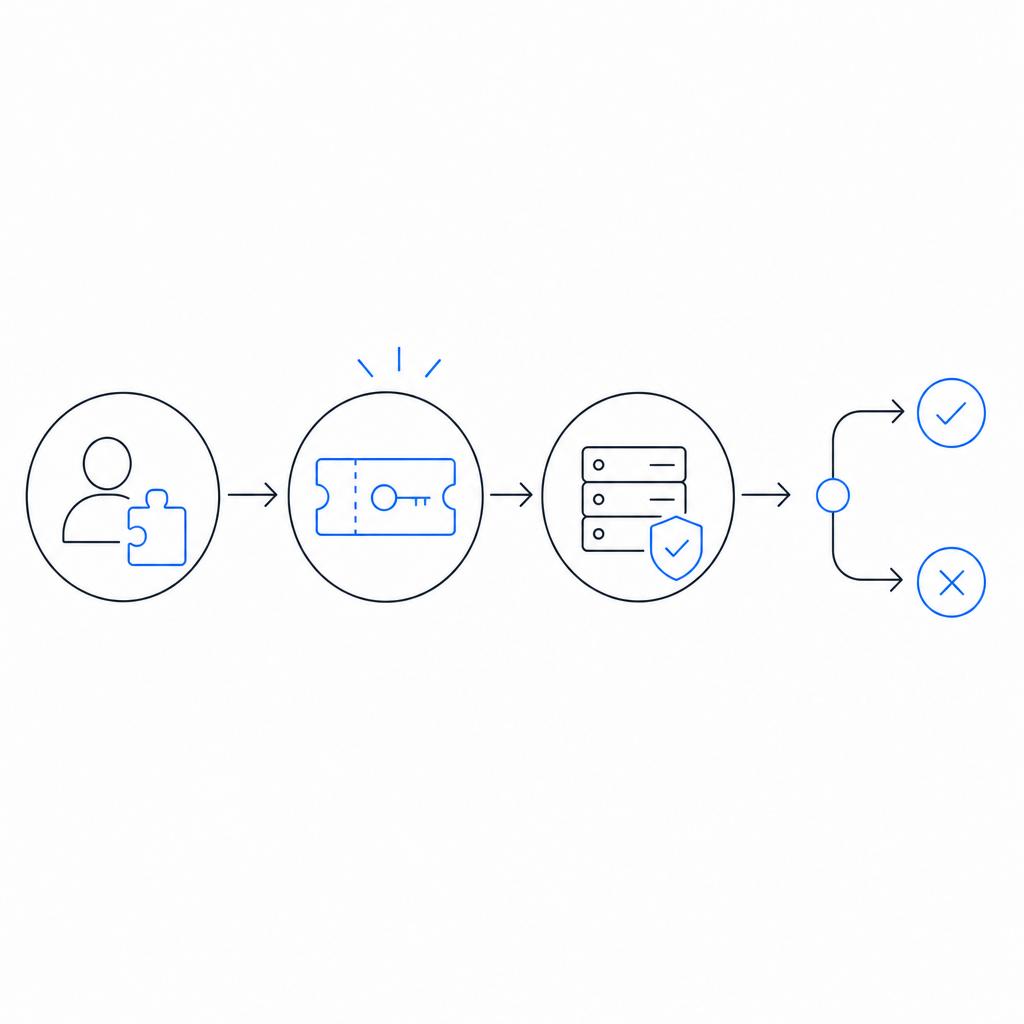
A good free CAPTCHA API should also make it obvious where the trust boundary is. The client should collect a challenge or token, but the actual decision should happen on your server, not in the browser alone. That separation is the difference between a cosmetic widget and an actual defense layer.
What to check before you integrate
Before you choose a free CAPTCHA API, compare more than just price. The cheapest option can become expensive if it creates support issues, accessibility complaints, or hard-to-debug failures.
1. Validation model
Ask whether the provider supports server-side validation and how the verification request works. A solid flow should look like this:
- Client receives a pass token after solving the challenge.
- Your backend sends the token to the provider.
- The provider responds with a validation result.
- Your app decides whether to allow the action.
CaptchaLa, for instance, validates with:
POST https://apiv1.captcha.la/v1/validate
Body: { pass_token, client_ip }
Headers: X-App-Key, X-App-Secret
That pattern is useful because it keeps the decision on your server and includes the client IP as part of the check.
2. SDK coverage
If you support web, mobile, and desktop, check whether the vendor has native SDKs instead of forcing you into a brittle custom wrapper.
CaptchaLa supports:
- Web: JavaScript, Vue, React
- iOS
- Android
- Flutter
- Electron
It also supports multiple UI languages, which can matter if your audience is global. A free API that only works cleanly in one frontend stack may create hidden engineering cost later.
3. Server libraries and ecosystem fit
A strong free tier is easier to adopt when the backend libraries fit your stack. CaptchaLa provides server SDKs like captchala-php and captchala-go, plus mobile packaging options such as Maven la.captcha:captchala:1.0.2, CocoaPods Captchala 1.0.2, and pub.dev captchala 1.3.2.
That kind of distribution matters because it reduces glue code. The less custom code you maintain around a security control, the easier it is to keep secure.
4. First-party data only
Privacy and data handling are not side notes. If you’re using a CAPTCHA in a regulated environment or just want a cleaner compliance story, verify whether the service relies on first-party data only and how it documents that behavior. This can simplify internal review, especially if you’re comparing it with broader network-based risk systems.
5. Capacity and upgrade path
Free is not helpful if it breaks the moment your product gets traction. Check whether the provider publishes reasonable tier thresholds and whether the integration stays the same as you scale.
Here’s a quick comparison of what teams often care about:
| Provider | Free availability | Strong server validation | SDK breadth | Notes |
|---|---|---|---|---|
| reCAPTCHA | Yes | Yes | Broad | Common choice, but some teams prefer alternatives for UX or policy reasons |
| hCaptcha | Yes | Yes | Broad | Often evaluated for privacy and publisher workflows |
| Cloudflare Turnstile | Yes | Yes | Good | Popular for low-friction challenges |
| CaptchaLa | Yes, 1,000/mo | Yes | Web, iOS, Android, Flutter, Electron | Also offers server SDKs and a clear upgrade path |
This is not about declaring a winner. It’s about fitting your product’s traffic, stack, and compliance needs.
A practical integration pattern for developers
If you’re building a new app, the safest approach is to treat the CAPTCHA as one step in a larger request pipeline. Don’t rely on the frontend alone; always verify on the backend before creating an account, posting a form, or starting an action that costs money or resources.
A typical flow looks like this:
- Load the CAPTCHA script from the provider’s CDN.
- Render the challenge in the client.
- Receive a
pass_tokenafter the user completes it. - Send the token and
client_ipto your backend. - Your backend calls the validation endpoint with your app credentials.
- Allow or deny the protected action based on the result.
If you’re using CaptchaLa, the loader is:
https://cdn.captcha-cdn.net/captchala-loader.jsAnd the server validation uses the POST endpoint noted above. There is also a server-token issuance endpoint:
POST https://apiv1.captcha.la/v1/server/challenge/issueThat can be useful when your architecture needs server-coordinated challenge handling rather than a purely browser-driven flow.
A minimal backend-style pseudocode example:
// English comments only
async function verifyCaptcha(passToken, clientIp) {
  const response = await fetch("https://apiv1.captcha.la/v1/validate", {
    method: "POST",
    headers: {
      "Content-Type": "application/json",
      "X-App-Key": process.env.CAPTCHA_APP_KEY,
      "X-App-Secret": process.env.CAPTCHA_APP_SECRET
    },
    body: JSON.stringify({
      pass_token: passToken,
      client_ip: clientIp
    })
  });

  const result = await response.json();

  // Only continue when the provider confirms the token is valid
  return result?.success === true;
}
The details will vary by language and framework, but the pattern should not. Your backend is the source of truth.
When a free tier is enough, and when it isn’t
A free CAPTCHA API is often enough if you are:
- validating a low-traffic landing page
- testing a signup flow before launch
- protecting a niche community or internal tool
- building a prototype with real user feedback
It may not be enough if you are:
- already above a few thousand checks per month
- running a consumer app with rapid growth
- handling sensitive workflows like payments or account recovery
- needing advanced operational guarantees or enterprise review
CaptchaLa’s published tiers illustrate the shape of that transition: free at 1,000/month, then Pro for roughly 50K-200K, then Business around 1M. That’s helpful because it makes capacity planning concrete instead of vague.
It’s also worth thinking about user experience. Some users will compare your flow with reCAPTCHA, hCaptcha, or Cloudflare Turnstile based on friction alone. If your product audience is mobile-heavy, multilingual, or sensitive to interruptions, SDK availability and challenge design may matter as much as pricing.

Choosing with a defender’s mindset
The safest way to evaluate a captcha free api is to ask, “Does this reduce abuse without adding fragile dependencies?” That means checking the server validation model, the SDKs you actually need, the traffic limits, and the upgrade path before you ship.
It also means keeping the implementation boring in the best possible way: frontend challenge, backend verification, clear secrets handling, and observable failure states. If a provider makes that straightforward, it’s easier to trust under load.
If you want to compare implementation details or see how the integration works across platforms, start with the docs. If you’re already estimating traffic and want to see where a free tier ends and paid tiers begin, take a look at pricing.
Where to go next: read the docs for implementation details, or check pricing to match your monthly volume to the right plan.