
When building mobile applications with React Native, incorporating CAPTCHA is essential to block bots and automate fraud without compromising user experience. CAPTCHA for React Native verifies users through challenges that are seamless, native-friendly, and secure. Unlike web-only CAPTCHA solutions, React Native requires SDKs or API integrations tailored for mobile environments and cross-platform compatibility.
This post explains how to implement CAPTCHA effectively in React Native apps, reviews popular options including CaptchaLa, Google reCAPTCHA, hCaptcha, and Cloudflare Turnstile, and provides technical guidance to get started. Whether you are adding spam protection to forms, sign-ups, or sensitive actions, a well-integrated CAPTCHA bridges security with smooth mobile usability.
Why React Native CAPTCHA is Different
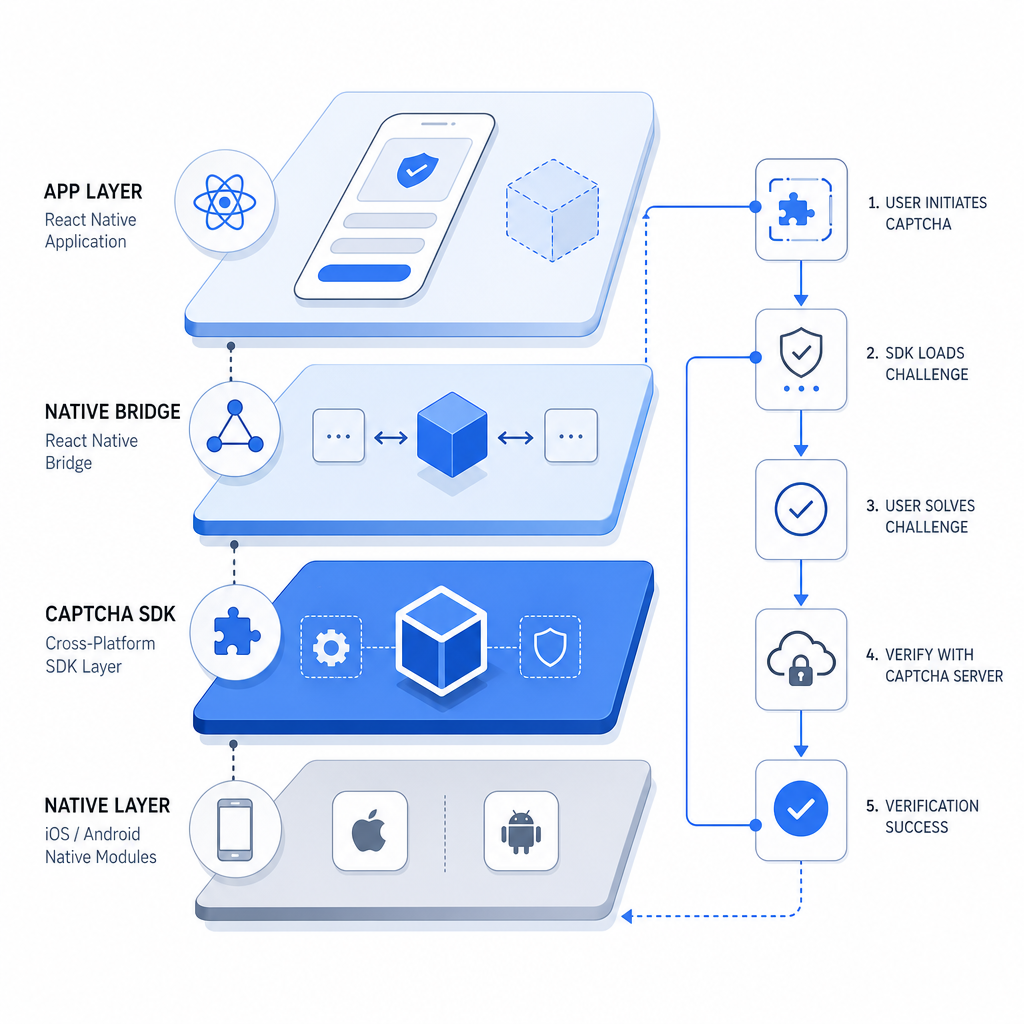
React Native apps run on iOS and Android using a shared JavaScript codebase, but CAPTCHA solutions must interact closely with each native platform. Unlike embedding a widget on a website, mobile CAPTCHA often requires:
- Native SDK bindings or libraries for React Native
- Handling asynchronous challenge flows in app UI
- Minimizing latency and app bundle size impact
- Supporting offline and low-bandwidth environments
- Compliance with privacy norms such as not sharing third-party tracking data
Many web CAPTCHA tools rely heavily on browser DOM or cookies, so they can be tricky or clunky on React Native. That’s why options with dedicated React Native or native mobile SDKs are preferred for better performance and user experience.
Popular CAPTCHA Options for React Native
| Solution | Availability | Native SDK Support | User Experience | Pricing Model |
|---|---|---|---|---|
| CaptchaLa | Web, iOS, Android | React Native, Android, iOS SDKs | Lightweight, multilingual UI | Free tier + Pro plans |
| Google reCAPTCHA | Web, Android, iOS | Android & iOS native SDKs | Widely adopted, familiar UI | Free |
| hCaptcha | Web, Android, iOS | Android & iOS native SDKs | Privacy-focused alternative | Usage-based pricing |
| Cloudflare Turnstile | Web, Android, iOS | Official iOS & Android SDKs | Passwordless, frictionless UX | Free with Cloudflare services |
CaptchaLa stands out by providing a dedicated React Native SDK alongside native iOS and Android SDKs, enabling easy integration without having to fallback on web views. It supports 8 UI languages and focuses on first-party data to preserve user privacy.

How to Integrate CaptchaLa in React Native
Getting started with CaptchaLa in React Native involves a few simple steps:
- Install the SDK
Use npm or yarn to add the CaptchaLa React Native SDK to your project:bashnpm install captchala-react-native - Import and Initialize
Import the component or hook where you want to add CAPTCHA. Initialize with your app key:javascriptimport { CaptchaLa } from 'captchala-react-native'; function MyForm() { const onSuccess = (passToken) => { // Send passToken alongside client IP to your backend for verification }; return ( <CaptchaLa appKey="YOUR_APP_KEY" onSuccess={onSuccess} language="en" /> ); } - Validate Token on Server
When your backend receives thepass_tokengenerated by CaptchaLa, validate it by calling the CaptchaLa API securely:POST https://apiv1.captcha.la/v1/validate Headers: X-App-Key, X-App-Secret Body: { pass_token, client_ip } - Handle Validation Result
Proceed with user registration, form submission, or sensitive action only if validation succeeded.
For detailed usage, visit CaptchaLa docs.
Technical Considerations for Bot Defense in React Native
When choosing or implementing a CAPTCHA in React Native, keep these technical aspects in mind:
SDK Maturity and Updates
Use CAPTCHA tools with actively maintained React Native SDKs. Check Maven, CocoaPods, or pub.dev package versions (for example, CaptchaLa is available asla.captcha:captchala:1.0.2,Captchala 1.0.2,captchala 1.3.2respectively).UI Customization and Language Support
Multi-language UI compatibility is important for international apps. CaptchaLa supports 8 languages natively, helping localize challenges.User Experience and Friction
Excessive CAPTCHA challenges frustrate users. Choose CAPTCHA providers that balance bot deterrence with minimal friction (Cloudflare Turnstile is noted for passwordless approaches, but requires Cloudflare integration).Privacy and Data Handling
Especially on mobile, avoid CAPTCHA that relies on third-party trackers or share user data with advertisers. CaptchaLa processes only first-party data by default.Performance Impact
Evaluate SDK bundle size and impact on app startup time. Embedding web views or serving heavy scripts might slow down mobile apps.
Comparing CaptchaLa With Competitors in React Native
Each provider has its strengths and potential trade-offs:
CaptchaLa:
Pros: Official React Native SDK, easy server validation APIs, supports multiple mobile platforms, first-party data privacy.
Cons: Smaller user base vs. Google reCAPTCHA.Google reCAPTCHA:
Pros: Familiar UI, trusted by users, free to use
Cons: Web-focused, requires workarounds on React Native, Google tracking concerns.hCaptcha:
Pros: Privacy-centric, alternative to Google, native mobile SDKs.
Cons: Paid tiers may add complexity, UI less polished in some cases.Cloudflare Turnstile:
Pros: Passwordless, frictionless UX, free with Cloudflare network.
Cons: Requires Cloudflare proxy, no React Native dedicated SDK yet (as of 2026).
Selecting the right CAPTCHA depends on your app’s priorities—privacy, ease of use, SDK support, or cost.
Where to Go Next
Integrating CAPTCHA into your React Native app doesn’t have to be complex. Leveraging a provider like CaptchaLa with dedicated React Native and native mobile SDKs can streamline bot defense while preserving user experience and privacy. Start by exploring their docs to understand implementation details and server-side validation flows.
When you’re ready to scale your protection, check out the pricing plans that fit your usage needs—whether a free monthly tier or higher-usage business plans.
Secure your React Native app today with a CAPTCHA strategy that balances defense and usability.