
When it comes to protecting your PHP-based website or application from spam and automated abuse, implementing a CAPTCHA system is one of the most straightforward and effective methods. A CAPTCHA for PHP acts as a gatekeeper that distinguishes human users from bots by challenging users with tasks that are easy for humans but difficult for bots, such as image recognition or pattern analysis. This blog post will explain how to add CAPTCHA to your PHP projects, explore some popular options, and provide practical implementation guidance — so you can keep your forms safe from malicious traffic.
Why Use CAPTCHA in PHP Applications?
Bots can wreak havoc by submitting fake registrations, spamming contact forms, skewing polls, or harvesting data. Unlike client-side JavaScript defenses that can be bypassed, server-side CAPTCHA verification ensures that only legitimate users get through.
CAPTCHA solutions designed specifically for PHP offer SDKs and APIs that make integration seamless:
- Prevent spam and fraudulent form submissions
- Reduce resource waste caused by bot traffic
- Protect user accounts and data integrity
- Comply with security best practices
Many popular CAPTCHA providers, including CaptchaLa, Google reCAPTCHA, hCaptcha, and Cloudflare Turnstile, support PHP with SDKs or REST APIs.

Popular CAPTCHA Options for PHP: Features Comparison
When choosing a CAPTCHA for your PHP project, consider factors like ease of integration, UX, language support, pricing, and privacy policies. Here’s a quick overview of several widely used providers:
| Feature | CaptchaLa | Google reCAPTCHA | hCaptcha | Cloudflare Turnstile |
|---|---|---|---|---|
| PHP SDK Availability | Yes (captchala-php) | No official SDK; REST API | Community SDKs + REST API | No official PHP SDK; REST API |
| Verification Endpoint | POST https://apiv1.captcha.la/v1/validate | POST https://www.google.com/recaptcha/api/siteverify | POST https://hcaptcha.com/siteverify | POST https://challenges.cloudflare.com/turnstile/v0/siteverify |
| UI Languages Supported | 8 | Multiple | Multiple | Multiple |
| Pricing Model | Free tier + scalable paid plans | Free | Free + paid tiers | Included with Cloudflare service |
| Privacy Focus | First-party data only | Google ecosystem dependent | Independent alternative | Integrated with Cloudflare infrastructure |
| Client SDKs | JS, iOS, Android, Flutter, Electron | JS | JS | JS |
CaptchaLa stands out with native PHP SDK support and a straightforward API designed to minimize friction in backend verification. Its support for multiple UI languages makes it ideal for global-facing apps.
Integrating Captcha for PHP: Step-by-Step Guide with CaptchaLa
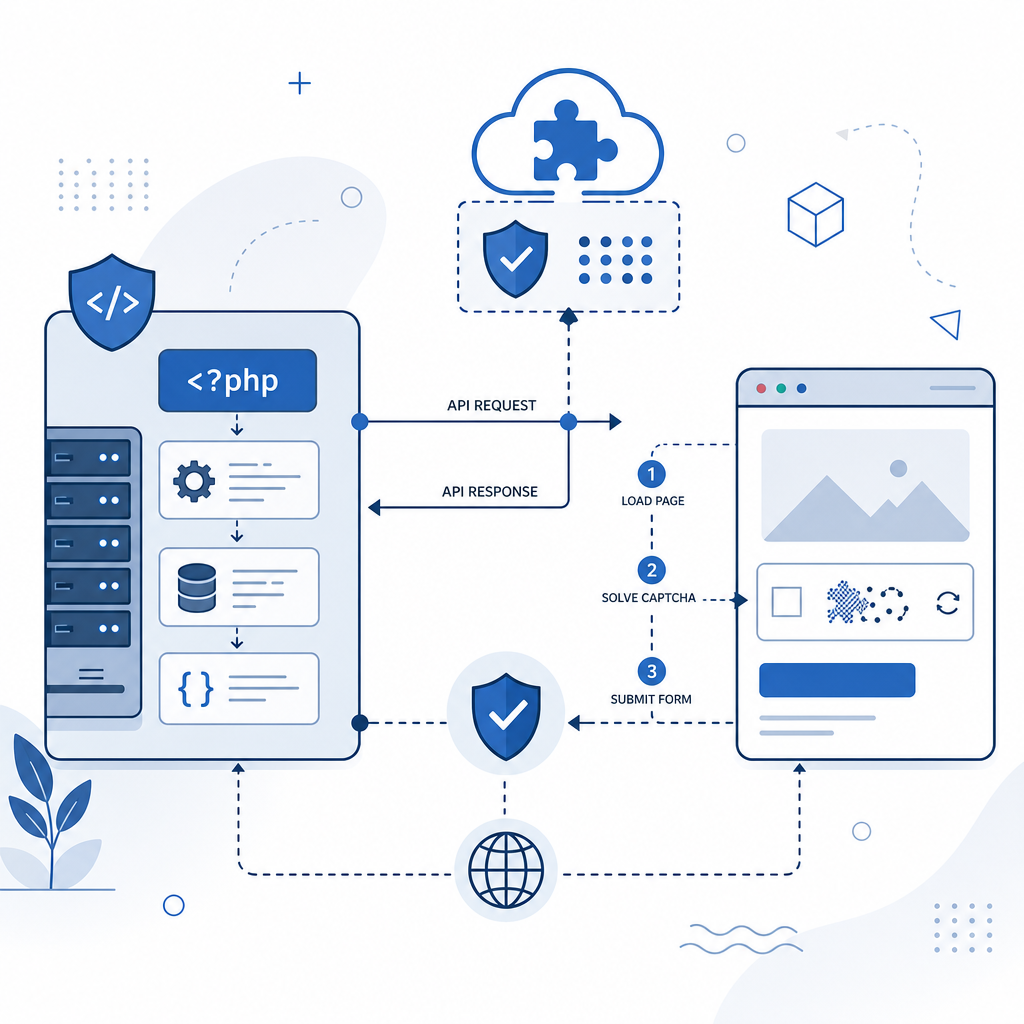
Here’s how you can quickly add CAPTCHA to your PHP forms using CaptchaLa’s server SDK:
1. Register and Get Credentials
Sign up at CaptchaLa, and get your X-App-Key and X-App-Secret credentials. These authenticate your API requests.
2. Add Captcha Challenge to Your Form
Include the CaptchaLa loader script in your HTML form page:
<script src="https://cdn.captcha-cdn.net/captchala-loader.js" async defer></script>
<div id="captchala-widget"></div>
This loads the CAPTCHA widget on your page seamlessly.
3. Obtain a Server Token (Challenge Issuance)
Before rendering the CAPTCHA, issue a server challenge token from your PHP backend:
<?php
// Use GuzzleHttp or similar to POST to CaptchaLa
$client = new \GuzzleHttp\Client();

$response = $client->post('https://apiv1.captcha.la/v1/server/challenge/issue', [
    'headers' => [
        'X-App-Key' => 'your-app-key',
        'X-App-Secret' => 'your-app-secret',
        'Content-Type' => 'application/json',
    ],
    'json' => new \stdClass()  // Empty JSON body
]);

$body = json_decode($response->getBody());
$server_token = $body->server_token;

// Pass $server_token to frontend
?>
Use the returned server_token to initialize the CAPTCHA widget on the client side.
4. Validate User Response on Form Submission
When a user submits the form, send their CAPTCHA response token along with their IP to your backend, which then verifies using the API:
<?php
$pass_token = $_POST['captcha_pass_token'];
$client_ip = $_SERVER['REMOTE_ADDR'];

$validation_response = $client->post('https://apiv1.captcha.la/v1/validate', [
    'headers' => [
        'X-App-Key' => 'your-app-key',
        'X-App-Secret' => 'your-app-secret',
        'Content-Type' => 'application/json',
    ],
    'json' => [
        'pass_token' => $pass_token,
        'client_ip' => $client_ip
    ]
]);

$validation_body = json_decode($validation_response->getBody());
if ($validation_body->success) {
    // Proceed with form processing
} else {
    // Return error or ask user to retry CAPTCHA
}
?>
5. Handle Errors & Edge Cases
- Set reasonable timeouts on API requests to avoid delays.
- Log validation failures for analysis of potential bot attacks.
- Offer user feedback if CAPTCHA validation fails repeatedly.
Final Thoughts on Choosing a CAPTCHA for PHP
- CaptchaLa offers a strong developer experience with native PHP SDKs, multiple client platforms, and flexible pricing from a free tier to high-volume plans. It is suitable if you want straightforward backend integration and customization.
- Google reCAPTCHA is widely known and free but does not have an official PHP SDK, so you work primarily with POST API calls and frontend JavaScript. Additionally, its dependency on Google services may pose privacy concerns for some.
- hCaptcha provides competitive privacy options and a pay-as-you-go model but requires community SDKs or manual API integration in PHP.
- Cloudflare Turnstile is a lightweight, user-friendly CAPTCHA alternative, but best paired with Cloudflare’s broader CDN/security stack and with no official PHP SDK available.
Each option balances ease of use, security, privacy, and pricing differently. For PHP developers looking for easy integration with a backend SDK and good support, CaptchaLa is worth considering.
Where to Go Next
Ready to implement CAPTCHA for your PHP application and protect your site from bots? Check out the official CaptchaLa documentation for integration details, sample code, and SDK downloads. To understand pricing tiers based on your expected traffic, visit CaptchaLa Pricing.
With the right CAPTCHA in place, your PHP forms can stay secure, your users protected, and your service reliable.