
An anti bot website is one that detects suspicious automation and adds just enough friction to stop abuse while keeping legitimate users moving. The goal is not to block every bot at the door; it is to make scripted abuse expensive, unreliable, and easy to distinguish from normal traffic.
That distinction matters because bots rarely look the same. Some are noisy and obvious, hammering forms or login endpoints. Others are quiet, distributed, and designed to mimic human timing. A good anti-bot setup treats CAPTCHA as one layer in a broader defense stack, not a standalone wall.

What an anti bot website actually defends
Most teams start by protecting the visible pain points: signup forms, password reset, checkout, referral abuse, and scraping-heavy pages. That is sensible, but the real objective is broader. An anti bot website should reduce:
- Automated account creation
- Credential stuffing and password reset abuse
- Content scraping and price monitoring
- Form spam and fake lead submissions
- Inventory hoarding and ticket scalping
- API abuse that can look “normal” at low volume
The important shift is to think in terms of risk, not just requests. A single request from a new browser on a residential IP may be harmless. The same pattern repeated at scale, with impossible typing speed and identical device fingerprints, is a different story.
A practical anti-bot posture combines several signals:
- IP reputation and velocity
- Session consistency
- Device and browser characteristics
- Interaction quality, such as mouse movement or focus changes
- Request history at the account, device, and subnet levels
- Challenge outcome and token validity
None of these signals is perfect on its own. Together, they create a much clearer picture.
Choosing the right control at each point
Not every endpoint deserves the same friction. A newsletter form does not need the same treatment as a login endpoint with real abuse risk. The best anti-bot websites place the lightest effective control in front of each action.
Here is a simple way to think about common options:
| Control | Good for | Trade-offs |
|---|---|---|
| Invisible risk checks | Low-friction screening | Limited transparency if used alone |
| CAPTCHA challenge | High-confidence human verification | Adds user friction if overused |
| Rate limiting | Abuse suppression at the request layer | Can miss distributed abuse |
| Device/session heuristics | Behavioral anomaly detection | Needs careful tuning |
| WAF / edge rules | Broad traffic filtering | Less context about user intent |
reCAPTCHA, hCaptcha, and Cloudflare Turnstile all address this problem from different angles. reCAPTCHA is widely recognized and often integrated into Google-centric stacks. hCaptcha is commonly used where teams want a more privacy-oriented challenge flow. Cloudflare Turnstile focuses on low-friction verification and edge integration. The right choice depends on your threat model, UX needs, and compliance constraints.
If you want a control that can be embedded across web and app surfaces, a good fit is one that supports multiple SDKs and server-side validation. CaptchaLa is built around that model, with native SDKs for Web, iOS, Android, Flutter, and Electron, plus server SDKs for PHP and Go.
A defender’s implementation pattern
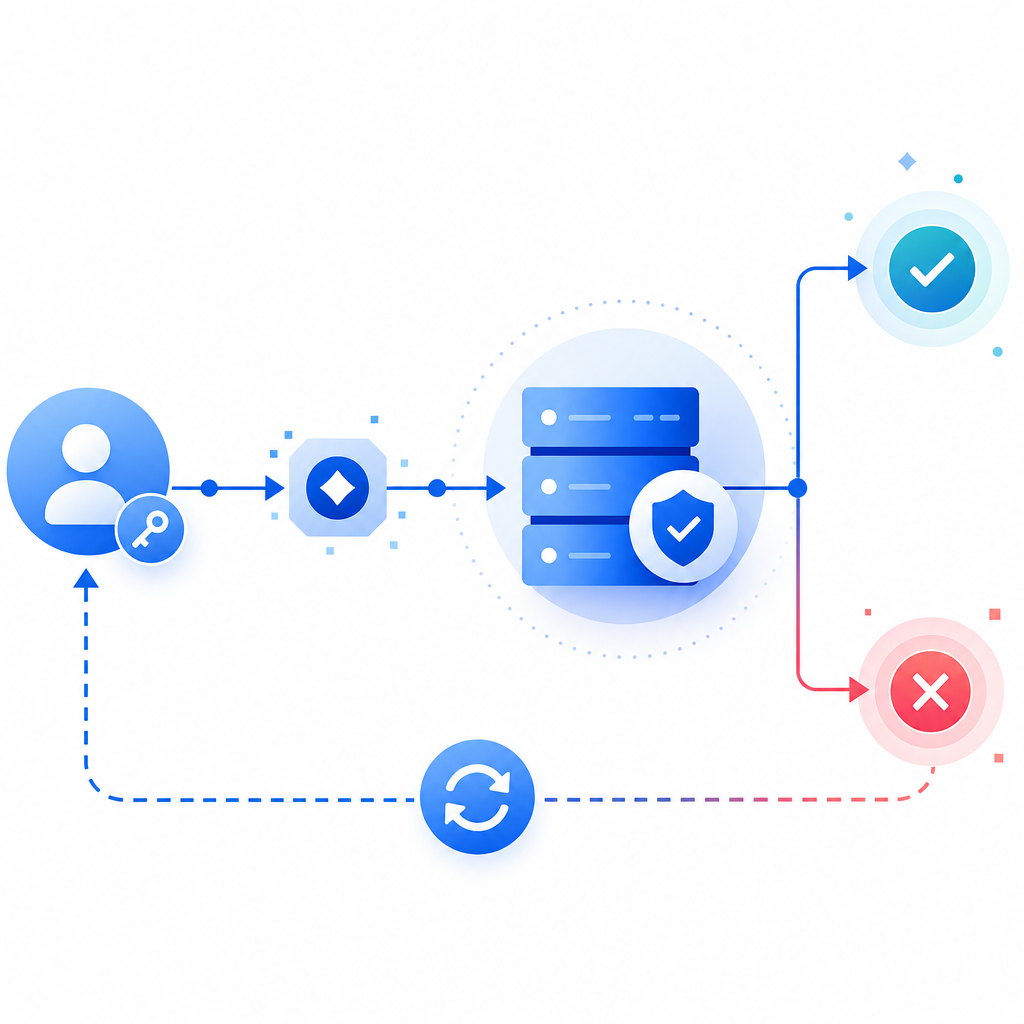
A reliable implementation has two parts: client-side challenge issuance and server-side verification. The client should obtain a token, and your backend should validate that token before granting the action.
A typical flow looks like this:
- Load the challenge script from your approved asset source.
- Render the widget or trigger an invisible challenge when risk rises.
- Receive a pass token on the client.
- Send that token to your backend with the user’s IP address.
- Verify the token server-side before creating the account, accepting the form, or issuing the session.
- Log the result so you can monitor false positives and abuse patterns.
- Escalate only when the score or behavior warrants it.
For CaptchaLa specifically, the loader is served from https://cdn.captcha-cdn.net/captchala-loader.js, and validation happens server-side with:
POST https://apiv1.captcha.la/v1/validate
Content-Type: application/json
X-App-Key: your_app_key
X-App-Secret: your_app_secret

{
  "pass_token": "token_from_client",
  "client_ip": "203.0.113.10"
}
If you need to issue a server-side challenge token for a controlled workflow, there is also:
POST https://apiv1.captcha.la/v1/server/challenge/issueA few implementation details matter more than teams expect:
- Validate the token on your server, not in the browser alone.
- Bind validation to the client IP when your risk model supports it.
- Treat token age as a replay-control input.
- Keep secrets off the client and out of logs.
- Record challenge outcomes so you can tune thresholds later.
- Prefer first-party data that you collect directly from the interaction.
For many teams, the biggest mistake is treating CAPTCHA as a checkbox. If the form still accepts repeated submissions from the same suspicious session, the abuse simply moves around the challenge. The defense should be layered: challenge, rate limit, session checks, and endpoint-specific rules.
A simple backend pattern
// Verify the pass token before completing the action
async function verifyCaptcha(passToken, clientIp) {
  const response = await fetch("https://apiv1.captcha.la/v1/validate", {
    method: "POST",
    headers: {
      "Content-Type": "application/json",
      "X-App-Key": პროცეს.env.APP_KEY,
      "X-App-Secret": process.env.APP_SECRET
    },
    body: JSON.stringify({
      pass_token: passToken,
      client_ip: clientIp
    })
  });

  return response.ok && (await response.json()).success === true;
}
If you are building in PHP or Go, using dedicated server SDKs can make that verification step easier to standardize across services. docs is the right place to check the exact integration details and SDK examples.
How to reduce friction for real users
A good anti bot website does not just stop abuse; it protects conversion. That means your controls should feel proportional.
Use challenge escalation, not universal friction
A universal challenge on every page is usually too blunt. A better pattern is:
- No challenge for low-risk browsing
- Light checks on signup or contact actions
- Stronger challenge after repeated failures or velocity spikes
- Step-up verification for password reset or checkout anomalies
This is where multi-language and multi-platform support can help. If your product has a web app plus mobile clients, you want the same policy logic applied consistently. CaptchaLa supports 8 UI languages and native SDKs for Web, iOS, Android, Flutter, and Electron, which makes that consistency easier to maintain across products without creating separate security experiences.
Tune for your users, not your assumptions
False positives usually come from one of three places:
- Overly strict thresholds
- Shared IPs or corporate networks
- Accessibility or device input patterns that look unusual to a simplistic model
The fix is not to remove defenses. It is to segment risk. For example, a repeated login failure from one account may justify a challenge, while a new visitor on a common mobile carrier may deserve a different treatment. The more context you add, the less blunt the control becomes.
Measure what matters
Track a few concrete metrics:
- Challenge rate by endpoint
- Pass rate by device family and geography
- Drop-off after challenge
- Abuse blocked per thousand requests
- False-positive appeals or support reports
- Conversion impact on protected flows
Those numbers will tell you whether your anti-bot system is protecting the business or accidentally taxing legitimate users.
Pricing and deployment fit
Cost matters because bot traffic scales faster than most teams expect. A useful rule is to match plan size to the protected surface area and request volume, then revisit after you have real telemetry.
CaptchaLa’s published tiers include a free tier at 1,000 monthly requests, Pro for roughly 50K-200K, and Business around 1M. That range is useful for teams that want to start with a narrower deployment and expand as abuse patterns become clearer. It also helps when you want to roll out protection on only the highest-risk paths first, instead of every endpoint at once.
The bigger strategic point is that an anti bot website should be easy to iterate. Abuse changes. Product flows change. Your challenge policy should be updated without a rewrite. If your validation, logging, and escalation logic are cleanly separated, you can adapt quickly when a new attack pattern appears.
Where to go next: see the integration details in the docs or review pricing to match a deployment to your traffic volume.