
If you’re seeing “anti bot verification failed perchance,” the short answer is: the verification step did not receive, trust, or successfully validate the token it expected. That can happen for normal reasons — expired tokens, mismatched keys, blocked scripts, bad IP forwarding, or a backend validation mistake — not just because a user is suspicious.
That phrase often shows up as a generic failure state, so the real task is to trace where the handoff broke: browser challenge, token issuance, transport, or server-side validation. Once you isolate that step, the fix is usually straightforward.
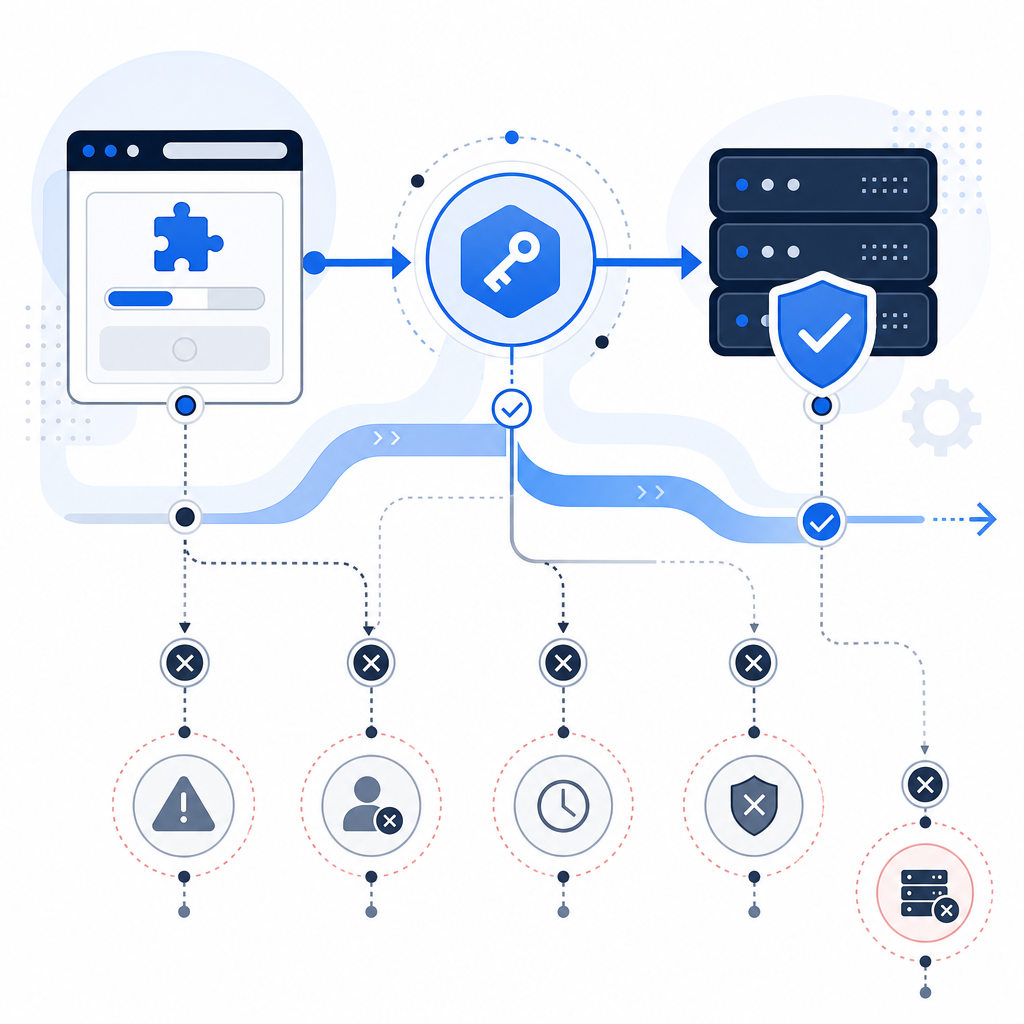
What that failure message usually means
“Anti bot verification failed perchance” is not a standard protocol error. It’s more like a symptom label. In practice, it usually maps to one of these situations:
- The client never completed the challenge.
- The client completed it, but the token expired before submission.
- The token was sent, but the backend validated it with the wrong secret or endpoint.
- The backend received the token, but the client IP or request context didn’t match expectations.
- A proxy, CDN, or browser privacy feature interfered with the loader or session state.
The important thing is that verification is a chain. If any link is weak, the whole flow fails. That’s why “fixing CAPTCHA” is often really about fixing the integration around it.
If you use CaptchaLa, the same principle applies: the client challenge and the server validation need to line up cleanly. The public loader is delivered from https://cdn.captcha-cdn.net/captchala-loader.js, while server-side validation happens through the API. If either side is misconfigured, you’ll get a failure that looks mysterious until you inspect both ends.
Common places the chain breaks
- Frontend loader blocked by CSP, ad blockers, or a strict firewall.
- Token not posted because the form submit handler forgot to attach it.
- Backend validation secret not loaded from the expected environment variable.
- Clock skew causing short-lived tokens to expire too quickly.
- Wrong client IP forwarded from a reverse proxy, which matters when the validation flow expects it.

How to debug it without guessing
Start with the simplest question: did the browser actually get a token?
A practical debugging sequence looks like this:
Open the browser dev tools.
- Check the Network tab for the loader script.
- Confirm the challenge widget initializes without JS errors.
- Look for the token field or callback output.
Verify form submission data.
- Make sure the token is included in the request body.
- Confirm the value is not empty or overwritten.
- Check whether multiple submits are reusing a stale token.
Inspect the server request to validation.
- Ensure the backend sends
pass_tokenandclient_ip. - Confirm the request includes
X-App-KeyandX-App-Secret. - Log the upstream HTTP status and response body.
- Ensure the backend sends
Check expiry and replay behavior.
- Tokens should be treated as one-time and short-lived.
- A page refresh or delayed submit may invalidate them.
- If users spend a long time on a form, re-challenge before submit.
Audit your edge setup.
- If you’re behind Cloudflare, Nginx, or another proxy, verify the original client IP is forwarded correctly.
- Make sure the app does not read the proxy IP instead of the real visitor IP.
Here’s a minimal backend-style validation sketch:
# Receive the token from the browser
pass_token = request.body["pass_token"]

# Capture the original client IP from trusted proxy headers
client_ip = get_real_client_ip(request)

# Send both values to the validation API
POST https://apiv1.captcha.la/v1/validate
Headers:
  X-App-Key: your_app_key
  X-App-Secret: your_app_secret
Body:
  {
    "pass_token": pass_token,
    "client_ip": client_ip
  }

# If validation fails, log the exact response and stop the request
# If validation succeeds, continue with the protected action
That pattern is intentionally boring. Boring is good here. The more deterministic your flow, the fewer false failures your users see.
How this compares across common verification providers
Different anti-bot systems make slightly different tradeoffs. The underlying goal is the same: distinguish legitimate traffic from abuse while keeping friction low.
| Provider | Typical integration style | Notes for debugging |
|---|---|---|
| reCAPTCHA | Google-hosted challenge + server verification | Widely used, but sometimes sensitive to browser privacy settings and blocked scripts |
| hCaptcha | Alternative challenge flow with server validation | Often chosen for privacy or policy reasons; token handling still needs careful backend validation |
| Cloudflare Turnstile | Mostly passive or low-friction checks | Good for reducing user friction; edge configuration and site rules still matter |
| CaptchaLa | Client challenge + server validation, plus native SDKs | Supports Web, iOS, Android, Flutter, Electron, and server SDKs like captchala-php and captchala-go |
The specific provider matters less than the integration hygiene. A well-implemented system with a clear validation path beats a “strong” system that’s wired loosely.
CaptchaLa’s documentation is helpful when you need to confirm the expected request shape, especially for the validation endpoint and challenge issuance flow. If you want the exact parameters and examples, docs is the right place to start.
Preventing false failures in production
Once the obvious bugs are fixed, the next goal is reducing false negatives — real users who get blocked by accident. That’s especially important if your audience uses mobile devices, embedded webviews, or stricter network environments.
A few production safeguards help a lot:
1) Keep token lifetime aligned with real user behavior
If your form is long or multi-step, don’t issue a token too early. Reuse is risky because verification tokens should be short-lived. Instead, trigger the challenge near the final submit step.
2) Validate on the server every time
Never trust a frontend-only success flag. The browser can be interrupted, cached, or manipulated. Your server should always perform the authoritative validation against the API.
3) Forward the correct client IP
This is one of the most common sources of confusion. If your app sits behind a proxy, make sure you parse the real client address from a trusted header chain, not a random request field.
4) Add logging that distinguishes failure types
Don’t log just “captcha failed.” Capture:
- token present or missing
- validation HTTP status
- API response code/message
- client IP used
- timestamp
- whether the token was reused
That detail makes it far easier to separate integration bugs from actual abuse.
5) Test on real device and network combinations
A desktop browser on a fast office network is not enough. Test:
- iOS Safari
- Android Chrome
- in-app webviews
- VPN traffic
- corporate networks with script filtering
CaptchaLa supports native SDKs for Web (JS/Vue/React), iOS, Android, Flutter, and Electron, which helps when you need a consistent flow across platforms rather than a patchwork of custom widgets.
When the problem is actually configuration, not the user
A surprising number of “verification failed” tickets come from infrastructure, not humans. That includes:
- deploying with the wrong environment variables
- rotating the app secret without updating the backend
- allowing the loader script in staging but not production CSP
- using one validation endpoint in tests and another in live traffic
- forgetting to update mobile builds after a backend change
If you need to issue a challenge server-to-server, CaptchaLa also provides a server-token issue endpoint at POST https://apiv1.captcha.la/v1/server/challenge/issue. That’s useful in flows where the backend needs to initiate or coordinate the challenge more explicitly.
For teams evaluating usage patterns or rollout size, the product tiers are straightforward: free tier at 1,000 verifications per month, Pro at 50K–200K, and Business at 1M. The platform uses first-party data only, which matters if you’re trying to keep the privacy story clean.
Where verification systems get messy is when teams overcomplicate the policy logic. The safer path is simple: challenge when needed, validate server-side, log clearly, and keep the user flow short.
Final check: a clean failure message beats a vague one
If users keep hitting “anti bot verification failed perchance,” don’t start by blaming the visitor. Start by checking whether the challenge rendered, whether the token traveled, and whether the server validated it with the right key, secret, and client IP. That sequence usually finds the problem fast.
If you’re implementing or reworking the flow, docs has the request details, and pricing shows the plan options if you’re sizing up rollout.