
A captcha def is the defensive layer that decides whether a visitor is likely human before you let them post, sign up, log in, scrape, or automate actions. In practice, it’s a mix of challenge design, token validation, risk signals, and server-side enforcement—not just a puzzle box on a page.
If you think of it as “the thing that blocks bots,” you’re close, but that undersells it. A good captcha def should be invisible when possible, measurable, and enforced where attackers can’t tamper with it: your backend.
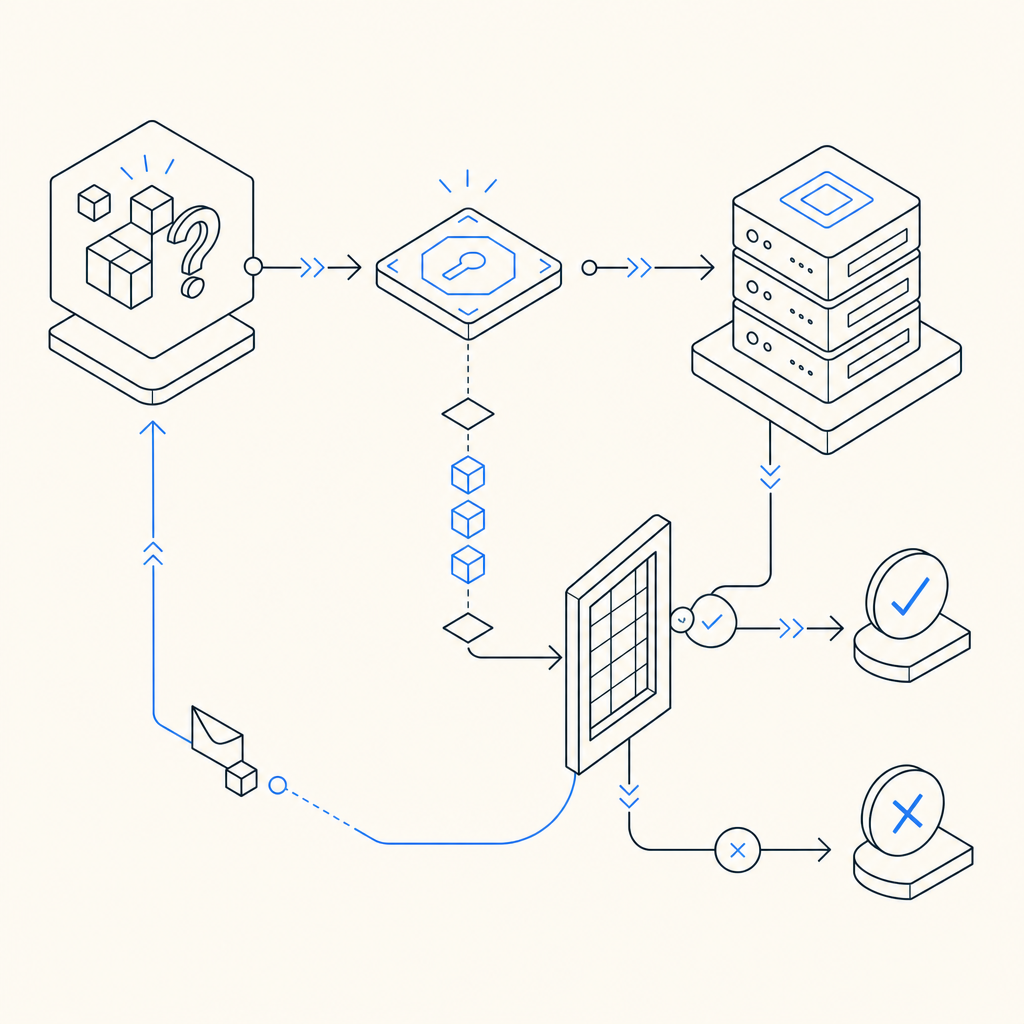
What captcha def actually covers
“Captcha” used to mean a distorted text image. Today, captcha def is broader: it includes any mechanism that helps a service distinguish legitimate users from automated traffic. That can be a visual challenge, a risk-based check, or a token passed from client to server and verified there.
The reason this matters is simple: modern abuse rarely looks like a classic brute-force attack. You may be dealing with:
- Credential stuffing against login forms.
- Fake account creation at signup.
- Inventory hoarding or ticket scalping.
- Form spam, promo abuse, and referral fraud.
- API automation that mimics human pacing.
A defender’s version of captcha def should answer three questions:
- Is this visitor interacting like a real person?
- Can the result be trusted by the server?
- What happens when the signal is uncertain?
That last one is important. If your policy is “block everything suspicious,” you’ll hurt conversions. If your policy is “trust the client,” you invite bypasses. The practical middle ground is to issue a short-lived token client-side, validate it server-side, and decide based on your own risk rules.
Common captcha approaches and when they fit
There isn’t one universal pattern, and the tradeoff depends on your audience, risk, and app type. Here’s a straightforward comparison:
| Approach | User friction | Server trust | Typical use | Notes |
|---|---|---|---|---|
| Text/image challenge | Medium to high | Medium | Legacy forms, high-risk flows | Familiar, but can be frustrating and accessible only with care |
| Behavioral/risk-based check | Low | Medium to high | Login, signup, checkout | Better UX, but needs good backend enforcement |
| Token-based validation | Low | High | Modern web/mobile apps | Best when the server verifies the token directly |
| Network-layer bot defense | Very low | High | Edge-heavy apps | Useful, but may not cover form-level intent |
reCAPTCHA, hCaptcha, and Cloudflare Turnstile all fit somewhere in this space. They differ in UX, ecosystem, and deployment style, but the main question for your team is the same: do you want a visible challenge, a low-friction signal, or a combination of both? For many products, a token-based flow is attractive because the backend can make the final decision instead of trusting a frontend flag.
CaptchaLa supports that model with native SDKs for Web, iOS, Android, Flutter, and Electron, plus UI support in 8 languages. That makes it easier to standardize behavior across client types without inventing separate flows for every platform.

A secure captcha def flow, end to end
A clean implementation usually has two phases: issuing a challenge/token on the client and validating it on the server. The important part is not the visual widget; it’s the trust boundary.
Recommended flow
- The client loads the challenge loader.
- The user completes the challenge or risk check.
- The client receives a
pass_token. - Your backend submits that token with the client IP to your validation endpoint.
- The service returns allow/deny, and your app enforces the result before accepting the action.
A minimal server-side validation request looks like this:
POST https://apiv1.captcha.la/v1/validate
X-App-Key: your_app_key
X-App-Secret: your_app_secret
Content-Type: application/json

{
  "pass_token": "token_from_client",
  "client_ip": "203.0.113.10"
}
On the client side, the loader is delivered from:
https://cdn.captcha-cdn.net/captchala-loader.jsAnd if you need a server-originated challenge token, the issue endpoint is:
POST https://apiv1.captcha.la/v1/server/challenge/issueFor teams shipping across stacks, the published SDKs can reduce glue code: Maven la.captcha:captchala:1.0.2, CocoaPods Captchala 1.0.2, pub.dev captchala 1.3.2, plus server SDKs captchala-php and captchala-go.
Why backend validation matters
A captcha def is only as strong as the place where you verify it. If the frontend decides “this user is okay,” an attacker can often bypass that logic by replaying requests or altering client behavior. Server-side validation closes that gap.
A few implementation details matter here:
- Bind validation to the same action the user intended, such as signup or password reset.
- Include the client IP when available, because it can improve risk assessment.
- Treat validation responses as one input, not the only input, for especially sensitive flows.
- Use short-lived tokens and reject reuse where your workflow allows it.
If you’re using docs to wire up the flow, focus on keeping the verification step as close as possible to the protected action. For example, validate immediately before creating an account or accepting a payment-related form. That minimizes the window for replay and keeps your logic understandable for engineers and auditors alike.
Practical policy choices for real products
Good captcha def is not just technical plumbing. It’s a policy decision about how much friction you’re willing to introduce and where. Different endpoints deserve different treatment.
Here’s a simple way to think about it:
- Login: prioritize detection of automation and credential stuffing; tolerate a tiny bit of friction.
- Signup: optimize for abuse reduction without wrecking conversion.
- Password reset: keep the path usable, but enforce stricter risk checks.
- Commenting and forms: prefer lightweight, low-friction verification with server-side checks.
- High-value actions: combine captcha with rate limits, device signals, and account reputation.
That layered approach is usually stronger than leaning on a single gate. A captcha def can reduce obvious abuse, but it shouldn’t replace rate limiting, IP reputation, velocity checks, or account-level controls. Those layers complement each other.
CaptchaLa’s pricing structure reflects that kind of graduated usage, with a free tier at 1,000 monthly validations, Pro at 50K–200K, and Business at 1M. The important part isn’t the plan name; it’s matching your abuse volume to the controls you actually need, while keeping the data model focused on first-party data only.
When comparing vendors, it helps to ask a few operational questions:
- Can we validate server-to-server with a simple endpoint?
- Do we have SDKs for our client platforms?
- Can we localize the user experience?
- How easy is it to layer this with our existing auth and fraud controls?
Those questions tend to matter more than branding, because they determine whether your captcha def becomes a maintainable part of the stack or a fragile add-on no one wants to touch.
Final checklist before you ship
Before you roll captcha def into production, sanity-check the following:
- The challenge or token is issued on the client at the right moment.
- The server validates the token before performing the protected action.
- Expired or reused tokens are rejected.
- Logging captures enough context for abuse review without over-collecting data.
- The fallback path is clear when validation fails.
- Accessibility and localization have been tested for your actual audience.
If you want a compact implementation path, start with the platform you already ship on, connect the loader, then validate every protected action server-side. That’s usually enough to cut a lot of low-effort abuse without turning your product into a maze.
Where to go next: read the docs for implementation details, or review pricing to match validation volume to your traffic.