
An anti bot script is a client-side component that helps your app tell real users from automated traffic before abuse reaches your forms, logins, or APIs. In practice, it loads in the browser, gathers a small amount of first-party interaction data, and produces a token your server can validate before allowing a sensitive action.
That sounds simple, but the details matter. A good implementation has to balance three things at once: user experience, security, and operational reliability. If the script is too heavy, users feel it. If it is too weak, bots get through. If it is too opaque, your own team cannot debug failures when a legitimate session is blocked.
What an anti bot script actually does
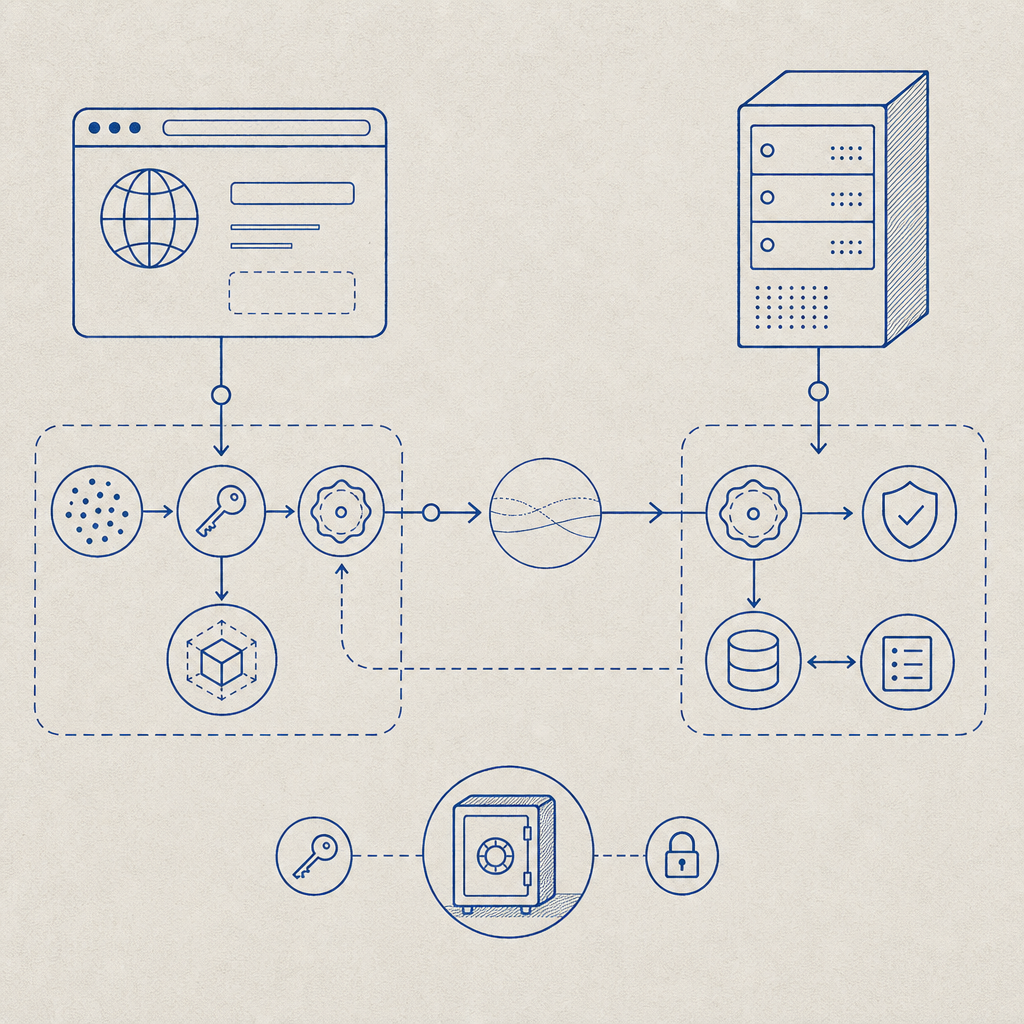
At a high level, an anti bot script sits between the user’s browser and your backend decision point. It is not a full fraud platform by itself; it is the client-side signal collector and challenge orchestrator that feeds a verification step on the server.
A typical flow looks like this:
- The page loads the anti bot script.
- The script initializes with your site key or loader config.
- It observes benign signals such as timing, interaction patterns, and browser consistency.
- It issues a pass token when the session looks legitimate, or triggers a challenge when risk is higher.
- Your backend validates that token before accepting the request.
The important part is that the server, not the browser, makes the final decision. Client-side signals are useful, but they should be treated as inputs. If you only trust the browser, bots can tamper with the page. If you only trust the server, you lose useful context. The anti bot script exists to bridge that gap.
For product teams, the main use cases are usually login protection, signup abuse, credential stuffing, ticketing, checkout protection, and API throttling. For engineering teams, the main concern is how to add that protection without introducing friction or brittle dependencies.
What makes a good implementation
A workable anti bot script should be lightweight, language-friendly, and easy to validate on the backend. It should also support modern app stacks without forcing a rewrite.
Here are the practical traits to look for:
- Loads quickly and does not block rendering
- Works across both traditional pages and SPA frameworks
- Produces a server-verifiable token
- Offers clear fallback behavior when validation fails
- Supports mobile and desktop surfaces consistently
- Keeps data handling limited to first-party signals
If you are evaluating providers, compare them on integration friction as much as detection quality. reCAPTCHA is widely recognized and has broad adoption. hCaptcha is often chosen by teams that want a different privacy and challenge model. Cloudflare Turnstile is attractive for teams already close to Cloudflare’s edge stack. Each has a place, but your decision should come down to fit: where your app runs, how much control your engineers need, and how much user friction you can tolerate.
| Option | Typical strength | Integration style | Notes |
|---|---|---|---|
| reCAPTCHA | Familiarity and ecosystem | Client widget + server verification | Common, but can feel heavier depending on challenge type |
| hCaptcha | Alternative challenge model | Client widget + server verification | Often used where teams want a different risk posture |
| Cloudflare Turnstile | Low-friction challenge flow | Browser-side token + server check | Good fit for Cloudflare-centered deployments |
| CaptchaLa | App-friendly bot defense | Web, mobile, desktop SDKs + server validation | Supports 8 UI languages and native SDKs for Web, iOS, Android, Flutter, and Electron |
If you are building from scratch, CaptchaLa is designed around that “client signal plus server validation” pattern. It offers native SDKs for Web (JS, Vue, React), iOS, Android, Flutter, and Electron, plus server SDKs for captchala-php and captchala-go. That means you can keep the same bot-defense concept across browser, mobile, and desktop entry points instead of stitching together separate products.
How to implement it without annoying real users
The best anti bot script is one that most legitimate users barely notice. That means you should place it strategically and validate only when needed.
A practical implementation plan:
- Load the script early, but do not block the main page thread.
- Initialize it on sensitive actions, not necessarily on every page view.
- Request a token only when the user reaches a protected flow.
- Send the token to your backend along with the client IP when appropriate.
- Validate before creating an account, submitting a form, or issuing a session.
- Log failures with enough detail to troubleshoot false positives.
- Add a graceful fallback for users with script blockers or unusual browsers.
For CaptchaLa, the loader is served from https://cdn.captcha-cdn.net/captchala-loader.js, and server-side validation is done with a POST request to https://apiv1.captcha.la/v1/validate using {pass_token, client_ip} along with X-App-Key and X-App-Secret. If your flow needs to mint a token server-side first, there is also POST https://apiv1.captcha.la/v1/server/challenge/issue.
Here is a simple backend validation sketch:
// Example server-side validation flow
// English comments only

async function validateCaptcha(passToken, clientIp) {
  const response = await fetch('https://apiv1.captcha.la/v1/validate', {
    method: 'POST',
    headers: {
      'Content-Type': 'application/json',
      'X-App-Key': process.env.CAPTCHALA_APP_KEY,
      'X-App-Secret': process.env.CAPTCHALA_APP_SECRET,
    },
    body: JSON.stringify({
      pass_token: passToken,
      client_ip: clientIp,
    }),
  });

  if (!response.ok) {
    throw new Error('Captcha validation request failed');
  }

  const result = await response.json();

  return result.valid === true;
}
If your app is multi-platform, the SDK list matters more than people expect. Web teams can keep a single integration path across JS, Vue, and React. Mobile teams can use native iOS or Android SDKs. Flutter and Electron teams can avoid inventing ad hoc bridges. That consistency reduces implementation drift, which is often where security bugs sneak in.
For Java and Apple ecosystems, the published package versions are straightforward: Maven la.captcha:captchala:1.0.2, CocoaPods Captchala 1.0.2, and pub.dev captchala 1.3.2. Those versioned artifacts make dependency management easier when you need reproducible builds.
Choosing the right risk posture
An anti bot script should match the risk of the action it protects. You do not need the same friction level for a newsletter signup and a password reset.
A useful way to think about it:
- Low risk: passive signal collection with token issuance in the background
- Medium risk: token required before form submission
- High risk: additional server-side verification or step-up challenge
- Critical risk: combine token validation with rate limits, IP reputation, and account-level heuristics
This is also where your data policy matters. CaptchaLa is built around first-party data only, which helps reduce the privacy complexity that can come with broader tracking or third-party enrichment. That does not remove the need for your own review process, but it can simplify how legal, security, and product teams evaluate the integration.
You should also plan for observability. Track validation success rates, challenge rates, and false-positive reports. A rising challenge rate might indicate bot pressure, but it can also mean a browser compatibility issue or a deployment regression. Good metrics prevent you from confusing one for the other.

A simple decision framework
If you are deciding whether to add an anti bot script, ask these questions:
- Is the action costly if abused?
- Can you tolerate a small amount of friction?
- Do you need the same protection across web, mobile, and desktop?
- Can your backend make the final allow/deny decision?
- Do you need a solution that fits into your existing SDK stack?
If the answer to most of those is yes, then a client-side anti bot script plus server validation is probably the right model. If your traffic is already mediated by a strong edge security layer, you may use the script as one signal among several rather than the only gate. If your app is highly interactive, focus on low-friction flows and avoid over-challenging users.
For teams looking for a straightforward place to start, docs is the best next stop. It covers the integration paths, SDKs, and validation flow in more detail, and pricing can help you map the free tier and paid tiers to your traffic volume. The free tier includes 1,000 validations per month, with Pro covering roughly 50K-200K and Business reaching 1M, which makes it easier to test before committing.
Where to go next: read the implementation guide in the docs or review tiers on pricing to see how your traffic pattern fits.