
A captcha code is a challenge-response test used to tell whether a visitor is likely human or automated. In plain terms, the “captcha code meaning” is less about a literal code you read and more about a verification step a site uses to reduce bots, spam, account abuse, and scripted attacks.
That basic idea has stayed the same, but the way CAPTCHAs are delivered has changed a lot. Some are visible puzzles, some are invisible risk checks, and some rely on device signals and server-side validation instead of asking users to type distorted text. For developers, the important part is not the puzzle itself; it’s the verification workflow behind it.
What the captcha code meaning really refers to
The term “captcha” stands for Completely Automated Public Turing test to tell Computers and Humans Apart. So when people ask about captcha code meaning, they usually mean one of three things:
- The challenge shown to the user, such as a checkbox, image selection, or puzzle.
- The token returned after the challenge is completed.
- The validation step your backend performs to confirm that token is legitimate.
That third part matters most. A CAPTCHA is not secure because the front end shows something annoying. It is secure because the server can verify that the result came from a valid interaction and not from a script replaying a guessed answer.
In modern systems, the frontend collects a pass token, and the backend checks it with a secret key. That separation is what keeps the challenge from becoming a mere visual obstacle. It also lets teams tune friction based on risk, route, device context, or account state.
Why sites use CAPTCHA at all
CAPTCHAs exist to stop automated abuse without putting too much burden on normal users. Common use cases include:
- login throttling and credential stuffing defense
- signup spam prevention
- checkout abuse reduction
- fake review filtering
- contact form spam control
- scraping and inventory-bot deterrence
The specific challenge style matters less than the goal: create enough proof of interaction to distinguish a real visitor from automation. Older image and text CAPTCHAs relied heavily on human perception. Newer systems often shift toward silent checks, browser signals, and server-side token validation, which can reduce friction for legitimate users.
There is a practical tradeoff here. Stronger challenges can reduce abuse, but they can also frustrate users, hurt accessibility, or create localization problems. That is why many products now support multiple languages and platform-specific SDKs rather than forcing one visual pattern everywhere.

How captcha validation works behind the scenes
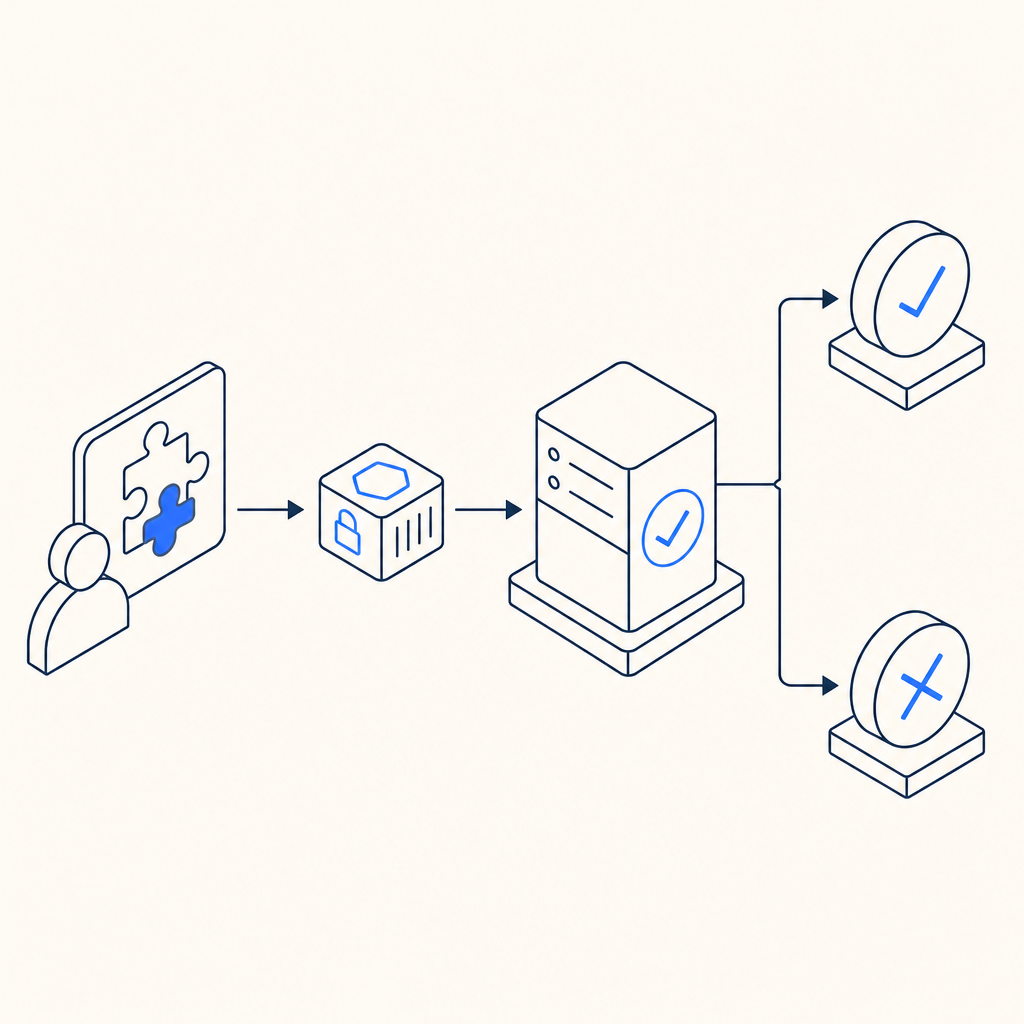
A useful way to understand captcha code meaning is to follow the request lifecycle. The exact implementation differs by vendor, but the general pattern is similar.
Typical validation flow
- A page loads the CAPTCHA loader script.
- The client creates a challenge or silent verification session.
- The user completes the challenge, or the system collects enough risk signals.
- The client receives a pass token.
- Your server sends that token to the CAPTCHA validation API.
- The API returns a pass/fail result, and your app decides whether to continue.
Here is a simplified example of the backend logic:
# English comments only
1. Receive form submission from client
2. Extract pass_token and client_ip
3. Send token to CAPTCHA validation endpoint
4. Include your app key and secret in server headers
5. Read validation response
6. If validation passes, process the request
7. Otherwise, reject or challenge again
For CaptchaLa specifically, validation is done with a POST request to https://apiv1.captcha.la/v1/validate using {pass_token, client_ip} in the body and X-App-Key plus X-App-Secret in headers. If you are generating server-side challenge issuance, there is also POST https://apiv1.captcha.la/v1/server/challenge/issue.
That design follows a common security principle: the frontend can collect signals, but only the backend can make trust decisions.
CAPTCHA types and how they compare
Different products solve the same problem in different ways. Here is a quick, objective comparison of common approaches:
| Product / approach | Typical user experience | Validation style | Notes |
|---|---|---|---|
| reCAPTCHA | Checkbox, image challenges, or invisible scoring | Google-side scoring + server verification | Widely used; can introduce variable friction |
| hCaptcha | Similar challenge-based flow | Challenge + server verification | Often used as an alternative with a different privacy posture |
| Cloudflare Turnstile | Usually minimal interaction | Browser and risk signals + token verification | Designed to reduce challenge friction |
| Custom CAPTCHA | Whatever you build | Usually server validation if done well | Flexibility is high, but maintenance is on you |
The right choice depends on your threat model and UX goals. For a low-risk newsletter form, a lightweight invisible check may be enough. For payment flows or account creation abuse, you may want stricter controls, additional rate limiting, and step-up verification.
CaptchaLa fits into this same category of bot-defense tooling, but the architectural detail to pay attention to is first-party data handling. If data handling is a requirement in your organization, that should be part of the evaluation alongside accuracy and UX.
Implementation notes that matter to developers
A good CAPTCHA integration should be boring in the best way: easy to add, hard to bypass, and predictable to validate. A few technical details are worth checking before you ship.
What to verify in your stack
- The loader is served from a trusted endpoint, such as
https://cdn.captcha-cdn.net/captchala-loader.js. - Validation happens server-side, not only in the browser.
- The client IP is passed consistently if your validation flow expects it.
- Challenge and validation tokens are short-lived.
- The backend rejects missing, expired, or replayed tokens.
- You log enough metadata to investigate abuse patterns without storing unnecessary personal data.
If you are using CaptchaLa, there are SDKs for Web (JS, Vue, React), iOS, Android, Flutter, and Electron, plus server packages like captchala-php and captchala-go. Mobile and desktop support matters because bot defense is not only a browser problem anymore.
For teams with mixed platforms, package availability can reduce integration drift. CaptchaLa also supports multiple UI languages, which helps when you need to localize the challenge experience across markets.
Choosing the right CAPTCHA strategy for your site
The best way to interpret captcha code meaning in practice is to ask: what behavior am I trying to stop, and what cost am I willing to impose on honest users?
A simple decision process might look like this:
- Identify the abuse vector.
- Is it signup spam, scraping, credential stuffing, or form flooding?
- Decide where friction belongs.
- Frontend challenge, backend validation, rate limiting, or a combination.
- Match the challenge to the risk.
- Invisible check for low risk, stronger challenge for sensitive flows.
- Validate server-side.
- Never trust a client-only “passed” state.
- Review accessibility and localization.
- Make sure users can still complete the flow in your target markets.
- Monitor false positives.
- If legitimate users fail too often, you need tuning.
For teams evaluating options, pricing and limits also matter. CaptchaLa’s published tiers include a free tier at 1,000 validations per month, Pro at 50K–200K, and Business at 1M. That kind of scale planning helps when you are matching protection to traffic growth rather than guessing.
Final takeaway
Captcha code meaning is straightforward once you separate the user-facing challenge from the real security mechanism. The challenge is just the visible part; the real defense is token issuance, server-side validation, and careful integration into your app’s trust flow.
If you are comparing approaches or planning an implementation, the next useful step is to read the integration docs or check pricing for your traffic level: docs and pricing.