
If you’re asking about captcha cloudflare, the short answer is: Cloudflare Turnstile is a strong no-friction challenge for many sites, but it is not always enough on its own. The right setup depends on whether you need simple bot filtering, stronger step-up verification, mobile coverage, multilingual UI, or a validation flow you fully control on your own backend.
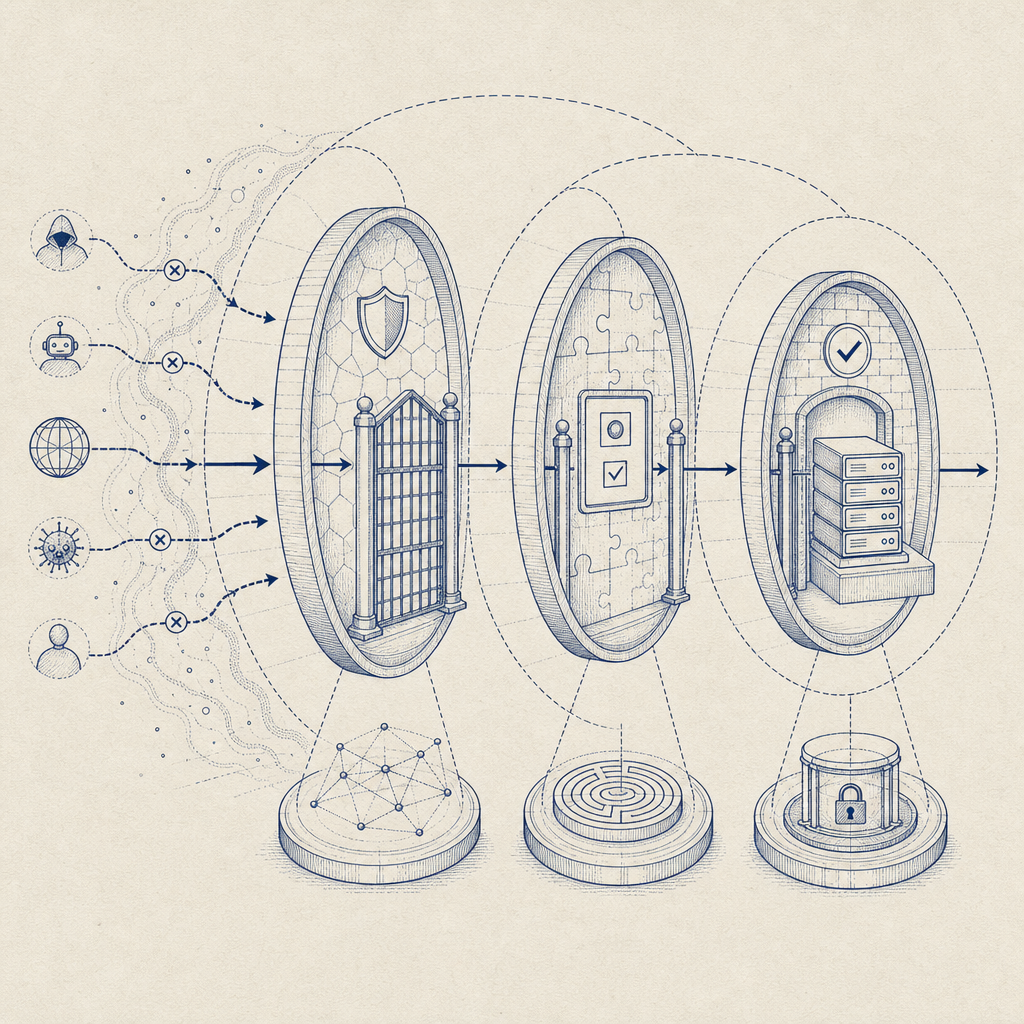
For a lot of teams, the real question is not “CAPTCHA or Cloudflare?” but “What level of abuse do we need to stop, and where should verification happen?” Cloudflare can sit in front of your app as a network layer, while a CAPTCHA service verifies interactive risk signals at the app layer. Those are complementary tools, not mutually exclusive ones.
What people mean by “captcha cloudflare”
When people search for “captcha cloudflare,” they usually mean one of three things:
- They want a CAPTCHA experience that works well with Cloudflare-protected sites.
- They want to compare Cloudflare Turnstile with reCAPTCHA or hCaptcha.
- They want to know whether Cloudflare alone is enough to stop bots.
Cloudflare Turnstile is designed to reduce friction, especially when you want to avoid the “pick all the traffic lights” style flow. It can be a good fit for signup forms, login protection, password reset flows, and other places where you want a low-friction challenge. But “good fit” does not mean “universal fit.”
A separate CAPTCHA layer becomes more useful when you need:
- a consistent challenge experience across web, mobile, desktop, and embedded apps
- explicit server-side verification you can inspect and audit
- localized UI across multiple regions
- first-party data handling and control over how tokens are validated
- integration patterns that work beyond a Cloudflare-only stack
That’s where services like CaptchaLa can help. It’s not about replacing your edge security; it’s about adding application-level verification where it matters.
Cloudflare Turnstile vs reCAPTCHA vs hCaptcha vs a dedicated CAPTCHA
The comparison below is intentionally practical rather than ideological. Each option has a role.
| Option | Main strength | Typical tradeoff | Good fit |
|---|---|---|---|
| Cloudflare Turnstile | Low-friction challenge and easy Cloudflare-adjacent deployment | Best when your stack already aligns with Cloudflare patterns | Forms, login gates, basic bot mitigation |
| reCAPTCHA | Broad familiarity and many legacy integrations | Can feel heavier for users and teams | Legacy apps, existing Google-based setups |
| hCaptcha | Strong bot challenge focus and flexible deployments | May require more tuning for UX | Abuse-prone forms, fraud-sensitive flows |
| Dedicated CAPTCHA layer | Full app-level control and flexible validation | Another component to operate | Multi-platform apps, custom risk workflows |
The important point is that “captcha cloudflare” is not a single architecture. Some teams use Cloudflare at the edge and a CAPTCHA on the form itself. Others use Turnstile only. Others keep Cloudflare for CDN/WAF and use a different CAPTCHA because they need SDKs for mobile or desktop apps.
If you’re deciding, look at the properties of the attack surface:
- Is the abuse happening at the edge, or after the user reaches your app?
- Do you need to verify inside a native mobile app?
- Do you need one integration pattern for web, Flutter, Electron, iOS, and Android?
- Do you need a custom server validation endpoint with explicit headers and secrets?
If the answer to the last three is yes, you probably want a dedicated CAPTCHA layer, even if Cloudflare is already in front of the site.
What a modern CAPTCHA flow should look like
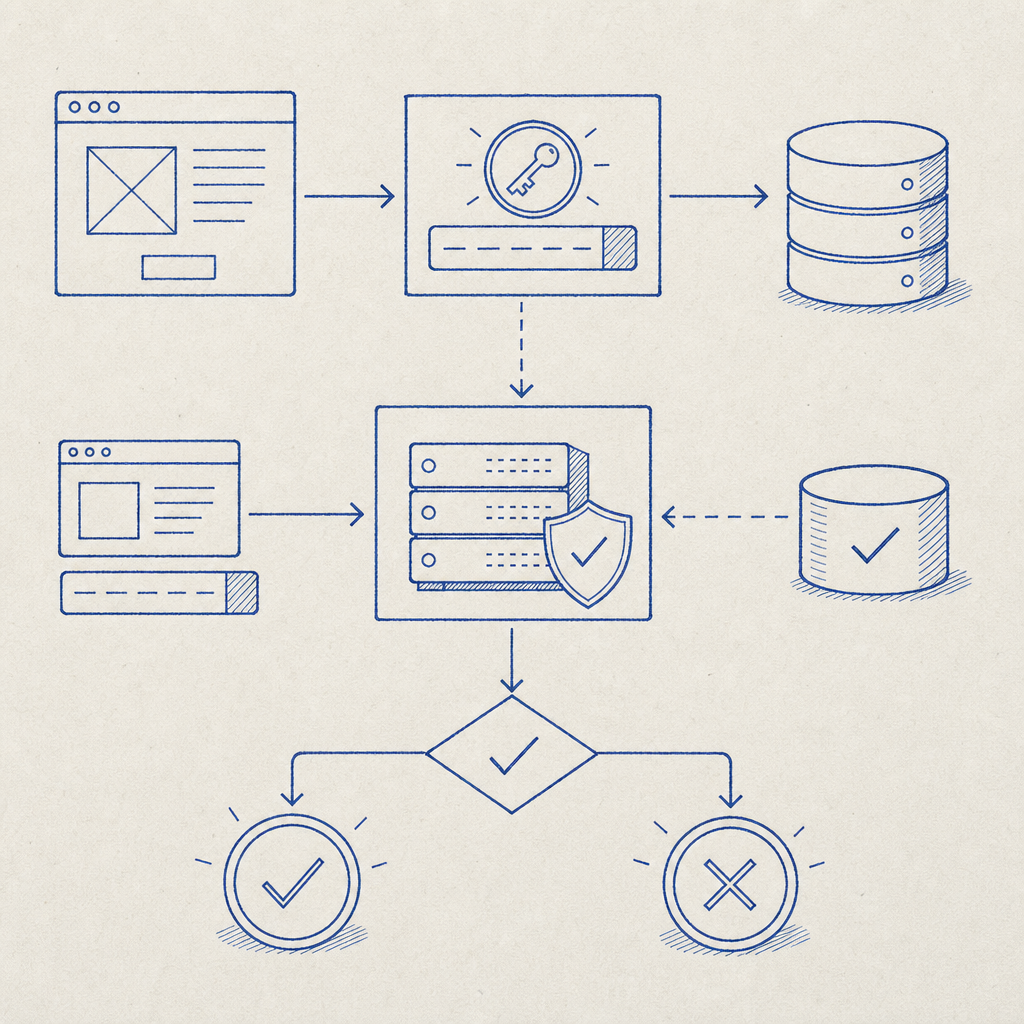
A modern verification flow should be simple for legitimate users and explicit for engineers. A clean implementation usually looks like this:
- The client loads the challenge script.
- The user completes the challenge, or the challenge resolves with a token.
- Your frontend sends the pass token to your backend.
- Your backend validates the token against the CAPTCHA provider.
- Your app grants access only after verification succeeds.
For CaptchaLa, the flow is designed around first-party data only and server-side validation. The client loads the script from https://cdn.captcha-cdn.net/captchala-loader.js, and the backend validates with a request to:
POST https://apiv1.captcha.la/v1/validate
The validation body includes:
{
  "pass_token": "token-from-client",
  "client_ip": "203.0.113.10"
}
And it uses:
X-App-KeyX-App-Secret
That server-side step matters. It keeps the trust decision off the browser and inside your application boundary, which is exactly where abuse decisions should live.
Minimal backend validation example
# Example only: validate a CAPTCHA token on your server
# Keep the secret on the backend, never in the browser

import requests

payload = {
    "pass_token": pass_token,
    "client_ip": client_ip,
}

headers = {
    "X-App-Key": APP_KEY,
    "X-App-Secret": APP_SECRET,
}

resp = requests.post(
    "https://apiv1.captcha.la/v1/validate",
    json=payload,
    headers=headers,
    timeout=5,
)

result = resp.json()

# Accept the request only if the validation succeeds
if result.get("success") is True:
    allow_request()
else:
    deny_request()
If you need to initiate a challenge from the server side, CaptchaLa also exposes:
POST https://apiv1.captcha.la/v1/server/challenge/issue
That can be useful when your backend decides when to step up verification based on account age, IP reputation, request velocity, or transaction value.
Integration details that matter more than marketing
A lot of CAPTCHA choices sound similar until you have to ship them. Then details matter.
CaptchaLa supports 8 UI languages and native SDKs for:
- Web: JS, Vue, React
- iOS
- Android
- Flutter
- Electron
It also has server SDKs for:
captchala-phpcaptchala-go
And package availability that can make adoption easier in existing projects:
- Maven:
la.captcha:captchala:1.0.2 - CocoaPods:
Captchala 1.0.2 - pub.dev:
captchala 1.3.2
Those details are especially relevant if you’re comparing against Cloudflare Turnstile in a broader “captcha cloudflare” decision. Turnstile fits naturally in web-first deployments, but if you need native SDKs and a consistent challenge model across platforms, a dedicated CAPTCHA service may reduce the number of one-off implementations you maintain.
A few technical questions to ask before you commit:
- Do you need one token format across web and native clients?
- Can your backend validate every challenge without trusting the browser?
- Can the UX be localized for your user base?
- Can your team monitor failures and tune challenge policy without editing edge rules?
If any of those are “not really,” then your CAPTCHA layer should probably be independent of your CDN or edge provider.
Where Cloudflare fits, and where it doesn’t
Cloudflare is still valuable in this stack. It can absorb traffic spikes, reduce origin load, help with WAF rules, and block obvious malicious patterns before requests ever hit your application. That is a different job from proving that a specific user interaction is legitimate.
That distinction matters because bots are not all the same:
- Some are noisy and easy to filter at the edge.
- Some behave like normal browsers until a signup or payment step.
- Some target password resets, referrals, inventory, or trial abuse.
- Some come through valid network paths and only need a challenge after a risky action.
So the strongest architecture is often layered:
- Cloudflare for edge protection and traffic shaping
- CAPTCHA for user interaction verification
- Backend logic for risk scoring and allow/deny decisions
If you only rely on edge filtering, you may miss form-level abuse. If you only rely on CAPTCHA, you may waste resources on traffic you could have dropped earlier. The balance depends on your traffic profile, not on slogans.
CaptchaLa’s plans reflect that practical approach too: free tier at 1000/month, Pro at 50K-200K, and Business at 1M. That makes it easier to test in a real workflow before committing to a larger deployment. If you want to compare implementation details or expected usage, the docs and pricing pages are the quickest place to start.
A sensible decision framework
If you’re making a captcha cloudflare decision for a production app, use this checklist:
- Put Cloudflare in front of the site if you need edge protection, caching, and WAF controls.
- Decide whether bots are attacking the edge, the form, or both.
- If you need challenge verification at the app layer, choose a CAPTCHA provider with server-side validation.
- Make sure your choice works across every client you ship.
- Keep secrets on the server and validate tokens before granting access.
- Revisit the flow after launch, because abuse patterns change.
That’s the real answer: Cloudflare and CAPTCHA solve related but different problems. In many systems, they work best together.
Where to go next: if you’re evaluating a layered setup, start with the docs or review pricing to see which tier matches your traffic and integration needs.