
The captcha box scam is a deceptive tactic where malicious actors exploit fake or manipulated CAPTCHA challenges to trick users into unintended actions or steal data. These scams often impersonate legitimate CAPTCHA services, causing confusion and compromising website security. Understanding how this scam operates and how to defend against it is essential for all web owners who rely on CAPTCHA for bot defense.
What Is the Captcha Box Scam?
At its core, the captcha box scam involves presenting users with fraudulent CAPTCHA prompts disguised as genuine verification challenges. Instead of validating human presence, these fake CAPTCHA boxes are designed to:
- Collect personal information or login credentials
- Redirect users to phishing or malware sites
- Abuse the CAPTCHA’s trust to run background scripts or install unwanted software
- Generate fake clicks or actions that benefit attackers financially
Unlike authentic CAPTCHA services—like reCAPTCHA, hCaptcha, or Cloudflare Turnstile—the scam’s fake CAPTCHA boxes are not connected to legitimate servers or verification methods. They often spoof logos or use similar visual styling to deceive users.
How the Scam Usually Works
The scam can appear in multiple forms, but common techniques include:
Fake CAPTCHA Overlays: Attackers inject a CAPTCHA box over web pages or apps asking users to complete puzzles or checkboxes. When users interact with it, their input is hijacked.
Browser Extensions or Pop-ups: Malicious browser add-ons or pop-ups present CAPTCHA challenges that appear legitimate but are controlled by attackers.
Phishing Messages: Emails or social media messages lure users to fake sites mimicking CAPTCHA prompts as part of a verification step.
Behind these fake CAPTCHA prompts, the scammer’s goal is not to block bots but to abuse the trust users place in CAPTCHA and extract sensitive data or manipulate user behavior.
Signs Your Site May Be Vulnerable
Websites that implement CAPTCHA incorrectly or rely on easily spoofed challenges face risks. Common vulnerability indicators are:
- Using static images or self-hosted CAPTCHA scripts without dynamic server validation
- Embedding CAPTCHA in iframes or third-party widgets without secure communication
- Failing to authenticate CAPTCHA tokens on the server side before allowing access
- Serving simple “click this box” puzzles or text-based challenges easily replicated by attackers
Having proper integration and validation between frontend CAPTCHA widgets and backend servers is key to preventing abuse.
Protecting Against the Captcha Box Scam
1. Use Verified CAPTCHA Providers With Server-Side Validation
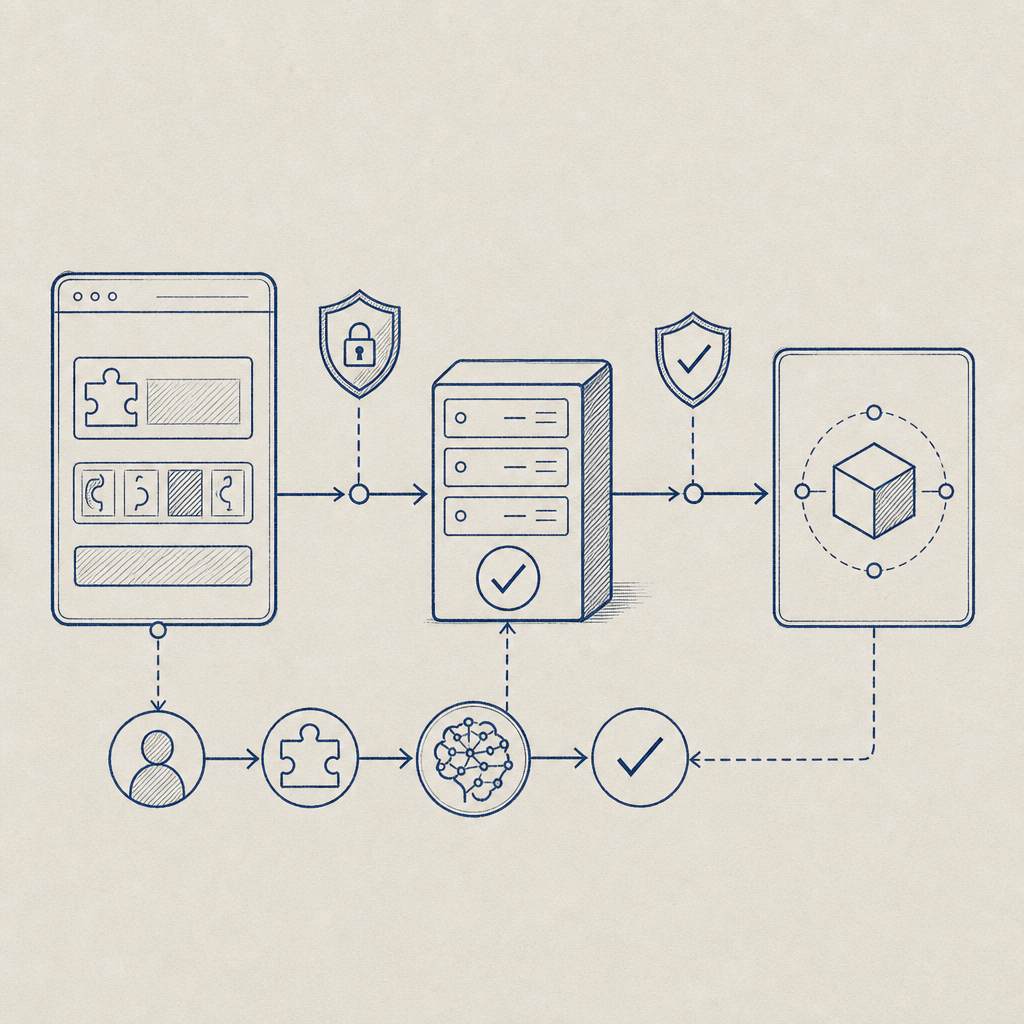
Providers like CaptchaLa offer easy-to-integrate CAPTCHA systems with robust server-side validation APIs. This means bots or attackers cannot simply fake the CAPTCHA token on the frontend; your server must confirm the token’s validity through secure API calls.
For example, CaptchaLa’s validation requires sending a pass_token and the client IP to the secure endpoint POST https://apiv1.captcha.la/v1/validate with your secret keys—adding a strong verification layer.
2. Implement Dynamic Challenges and Token Expiration
Static CAPTCHA images or challenges that never change are prime targets for spoofing. Dynamic challenges that require interaction with a backend and expire after short durations reduce risk and complicate attackers’ efforts.
3. Monitor User Behavior Around CAPTCHA Elements
Suspicious behaviors—like rapid repeated requests to CAPTCHA endpoints or unusual interaction patterns—should raise alerts. Analyzing logs and rate limiting IPs reduces automated abuse.
4. Educate Your Users
Inform users about official CAPTCHA designs and possible scams using fake CAPTCHA boxes or pop-ups. Encourage them to avoid filling out CAPTCHA forms from suspicious sites or unsolicited emails.
Comparison Table: Popular CAPTCHA Solutions and Security Features
| Feature | CaptchaLa | reCAPTCHA | hCaptcha | Cloudflare Turnstile |
|---|---|---|---|---|
| Server-side Validation | Yes (API-based) | Yes | Yes | Yes |
| Multi-platform SDKs | Web, iOS, Android, Flutter | Web, Android, iOS | Web, Android, iOS | Web |
| Token Expiration Control | Supported | Supported | Supported | Supported |
| Native Language Support | 8 UI languages | Limited | Multiple | Limited |
| Free Tier Availability | 1000 validations/month | Yes | Yes | Yes |

Best Practices for Developers Integrating CAPTCHA
When implementing CAPTCHA to defend against bots and scams, keep these technical specifics in mind:
Never trust frontend tokens alone. Always validate CAPTCHA tokens server-side using provider APIs with secure credentials.
Use native SDKs when possible. For instance, CaptchaLa provides SDKs for JavaScript frameworks (Vue, React), mobile (iOS, Android), and desktop (Electron) for seamless integration. This minimizes the risk of injection or spoofing attacks.
Rotate API keys and secrets periodically. Keeping authentication credentials fresh helps prevent unauthorized access even if credentials leak.
Use HTTPS exclusively to secure communication between client, CAPTCHA service, and your backend to prevent MITM attacks.
Here's an example snippet pseudocode for validating a CAPTCHA token using CaptchaLa’s API:
# Python example for server-side validation
import requests

def validate_captcha(pass_token, client_ip):
    url = 'https://apiv1.captcha.la/v1/validate'
    headers = {
        'X-App-Key': 'YOUR_APP_KEY',
        'X-App-Secret': 'YOUR_APP_SECRET',
    }
    data = {'pass_token': pass_token, 'client_ip': client_ip}
    response = requests.post(url, headers=headers, json=data)
    return response.json().get('success', False)

# Use this before allowing sensitive user actions
Why CaptchaLa Helps Mitigate Captcha Box Scams
CaptchaLa’s approach to CAPTCHA security emphasizes:
- First-party data usage only, depending on your site’s traffic for risk profiling rather than third-party tracking
- Clear server challenge issuance methods with SDKs and APIs documented at CaptchaLa docs
- Straightforward pricing tiers suitable for small sites (free 1000/month) to large businesses (1M/month+), detailed at CaptchaLa pricing
Choosing a CAPTCHA provider with strong validation, transparent APIs, and wide SDK support acts as a solid defense against fraudulent CAPTCHA boxes.
Conclusion
The captcha box scam exploits users' trust in CAPTCHA systems to spread fraud and steal data. Preventing it requires robust CAPTCHA integration, server-side token validation, dynamic challenges, and user awareness. Leveraging platforms like CaptchaLa, alongside established providers such as reCAPTCHA, hCaptcha, or Cloudflare Turnstile, can significantly reduce your exposure to these fake CAPTCHA threats. Prioritizing security in CAPTCHA deployment ensures your website maintains trusted bot defense without inadvertently opening doors to scammers.
If you want to learn more about implementing secure CAPTCHA or explore different pricing options for your needs, visit CaptchaLa pricing or dive into our detailed docs to get started.