
A captcha application is a verification layer that helps you tell real users from automated traffic before a form submission, login attempt, signup, or sensitive action goes through. The practical goal is simple: reduce abuse without turning your product into a usability puzzle.
That sounds straightforward, but the details matter. A good captcha application should fit naturally into your UI, send clear signals to your backend, and avoid creating friction for legitimate users. The best implementations treat CAPTCHA as one control in a broader bot-defense system, not as a standalone wall.
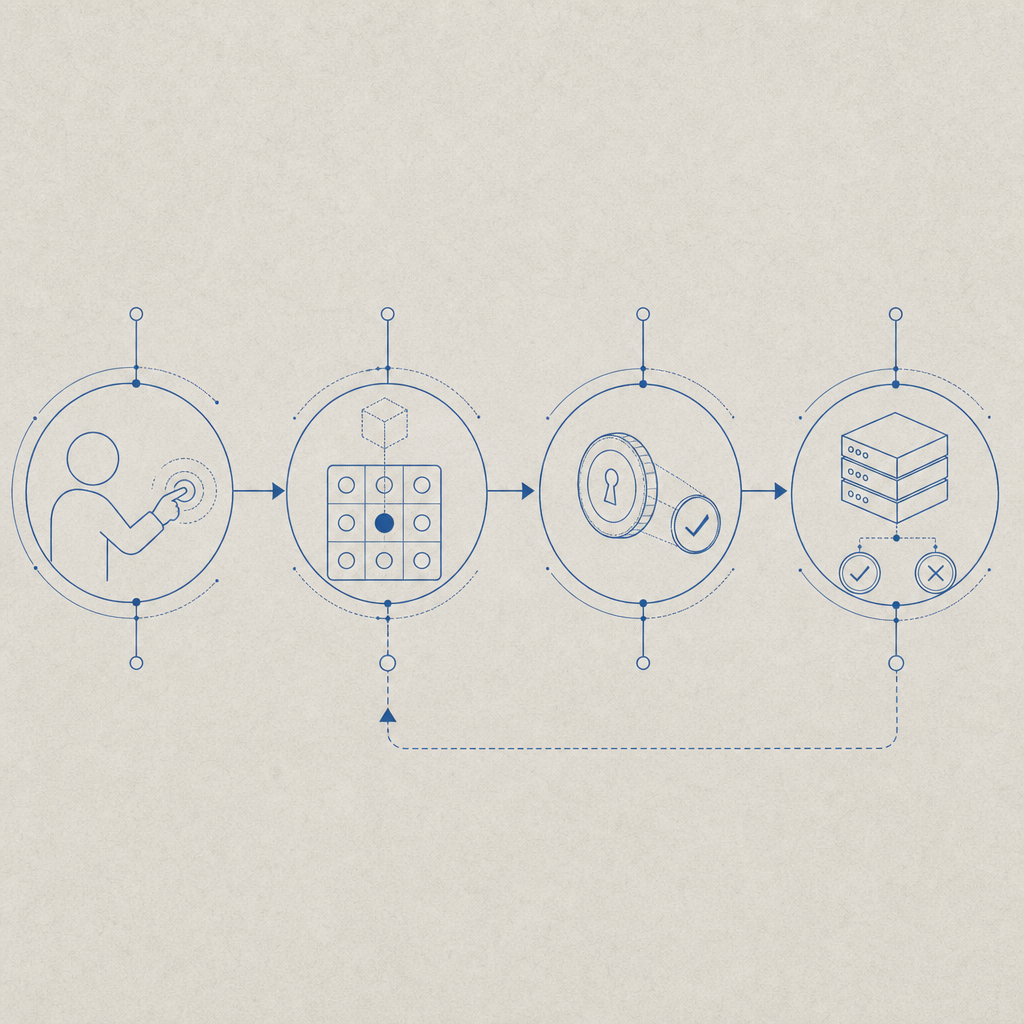
What a captcha application actually does
At its core, a captcha application inserts a verification checkpoint between the client and your server. The client proves it completed the challenge, the server validates that proof, and your app decides whether to allow the action.
That flow is usually the same whether the protected action is:
- Account registration
- Password reset
- Login or MFA step-up
- Checkout or promo-code submission
- API request throttling on suspicious traffic
The difference is in how much friction you want to add. For example, a signup form might tolerate an extra step if abuse is high, while a login page may need a lower-friction challenge or risk-scoring approach. Modern systems also make room for passive signals, so not every user sees the same experience.
A practical captcha application should support multiple environments and devices. CaptchaLa, for example, offers native SDKs for Web (JS, Vue, React), iOS, Android, Flutter, and Electron, plus 8 UI languages. That matters if your product spans mobile and desktop, or if you need a consistent challenge experience across platforms.
Architecture: client, token, server verification
The architecture is usually more important than the visual challenge itself. If the token exchange is weak, the CAPTCHA is mostly theater. The secure pattern is:
- Render the challenge in the client.
- User completes the challenge.
- Client receives a pass token.
- Client sends that token to your backend.
- Backend validates the token with your CAPTCHA provider.
- Backend decides whether to allow the request.
Here’s the key point: the server should be the source of truth. Don’t trust the client to self-assert “challenge passed.” Validate the token server-side and bind it to the request context where possible, such as IP or session metadata.
A typical verification request looks like this:
POST https://apiv1.captcha.la/v1/validate
Headers:
  X-App-Key: your_app_key
  X-App-Secret: your_app_secret

Body:
  {
    "pass_token": "token_from_client",
    "client_ip": "203.0.113.42"
  }
On the client side, you typically load the CAPTCHA script from a CDN and attach it to the relevant form or action:
https://cdn.captcha-cdn.net/captchala-loader.jsOn the server side, CaptchaLa also supports a server-token issuance endpoint:
POST https://apiv1.captcha.la/v1/server/challenge/issueIf you’re building a captcha application for sensitive workflows, this server-side issuance pattern can help you shape when and how a challenge appears.
Why validation belongs on the backend
Backend validation gives you control over:
- replay resistance
- request attribution
- rate limiting decisions
- logging and anomaly detection
- consistency across web and mobile clients
It also lets you keep secrets out of the browser. That’s important because the client is inherently observable, while your backend can enforce policy with much more confidence.
Choosing the right CAPTCHA approach
Not every captcha application should look the same. Some products need a visible challenge, some need a low-friction invisible check, and some need adaptive behavior based on risk.
Here’s an objective comparison of common options:
| Option | Typical strength | User friction | Best fit | Notes |
|---|---|---|---|---|
| reCAPTCHA | Medium to high | Low to medium | General web forms | Widely used; ecosystem is familiar |
| hCaptcha | Medium to high | Low to medium | Abuse-prone public forms | Often selected for privacy or publisher incentives |
| Cloudflare Turnstile | Medium | Low | Fast, low-friction flows | Good fit where silent verification is preferred |
| Custom captcha application | Variable | Variable | Specialized workflows | More control, more engineering responsibility |
The right answer depends on your product’s abuse pattern. A public comment form has different needs than a banking signup flow. If you’re dealing with credential stuffing, fake account creation, or automated ticket hoarding, the challenge should be part of a layered defense that includes rate limits, device signals, and server-side rules.
This is where implementation quality matters more than brand recognition. A lightweight captcha application that integrates cleanly into your stack can outperform a heavier one that frustrates users or is hard to instrument. For teams that want a straightforward integration path, CaptchaLa keeps the flow focused on token issuance and validation rather than extra platform complexity.
Implementation details that reduce friction
A captcha application works best when it is invisible to most users and obvious to your application. That means paying attention to details.
1. Place the challenge late in the flow
Don’t force users through verification before they’ve even entered meaningful input. Trigger the challenge when the action is worth protecting, such as after form completion or right before submission.
2. Match challenge intensity to risk
Not every request deserves the same response. You can use simple heuristics such as:
- repeated failures from the same IP
- unusual velocity from a new session
- disposable email domains
- mismatched geo or device patterns
- suspicious user-agent changes
3. Keep the server response strict
If validation fails, fail closed for sensitive actions. Return a clear but non-informative error message. Avoid telling attackers whether the token was malformed, expired, or reused.
4. Log enough to debug, not enough to leak
Store validation results, timestamps, and request context. Avoid keeping raw secrets or overly verbose challenge data. You want observability, not a second security problem.
For teams using CaptchaLa, the documentation covers SDK setup, validation patterns, and integration details across web and mobile stacks; the docs are the best place to confirm exact wiring for your framework.
A practical integration pattern
If you’re wiring a captcha application into a form submission, the flow typically looks like this:
// English comments only
async function submitProtectedForm(formData) {
  // 1. Collect the CAPTCHA pass token from the client widget
  const passToken = await window.getCaptchaPassToken();

  // 2. Send the token and request data to your backend
  const response = await fetch("/api/form-submit", {
    method: "POST",
    headers: {
      "Content-Type": "application/json"
    },
    body: JSON.stringify({
      ...formData,
      pass_token: passToken
    })
  });

  // 3. Handle the server's final decision
  if (!response.ok) {
    throw new Error("Submission blocked");
  }

  return response.json();
}
In your backend handler, validate the token with your CAPTCHA provider before completing the action. If you’re using PHP or Go, CaptchaLa provides server SDKs (captchala-php and captchala-go) so you can keep the validation logic in your application layer rather than hand-crafting every request.
For mobile and desktop apps, the native SDKs are especially useful because they let you keep the same security model across web, iOS, Android, Flutter, and Electron. That reduces drift between product surfaces and makes it easier to reason about abuse patterns across channels.
Cost, scale, and deployment planning
A captcha application should be sized to your abuse profile, not just your traffic volume. A product with 10,000 monthly visitors but a highly targeted signup abuse problem may need more sophisticated controls than a high-traffic content site with low risk.
When evaluating deployment, consider:
- monthly challenge volume
- peak-hour concurrency
- latency impact on submission flows
- regional performance
- whether your product needs first-party data only handling
CaptchaLa’s published tiers are useful as a planning reference: Free covers 1,000 monthly challenges, Pro is positioned for roughly 50K-200K, and Business targets around 1M. If your traffic pattern is uneven, model the peak week, not just the monthly average.
A strong deployment checklist looks like this:
- Load the client script asynchronously.
- Verify tokens only on the server.
- Tie validation to the protected request.
- Monitor failure rates by endpoint.
- Add rate limits around repeated failures.
- Review logs for abuse patterns weekly.
- Revisit friction if legitimate conversion drops.
That checklist keeps the CAPTCHA from becoming a one-off widget and turns it into a measurable control.

Where a captcha application fits in your stack
The strongest use of a captcha application is not as a gate for everything, but as a targeted defense for the places attackers care about most. In practice, that means pairing CAPTCHA with bot scoring, throttling, fraud checks, and human review where needed.
If you are comparing providers like reCAPTCHA, hCaptcha, or Cloudflare Turnstile, focus on developer workflow, mobile support, validation control, and how well the service matches your abuse profile. If you are building with CaptchaLa, start with the integration examples in the docs and compare plans on the pricing page.
Where to go next: review the integration docs and choose the tier that matches your monthly challenge volume and product risk.