
When developers look for "captcha api google," they're typically referring to Google's popular reCAPTCHA service—a tool designed to distinguish human users from bots, thereby protecting websites from spam, abuse, and automated attacks. Google's reCAPTCHA API offers an easy way to integrate such protections, allowing web applications to verify user authenticity using challenges that humans can solve more readily than bots. But how does this API actually work? And what are the notable alternatives available for modern bot defense?
What Is Google’s CAPTCHA API?
Google’s CAPTCHA API, known as reCAPTCHA, provides a challenge-response system to differentiate between legitimate users and automated scripts. It serves either interactive challenges (like selecting images with street signs) or invisible risk-analysis techniques that assess user behavior behind the scenes.
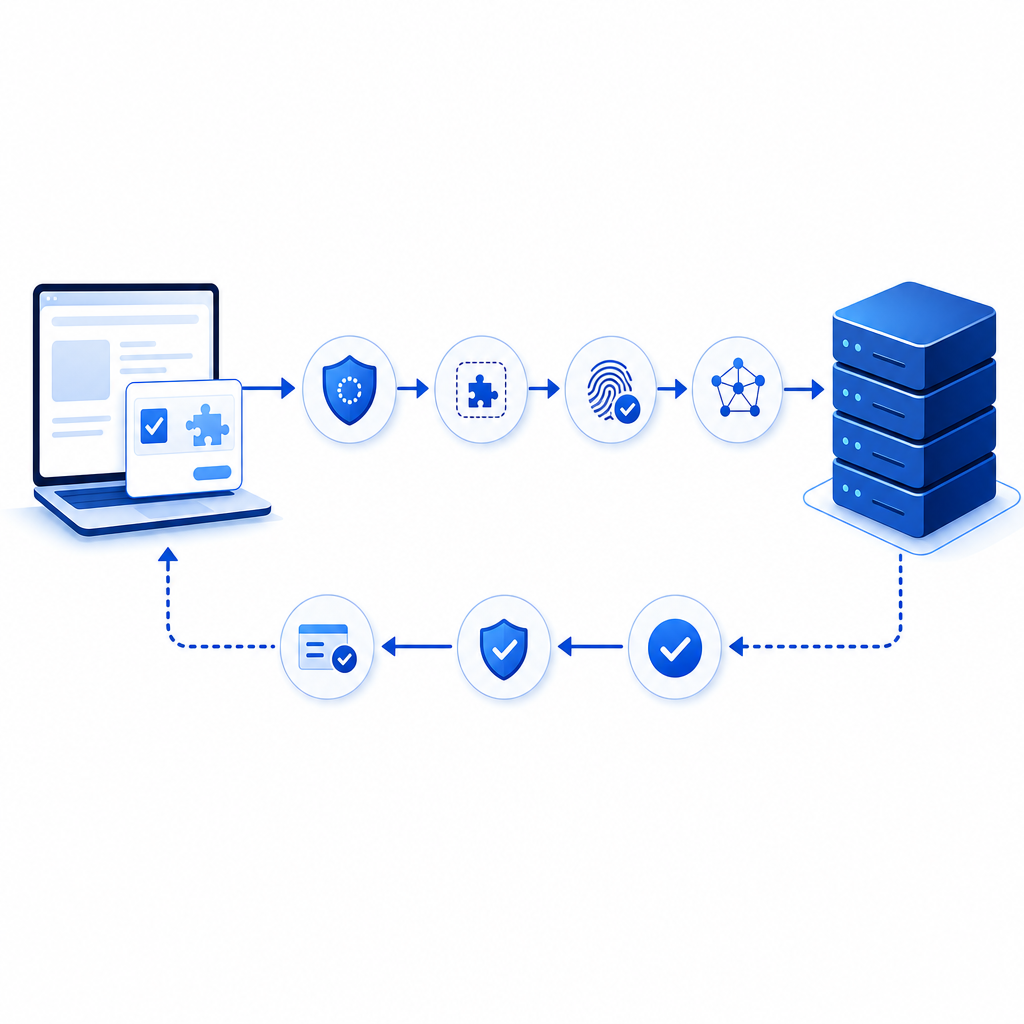
How reCAPTCHA API Works in Practice
Client-Side Integration
You embed Google's reCAPTCHA JavaScript widget on your site, which loads challenges or runs invisible checks.User Interaction
Users may complete a checkbox ("I'm not a robot"), solve image puzzles, or simply pass through the invisible risk analysis.Server-Side Verification
When a user submits a form, your backend sends the token generated by the widget along with the user’s IP to Google’s API endpoint for validation. Google responds with a score or a pass/fail status.Decision Logic
Based on the validation response, your server grants access or blocks the request.
This split client-server workflow ensures that validation cannot be bypassed easily and leverages Google's vast data on user behaviors to detect bots with reasonable accuracy.
Alternatives to Google reCAPTCHA API at a Glance
While reCAPTCHA is a prominent choice, there are other CAPTCHA APIs worth considering. These alternatives vary in terms of user experience, privacy, pricing, and customization.
| Feature | Google reCAPTCHA | hCaptcha | Cloudflare Turnstile | CaptchaLa |
|---|---|---|---|---|
| Challenge Types | Image puzzles, checkbox, invisible | Image puzzles, checkbox | Invisible, low friction | Interactive & invisible options |
| Privacy Focus | Collects user data, links to Google account | Strong privacy focus | Privacy-centric, no tracking cookies | First-party data only |
| Pricing | Free, with usage limits, some enterprise tiers | Usage-based pricing | Free for Cloudflare users | Free tier + scalable paid plans |
| SDKs & Integrations | JS-based widget, server SDKs limited | Wide language support | JS widget, easy integration | Native SDKs for Web, iOS, Android, Flutter, Electron, server SDKs (PHP, Go) |
| Customization | Limited styling options | Some options | Minimal UI | Flexible, themable UI with 8 languages |
| Bot Detection Approach | Behavior analysis + challenges | Challenge-based + behavior | Invisible, low friction | Token-based verification with own challenge system |
Integrating the Captcha API Google vs. CaptchaLa
Developers evaluating “captcha api google” often want to know the ease of implementation and flexibility.
Google reCAPTCHA Example Snippet
// Load reCAPTCHA script on your page
<script src="https://www.google.com/recaptcha/api.js" async defer></script>

<form action="/submit" method="POST">
  <div class="g-recaptcha" data-sitekey="YOUR_SITE_KEY"></div>
  <button type="submit">Submit</button>
</form>
Backend verification (Node.js example):
const fetch = require('node-fetch');
const secretKey = 'YOUR_SECRET_KEY';

async function verifyToken(token) {
  const response = await fetch(`https://www.google.com/recaptcha/api/siteverify?secret=${secretKey}&response=${token}`, {
    method: 'POST',
  });
  const data = await response.json();
  return data.success && data.score > 0.5; // Adjust score threshold as needed
}
CaptchaLa Integration Overview
CaptchaLa emphasizes privacy and developer-friendly SDKs supporting various platforms. Its API model is token-based, with validation done via server calls requiring app keys and secrets.
Client-side load script example:
<script src="https://cdn.captcha-cdn.net/captchala-loader.js"></script>Server-side validation in PHP:
$ch = curl_init('https://apiv1.captcha.la/v1/validate');
curl_setopt($ch, CURLOPT_POST, true);
curl_setopt($ch, CURLOPT_HTTPHEADER, [
  'X-App-Key: your_app_key',
  'X-App-Secret: your_app_secret',
  'Content-Type: application/json'
]);
curl_setopt($ch, CURLOPT_POSTFIELDS, json_encode([
  'pass_token' => $userToken,
  'client_ip' => $userIp
]));
curl_setopt($ch, CURLOPT_RETURNTRANSFER, true);
$response = curl_exec($ch);
curl_close($ch);

$result = json_decode($response, true);
if ($result['success']) {
  // Proceed with verified user
}
Key Technical Considerations When Choosing a CAPTCHA API
1. Privacy and Data Handling
Websites increasingly prioritize user privacy. Google’s reCAPTCHA relies on user behavioral data, sometimes linking data across services. Alternatives like CaptchaLa focus on first-party data only, reducing the privacy footprint.
2. User Experience and Accessibility
Invisible or low-friction CAPTCHA options provide a smoother experience for users, reducing friction during conversions. CaptchaLa supports 8 UI languages and offers customizable UI components, which helps inclusiveness.
3. SDK and Platform Support
If your app spans mobile, desktop, and web, availability of native SDKs matters. CaptchaLa provides SDKs not just for web frameworks (JS/Vue/React) but also for iOS, Android, Flutter, and Electron, broadening easy integration.
4. Pricing at Scale
Google reCAPTCHA is free for many use cases but may have enterprise costs or limitations on usage scope. CaptchaLa offers a free tier (1000/month), Pro (50K-200K), and Business (up to 1M), facilitating scaling without sudden cost surges.

Practical Tips for Implementing CAPTCHA APIs
Choose the Right Challenge Type
Decide between visible challenges and invisible risk analysis depending on your audience and security needs.Verify on the Server Side
Never trust client-side tokens without server verification to prevent token forgery.Monitor and Tune Thresholds
For scoring CAPTCHAs like Google’s reCAPTCHA v3, adjust thresholds carefully to balance blocking bots without frustrating valid users.Stay Updated on SDKs and APIs
CAPTCHA providers occasionally update APIs for security. Keep dependencies up-to-date and monitor provider documentation.Consider Privacy Regulations
Ensure your CAPTCHA implementation complies with GDPR, CCPA, or local data privacy laws.
Conclusion
The "captcha api google" query often leads developers to Google's reCAPTCHA due to its broad adoption and ease of setup. However, depending on your security needs, privacy priorities, and integration complexity, alternatives like CaptchaLa offer competitive solutions with native SDKs for multiple platforms and privacy-first data handling.
For projects requiring a balance of scalability, multilingual support, and developer-controlled validation APIs, CaptchaLa is worth evaluating alongside established options like hCaptcha and Cloudflare Turnstile.
If you want to explore further, check out CaptchaLa’s documentation or review their pricing plans to see if it fits your project’s scale and goals. Whether you choose Google’s reCAPTCHA or another API, implementing robust CAPTCHA solutions remains a vital step to defend your site effectively against bots.
Ready to protect your platform with reliable bot defense? Visit CaptchaLa to learn more about their flexible APIs and SDKs.