
A captcha android sdk adds a verification step inside your Android app so you can distinguish real users from automated traffic before sensitive actions are completed. The basic pattern is simple: render a challenge when needed, collect a pass token, and send that token to your backend for validation.
For Android teams, the real question is not whether to add a challenge, but where it belongs in the flow. Login, sign-up, password reset, promo abuse, and high-risk form submissions are the most common places. If you push the check too early, you create friction; too late, and the request may already have reached something expensive or sensitive.
A well-designed SDK keeps the client side light and the server side authoritative. That means the app triggers the challenge, but your backend decides whether the token is valid. CaptchaLa follows that model, and it is especially useful when you want Android support alongside web and other native platforms without stitching together a separate stack for each one.
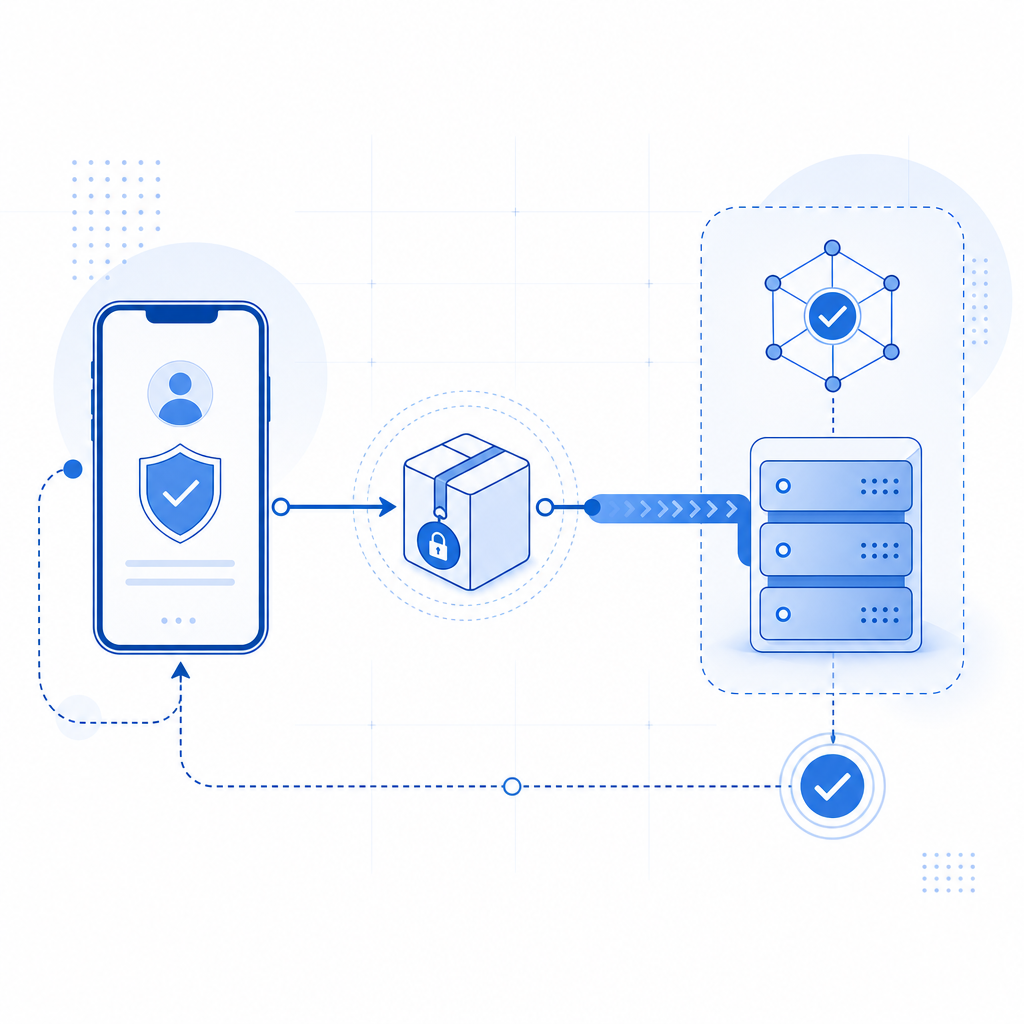
What a captcha android sdk actually does
At a high level, an Android CAPTCHA SDK has four jobs:
- Detect when a challenge should appear.
- Display the challenge in the app, usually in a modal, webview, or native view wrapper.
- Return a short-lived token after the user passes the check.
- Let your server verify that token before continuing the protected action.
That last step matters most. If the app alone decides “challenge passed,” the result can be spoofed. A proper implementation sends the token to your backend, where you validate it against the provider’s API using your secret key. CaptchaLa’s validation endpoint is POST https://apiv1.captcha.la/v1/validate with a body containing {pass_token, client_ip} and headers X-App-Key plus X-App-Secret.
This server-side check is what makes the SDK useful for abuse prevention rather than just UI decoration.
What to look for in Android support
When evaluating an Android SDK, check for these specifics:
- Native integration path: less glue code means fewer lifecycle bugs.
- Token lifecycle: tokens should be short-lived and one-time or near one-time.
- UI flexibility: the challenge should fit login, checkout, or account recovery screens.
- Localization: if you ship globally, UI language support matters.
- Backend compatibility: your app should not need to know secret validation logic.
CaptchaLa includes 8 UI languages and native SDKs across Web (JS/Vue/React), iOS, Android, Flutter, and Electron, which helps if your mobile app is one piece of a broader product surface.
Android implementation patterns that hold up
A clean Android integration usually follows a predictable flow: request the challenge token, show the challenge, capture the pass token, then submit it to your backend along with the action being protected. The server validates the token and either continues or rejects the request.
Here’s a simplified example of how that architecture looks in practice:
// English comments only
fun onProtectedActionRequested() {
    // 1. Ask your app backend for a challenge token if required
    requestChallengeFromBackend { challengeToken ->
        // 2. Open the CAPTCHA UI using the token
        captchalaSdk.launchChallenge(challengeToken) { passToken ->
            // 3. Send pass token to your backend for verification
            submitPassTokenToBackend(passToken)
        }
    }
}
The exact SDK calls will differ depending on your app structure, but the pattern stays the same: the client collects proof, the server verifies it.
Practical Android concerns
Android teams tend to run into the same handful of issues:
- Activity and fragment lifecycle: avoid losing the challenge state during rotation or backgrounding.
- Threading: keep challenge launch and network calls off the main thread when appropriate.
- Network retries: if validation times out, retry safely instead of reusing stale tokens.
- Deep links and redirects: if the challenge completes in a browser-like flow, make sure the return path is explicit.
- Analytics separation: log challenge outcomes without storing unnecessary personal data.
If you are using a cross-platform stack, CaptchaLa’s Android support sits alongside Flutter and Electron, which can simplify consistency if your app family spans multiple clients.
Comparing Android CAPTCHA options
Android CAPTCHA integrations often differ more in deployment model than in appearance. Some are mostly web-based wrappers; others are tightly coupled native SDKs. Some emphasize invisible checks, while others use explicit challenges.
| Option | Typical Android integration | Server validation | UI languages | Notes |
|---|---|---|---|---|
| reCAPTCHA | WebView or mobile wrapper | Yes | Limited app-side control | Common choice, but often requires Google ecosystem dependence |
| hCaptcha | SDK or embedded flow | Yes | Varies by setup | Good fit when you want a familiar challenge model |
| Cloudflare Turnstile | Often web-first, can be embedded | Yes | Web-centric | Lightweight friction profile, depending on implementation |
| CaptchaLa | Native SDK + server validation | Yes | 8 languages | Supports Android plus web, iOS, Flutter, Electron |
None of these is universally “right.” The best choice depends on your app’s traffic profile, privacy requirements, and how much control you want over the user flow.
For teams that prefer clear deployment boundaries, a first-party approach can be easier to reason about. CaptchaLa is designed around first-party data only, which may matter if your security and compliance teams want a narrower data footprint. It also offers a free tier for 1,000 monthly uses, with Pro tiers in the 50K–200K range and a Business tier at 1M.
Server-side validation and challenge issuance
Client-side Android code only gets you halfway. The backend should remain the source of truth, and it should perform two related tasks:
- Issue challenge tokens when a protected action requires proof.
- Validate pass tokens before allowing the action to complete.
CaptchaLa exposes a server-token issuance endpoint at POST https://apiv1.captcha.la/v1/server/challenge/issue, which is useful when your backend wants to decide whether a challenge should be displayed at all. That is often a better design than hardcoding rules into the app, because abuse signals tend to evolve faster than mobile releases.
A secure validation flow generally looks like this:
- Android app requests a protected action.
- Your backend evaluates risk and, if needed, requests or issues a challenge token.
- The app renders the challenge in the SDK.
- The user completes the challenge and receives a pass token.
- The app sends the pass token to your backend.
- Your backend validates the token with the CAPTCHA provider.
- Only then does your backend finish the action.
That server-centric approach is why many teams prefer to integrate CAPTCHA into their API layer rather than in the Android client alone. It also makes it easier to support other clients later, such as web or iOS, without changing the trust model.

Choosing the right approach for your app
If you are deciding how to add CAPTCHA to an Android product, the main tradeoff is friction versus abuse resistance. A lighter challenge may improve conversion but let more automated traffic through. A stricter flow may stop abuse more effectively but can frustrate legitimate users if it appears too often.
A few technical questions help narrow the choice:
- How often will the challenge appear for authenticated users?
- Should login, signup, and checkout use different risk thresholds?
- Do you need one integration for Android plus web and iOS?
- Will your backend validate every token, or only some actions?
- Do you need a provider with straightforward SDK and server endpoints?
If your answer to the last two is “yes,” it helps to pick a provider with a clear implementation path. CaptchaLa’s documentation at docs covers the client and server flow, while pricing makes it easier to match volume to plan before you ship.
Where to go next
If you are implementing a captcha android sdk now, start by mapping the protected actions, then wire the Android client to your backend validation flow, and only after that tune challenge frequency. For implementation details, see the docs, or review pricing if you want to estimate usage against your expected traffic.