
When it comes to adding CAPTCHA protection in Android apps, utilizing open-source libraries available on GitHub is a common approach. These Android CAPTCHA GitHub repositories provide reusable components and SDKs developers can quickly integrate to defend against bots and spam. Libraries like those from CaptchaLa enable seamless CAPTCHA implementation tailored to mobile environments, simplifying verification for users while adding a strong layer of security. If you're wondering how to incorporate reliable CAPTCHA solutions in your Android app using GitHub resources, this guide will walk you through the options, setup, and comparison of popular tools.
What Is a Captcha Android GitHub Library?
A CAPTCHA Android GitHub library is a publicly available software package, stored on GitHub, designed to integrate CAPTCHA challenges into Android apps. These libraries usually come as SDKs, consisting of code, UI components, and APIs that allow your app to prompt users with verification challenges such as puzzles, image recognition, or invisible checks. They help app developers easily add bot-prevention features without building CAPTCHA technology from scratch.
Many of these open-source solutions are official SDKs from CAPTCHA service providers or independent tools created by the community. They are often distributed through package management systems like Maven, making integration into Android Studio straightforward.
Popular Android CAPTCHA Libraries on GitHub
Here’s a quick overview of some widely used CAPTCHA libraries you can find on GitHub, including their main features and usage considerations:
| Library | Provider | Main Features | Integration Method | License |
|---|---|---|---|---|
| CaptchaLa Android SDK | CaptchaLa | Native SDK, multi-language UI, flexible validation | Maven (la.captcha:captchala:1.0.2) | Commercial/Free tier info on site |
| reCAPTCHA Android | Invisible and checkbox CAPTCHA, strong ecosystem | Gradle plus Google Services auth | Apache 2.0 | |
| hCaptcha Android SDK | hCaptcha | Privacy-first, GDPR-compliant, alternative to reCAPTCHA | Maven Central | Proprietary |
| Cloudflare Turnstile | Cloudflare | Privacy-focused, no user interaction challenge | REST APIs + client libs | Proprietary |
Each library delivers a blend of user experience and security. Google’s reCAPTCHA is deeply entrenched and trusted but involves user data sharing with Google. hCaptcha offers a more privacy-conscious alternative, while Cloudflare Turnstile aims for minimal user friction. CaptchaLa, meanwhile, provides a versatile SDK with native Android support and multi-language UI, plus active APIs that can be easily customized to your backend.

Steps to Integrate CaptchaLa Android SDK from GitHub
Here’s a straightforward way to add the CaptchaLa Android SDK, drawing from the official GitHub Maven repository:
- Add Maven Dependency
In yourbuild.gradle(app module), include:
dependencies {
    implementation 'la.captcha:captchala:1.0.2'
}- Initialize SDK in Your Activity
In your main activity’s onCreate, initialize the captcha widget:
import la.captcha.CaptchaWidget;

@Override
protected void onCreate(Bundle savedInstanceState) {
    super.onCreate(savedInstanceState);
    setContentView(R.layout.activity_main);

    CaptchaWidget captcha = findViewById(R.id.captcha_widget);
    captcha.setAppKey("YOUR_APP_KEY");
    captcha.loadChallenge();
}- Handling User Verification
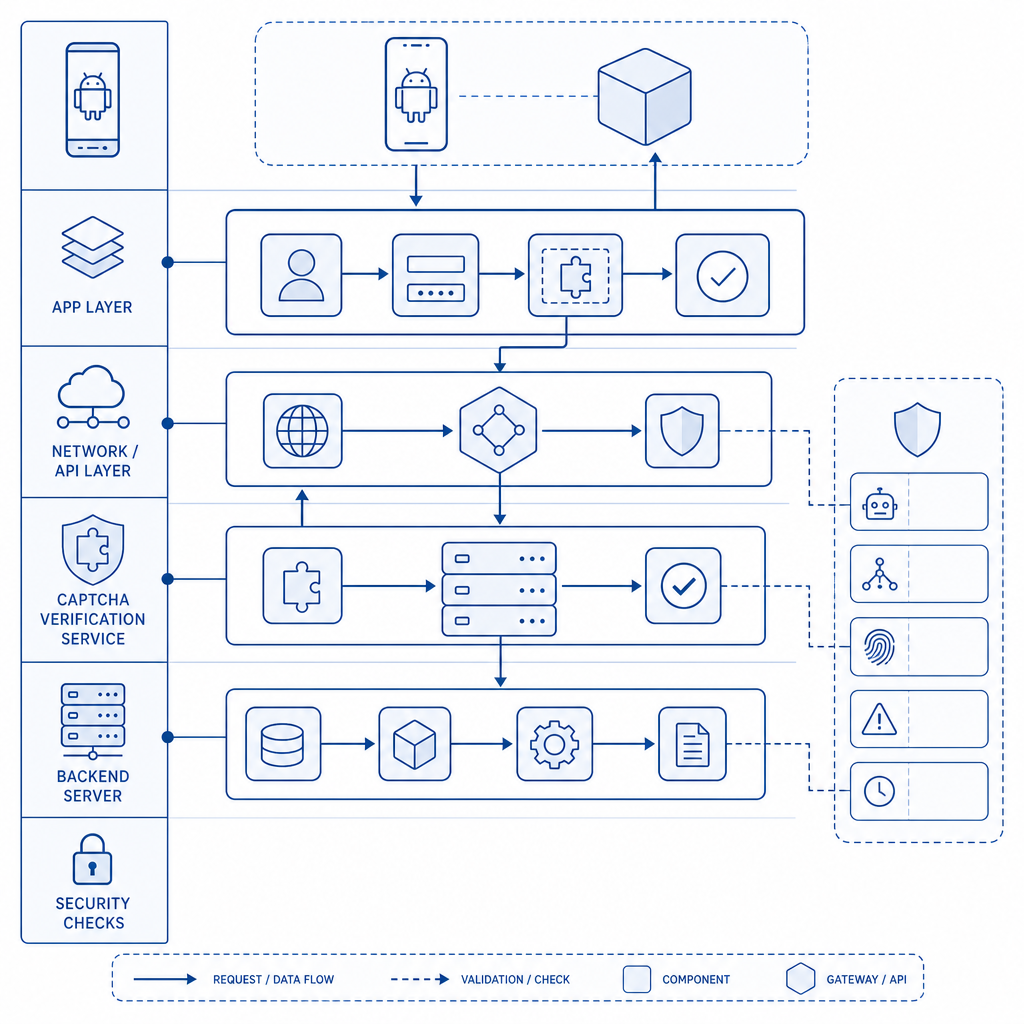
Once the user completes the CAPTCHA, capture the token and verify it on your backend.
String passToken = captcha.getPassToken();
// Send passToken + client IP to server for validation using:
// POST https://apiv1.captcha.la/v1/validate with X-App-Key + X-App-Secret headers- Backend Validation (Example in PHP)
$postData = json_encode([
    'pass_token' => $receivedPassToken,
    'client_ip' => $userIp
]);

$curl = curl_init('https://apiv1.captcha.la/v1/validate');
curl_setopt($curl, CURLOPT_POST, true);
curl_setopt($curl, CURLOPT_POSTFIELDS, $postData);
curl_setopt($curl, CURLOPT_HTTPHEADER, [
    'X-App-Key: YOUR_APP_KEY',
    'X-App-Secret: YOUR_APP_SECRET',
    'Content-Type: application/json'
]);
curl_setopt($curl, CURLOPT_RETURNTRANSFER, true);

$response = curl_exec($curl);
curl_close($curl);

// Parse and verify $response JSON
This integration flow shows how GitHub SDKs like CaptchaLa’s enable a smooth client-server CAPTCHA challenge and validation loop.
Comparing Captcha Android SDKs: What Matters Most?
When choosing a GitHub CAPTCHA Android library for your app, consider these factors:
Privacy & Data Handling
Review if the provider collects personal data and how it’s protected. CaptchaLa emphasizes first-party data handling with options to run your own validation backend.User Experience
Invisible CAPTCHAs or those requiring minimal user input (like Cloudflare Turnstile) reduce friction, but may not suit all threat types.Language and UI Customization
CaptchaLa supports 8 UI languages natively and customizable challenge styles that fit diverse user bases.Backend Support & Documentation
Robust docs and server SDKs (PHP, Go) help with seamless validation. CaptchaLa maintains comprehensive docs and example repositories on GitHub.Performance and Load
Check library size and challenge generation latency to avoid slowing down app loads or user flow.
Understanding these technical and business factors ensures you pick a library that fits your Android app’s bot defense and user experience needs.
Why Use CaptchaLa’s Android CAPTCHA SDK?
Among available options on GitHub, CaptchaLa stands out by offering:
- Native Android SDK on Maven simplifying implementation.
- Fully supported backend validation APIs with example server SDKs.
- Multi-language UIs and challenge types out of the box.
- Scalable pricing plans, including a free tier (1000 verifications monthly).
- Commitment to first-party data and privacy-respecting practices.
- Additional integrations for iOS, Flutter, and Electron apps, enabling cross-platform consistency.
While Google reCAPTCHA and hCaptcha remain popular, CaptchaLa provides a balanced alternative for developers seeking customizable, privacy-conscious CAPTCHA solutions with strong GitHub-backed resources.
Conclusion
Integrating CAPTCHA into Android applications via GitHub libraries is a practical and efficient way to harden your app against bots and fraudulent traffic. Whether you choose CaptchaLa, reCAPTCHA, hCaptcha, or Cloudflare Turnstile, understanding the nuances of each SDK—such as privacy implications, user experience, and backend validation workflow—is crucial.
Using CaptchaLa’s Android SDK pulls together open-source convenience with robust server-side APIs for validation, making it a strong candidate for developers looking for transparency and control. Their docs provide step-by-step guidance, and pricing remains accessible across project sizes.
Where to go next? Explore the CaptchaLa pricing plans to understand what tier fits your app’s needs and dive into our developer documentation to begin integrating a reliable CAPTCHA Android GitHub library today.