
An Amazon puzzle CAPTCHA is a type of challenge-response test designed to tell humans and automated bots apart by requiring users to solve a simple puzzle involving images, shapes, or objects. This CAPTCHA variant is often employed to enhance security during user verification and reduce automated abuse by prompting users to complete an interactive, visual task that is easy for humans but difficult for bots to solve reliably.
What is an Amazon Puzzle CAPTCHA?
Amazon puzzle CAPTCHA refers broadly to CAPTCHA challenges that involve puzzle-like tasks, popularized or inspired by Amazon’s efforts to filter out bot traffic while maintaining a smooth user experience. Instead of traditional distorted text, users may be asked to:
- Rotate objects to the correct orientation
- Assemble jigsaw pieces
- Identify parts of an image that fit together
These puzzles rely on visual cognition and interaction, making it much harder for bots — including those using optical character recognition (OCR) — to bypass the challenge.
The term "Amazon puzzle CAPTCHA" is sometimes used informally or by analogy, as Amazon has experimented with and popularized various CAPTCHA styles on their platform to protect login and checkout flows.
How Puzzle CAPTCHAs Work Technically
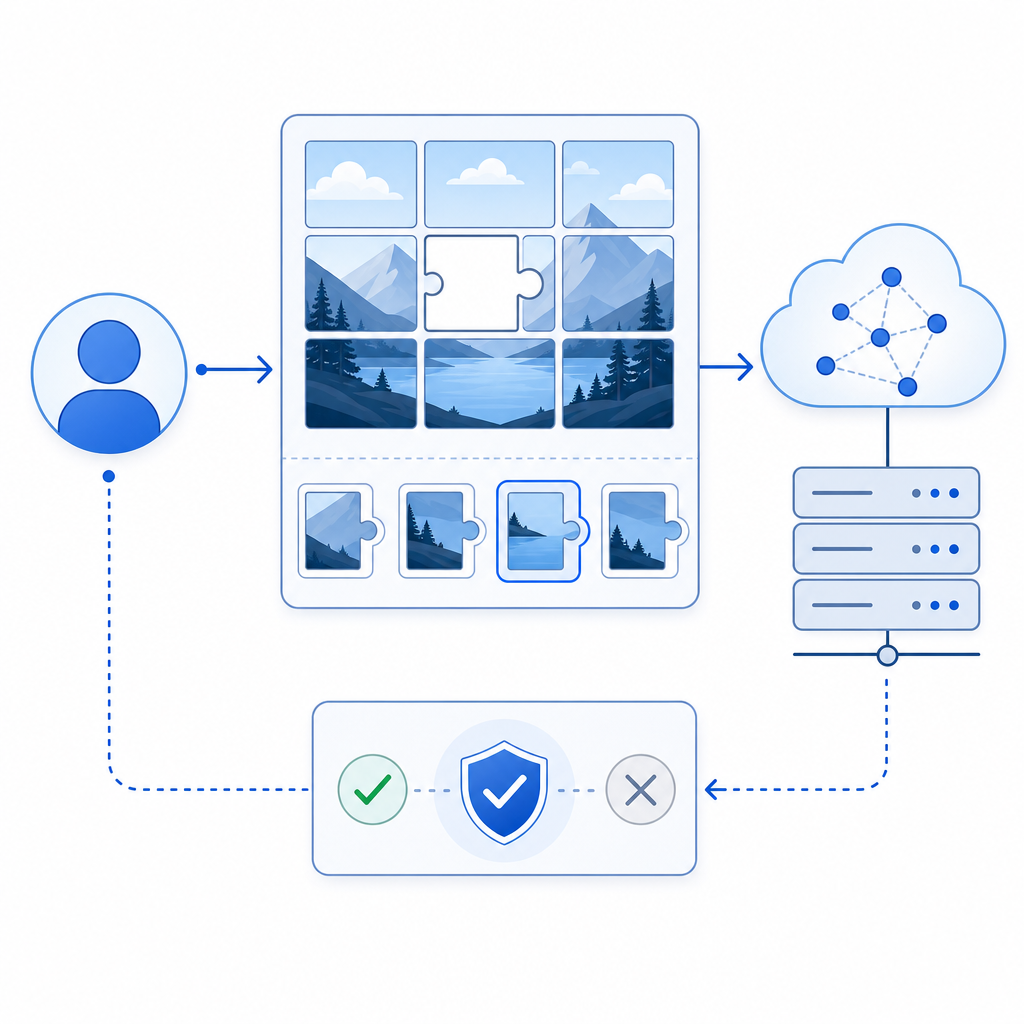
A typical puzzle CAPTCHA workflow involves these steps:
- The web server generates a challenge comprising puzzle pieces or image segments.
- The client loads puzzle assets via a secure API or CDN.
- The user interacts with the puzzle — rotating, dragging, or matching elements until the correct solution is formed.
- Once the user submits the completion, the puzzle data (e.g., piece positions or rotations) is sent to a backend verification API.
- The backend checks the solution’s correctness and returns a pass/fail response.
- On success, the user is allowed to continue; on failure, a new challenge or alternate CAPTCHA appears.
Puzzle CAPTCHAs usually incorporate randomness and multiple states for puzzles to avoid automated replay attacks or brute-forcing.
Why Puzzle CAPTCHAs are Effective
- Visual recognition and spatial skills involved are still challenging for AI bots compared to text deciphering.
- Interactive tasks require human-like drag and drop or rotation actions, harder to emulate programmatically.
- Frequent challenge variations make pre-recorded solutions ineffective.
- Improve user experience by avoiding frustrating distorted text or audio puzzles.
Comparing Puzzle CAPTCHA to Other CAPTCHA Types
| Feature | Puzzle CAPTCHA | reCAPTCHA v2/v3 | hCaptcha | Cloudflare Turnstile |
|---|---|---|---|---|
| Interaction Type | Interactive puzzle-solving | Checkbox / invisible scoring | Image recognition | Invisible, behavioral analysis |
| Bot Resistance | High against OCR and bots | Moderate to High | Moderate | Moderate |
| User Experience | Engaging but takes longer | Quick but sometimes annoying | Sometimes slower | Minimal user friction |
| Privacy & Data | First-party data friendly (varies) | Google data collection | Third-party tracking concerns | Privacy-centric |
| Integration Complexity | Moderate (SDKs available) | Easy (widely used) | Similar to reCAPTCHA | Easiest to implement |
| Multi-language Support | Supports 8 UI languages | Multiple languages | Multiple languages | Multiple languages |
Puzzle CAPTCHAs like those offered by CaptchaLa provide native SDKs for Web (JS, Vue, React), iOS, Android, Flutter, and Electron, making integration flexible. This breadth of SDKs ensures the puzzles can run natively across your user devices with a consistent look and feel.
Implementing Amazon Puzzle CAPTCHA with CaptchaLa
Integrating a puzzle CAPTCHA from CaptchaLa follows a straightforward sequence:
Load the CaptchaLa Loader
Include CaptchaLa’s loader script in your frontend:html<script src="https://cdn.captcha-cdn.net/captchala-loader.js" defer></script>Render the Puzzle CAPTCHA Widget
In your JavaScript, initialize and render it into your chosen container:js// Initialize CaptchaLa puzzle challenge LaCaptcha.render({ containerId: 'captcha-container', appKey: 'YOUR_APP_KEY', language: 'en' });Handle User Completion
The widget returns apass_tokenupon successful puzzle completion, which you validate server-side by POSTing to:https://apiv1.captcha.la/v1/validate
with body:json{ "pass_token": "TOKEN_FROM_CLIENT", "client_ip": "USER_IP" }Headers include your
X-App-KeyandX-App-Secret.Issue Server Token for Challenge (optional)
You can request pre-generated challenge tokens via:httpPOST https://apiv1.captcha.la/v1/server/challenge/issueThis can help reduce frontend load or customize challenge types.
This approach helps protect forms, login endpoints, and APIs from bots, while preserving user convenience with puzzle-style human verification.

Why Choose Puzzle CAPTCHA over Other Bot Defenses?
While services like Google’s reCAPTCHA, hCaptcha, and Cloudflare Turnstile offer robust protections, puzzle CAPTCHAs add a distinct element of interaction that may increase effectiveness in certain use cases. For example:
- Increased Bot Detection: Puzzles requiring manipulation and spatial reasoning can detect automation tactics missed by passive risk analysis.
- Better User Accessibility: Some users find puzzle CAPTCHAs easier than deciphering distorted text or listening to audio clips.
- Customization & Control: Platforms like CaptchaLa allow you to host puzzles with minimal third-party data exposure, enhancing privacy compliance.
- Multi-Platform Support: With SDKs for native mobile, web, and desktop apps, puzzle CAPTCHAs are versatile across environments.
That said, puzzle CAPTCHAs may take a bit longer for users to solve compared to invisible or checkbox CAPTCHAs, so evaluating your user base and threat model is essential when selecting a CAPTCHA style.
For teams looking to implement puzzle CAPTCHAs or other bot-defense solutions, resources like CaptchaLa’s documentation provide detailed guides and SDK references. You can also review their pricing plans to find an option that fits your traffic levels and security needs.
Exploring puzzle CAPTCHAs through platforms like CaptchaLa helps balance security, privacy, and user experience for effective bot defense.
Where to go next: dive into the CaptchaLa docs or explore their pricing page to integrate puzzle CAPTCHA on your site or app.