
If you’re evaluating Amasty Invisible Captcha for Magento 2, the short answer is this: it’s a lightweight way to reduce form abuse without forcing shoppers to solve an obvious challenge every time. That makes it a sensible fit for login, registration, contact, and checkout-adjacent forms where friction matters.
The catch is that “invisible” does not mean “set and forget.” On a store with real traffic, you still want to think about challenge placement, false positives, accessibility, analytics, and how the solution behaves when bots change tactics. That’s especially true in Magento 2, where extension compatibility and checkout performance are part of the buying experience, not just technical details.

What Amasty Invisible Captcha is doing in Magento 2
Amasty Invisible Captcha is generally used to protect Magento 2 forms with minimal interruption for humans. Instead of asking every visitor to identify traffic lights, it watches for signals that indicate automation and only escalates when needed. That approach is popular because it preserves conversion flow better than always-on puzzles.
For Magento 2 merchants, the main value is simple: fewer spam signups, fewer scripted login attempts, and less junk submitted through contact or review forms. If your store has been getting hit by bots, invisible verification can reduce noise without making every legitimate shopper feel like they’re being punished for visiting.
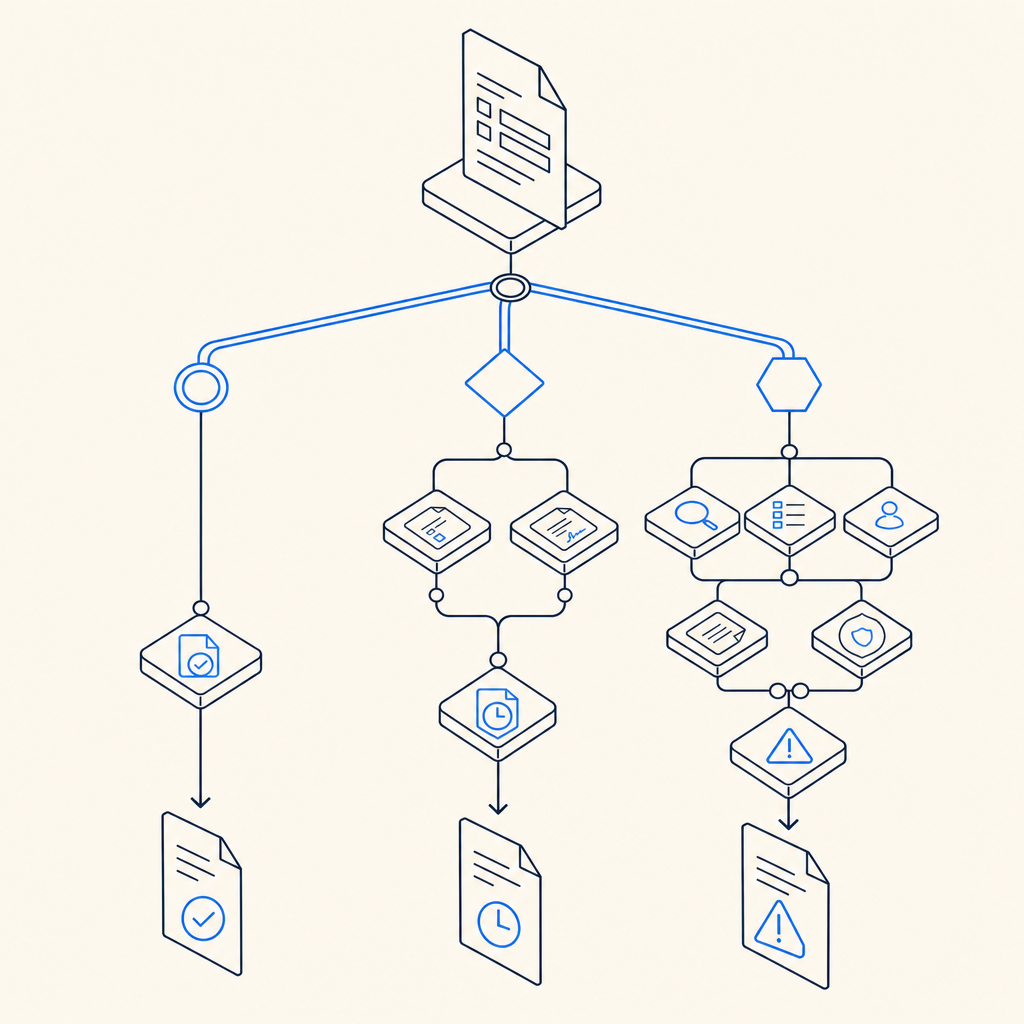
A practical way to think about it is:
Human-friendly default path
Most users complete the form normally.Risk-aware intervention
Suspicious patterns trigger a challenge or validation step.Server-side decisioning
The backend verifies the token or pass result before accepting the submission.Post-validation handling
The request is either accepted, rejected, or redirected into a fallback flow.
That last part matters. A CAPTCHA layer is not just front-end decoration; it’s part of your request trust model. If the validation step is weak, easy to bypass, or poorly integrated, the protection becomes mostly cosmetic.
Where it fits well, and where it can feel awkward
Invisible CAPTCHA works especially well on forms that already have a natural pause: signup, login, password reset, newsletter signup, and contact forms. In those cases, the added check is usually invisible to the majority of users and only appears when needed.
It can feel less elegant if you try to place it everywhere without thinking about context. For example, an aggressively tuned challenge on a high-volume checkout flow can create friction that’s measurable in abandonment. The goal is not to “block all bots at any cost.” The goal is to make abuse expensive while keeping legitimate users moving.
A quick comparison with other options
Here’s a practical, defender-focused comparison of common approaches:
| Option | User friction | Typical strengths | Common tradeoffs |
|---|---|---|---|
| Amasty Invisible Captcha | Low | Magento-native fit, minimal interruption | Depends on extension quality and tuning |
| Google reCAPTCHA | Low to medium | Familiar, widely supported | Privacy/compliance concerns for some teams, occasional UX variability |
| hCaptcha | Low to medium | Good bot pressure, privacy positioning | Can still introduce visible challenges |
| Cloudflare Turnstile | Low | Smooth UX, simple integration patterns | Best when your stack already aligns with Cloudflare services |
No option is universally “right.” The best choice depends on your threat model, your regions, and how much traffic you’re willing to ask to prove they’re human. For some stores, a Magento-focused extension is enough. For others, a more programmable verification layer is more useful.
What to check before you rely on it
If you’re reviewing Amasty Invisible Captcha for Magento 2, focus on operational details instead of marketing claims. A protection layer should be tested the same way you’d test payments or shipping: with real traffic patterns, edge cases, and rollback plans.
A solid review checklist includes:
Form coverage Confirm exactly which forms are protected: login, registration, contact, password reset, review submission, and any custom forms.
Fallback behavior Test what happens when verification fails, times out, or is unavailable. You want predictable user messaging.
Performance impact Measure page load and submission latency, especially on mobile networks.
Accessibility Ensure assistive technologies can still complete the flow.
Multi-store and locale support Confirm the extension behaves correctly across storefronts, languages, and themes.
Logging and monitoring Decide where validation errors surface and how you’ll investigate spikes.
Maintenance cadence Magento upgrades and extension updates should be part of your release process, not a surprise.
If you’re building your own defense layer or comparing extensions, it also helps to separate front-end challenge display from server-side verification. That way, the store can make a decision based on trusted backend validation rather than trusting a client-only signal.
Example: how a validation flow usually looks
For teams thinking in integration terms, the pattern is often:
1. User submits form
2. Client receives pass token
3. Server validates token
4. Server decides allow or deny
5. Store records the outcome for review
If you use a service like CaptchaLa, the server-side model is straightforward: send a POST request to https://apiv1.captcha.la/v1/validate with {pass_token, client_ip} and authenticate with X-App-Key plus X-App-Secret. For challenge issuance, the server-token endpoint is POST https://apiv1.captcha.la/v1/server/challenge/issue. CaptchaLa also supports first-party data only, which is relevant if your compliance or privacy requirements are strict.
When to compare it with other bot-defense layers
It’s reasonable to compare Amasty Invisible Captcha with other verification systems, because CAPTCHA is only one part of bot defense. For some merchants, the right answer is a blend: rate limiting, account protection, velocity checks, and challenge-based verification.
A few things to keep in mind:
- reCAPTCHA is often chosen for familiarity and broad ecosystem support.
- hCaptcha can be attractive when privacy posture matters.
- Cloudflare Turnstile can reduce friction significantly, especially for sites already using Cloudflare.
- Magento-specific extensions can be easier to adopt if the main need is form protection inside the commerce platform itself.
If you want a more flexible setup than a single extension, it can help to think in terms of a verification service that works across web and mobile surfaces. CaptchaLa docs cover native SDKs for Web (JS/Vue/React), iOS, Android, Flutter, and Electron, plus server SDKs for PHP and Go. It also offers 8 UI languages and deployment patterns that can fit different product stacks.
That flexibility matters if Magento 2 is only one part of your customer journey. Maybe the store has a mobile app, maybe account access happens in multiple places, or maybe you want one risk policy across checkout, forms, and API-driven actions.
A simple decision framework for Magento 2 teams
A good selection process is less about brand names and more about operational fit. If you’re deciding whether Amasty Invisible Captcha is enough, ask these questions:
- Do we mainly need to protect standard Magento forms?
- Is our traffic profile mostly normal users with occasional bot spikes?
- Do we want the lightest possible user experience?
- Are we comfortable with extension-based maintenance inside Magento?
- Do we need the same verification logic outside Magento later?
If the answer to the last question is yes, a platform-style approach can be more future-proof than a single-purpose plugin. If you only need a compact Magento fix, an invisible CAPTCHA extension may be the most practical step.
Pricing also tends to follow that same split. Smaller stores may be fine on modest plans, while higher-volume merchants need predictable capacity. For reference, CaptchaLa offers a free tier for 1,000 validations per month, Pro at 50K–200K, and Business at 1M, which makes it easier to match usage to traffic rather than overbuying on day one.
Where to go next: if you’re comparing options for Magento 2 protection, review the implementation details in the docs and check plan fit on pricing.