
If you’re looking for alternatives to captcha, the short answer is: you usually want a layered bot-defense strategy, not a single replacement. Traditional CAPTCHAs can still help, but many teams now combine frictionless checks, device and behavior signals, rate limits, risk scoring, and server-side validation to reduce abuse without making real users suffer.
That shift makes sense. Users dislike puzzles, accessibility concerns are real, and modern bots are often good enough to pass simple challenges. The goal is not “no CAPTCHA at any cost”; it’s fewer attacks, less user friction, and clearer trust signals for your app. 
What people usually mean by alternatives to captcha
“Alternatives to captcha” can mean a few different things, and it helps to separate them before choosing a solution:
Frictionless bot checks
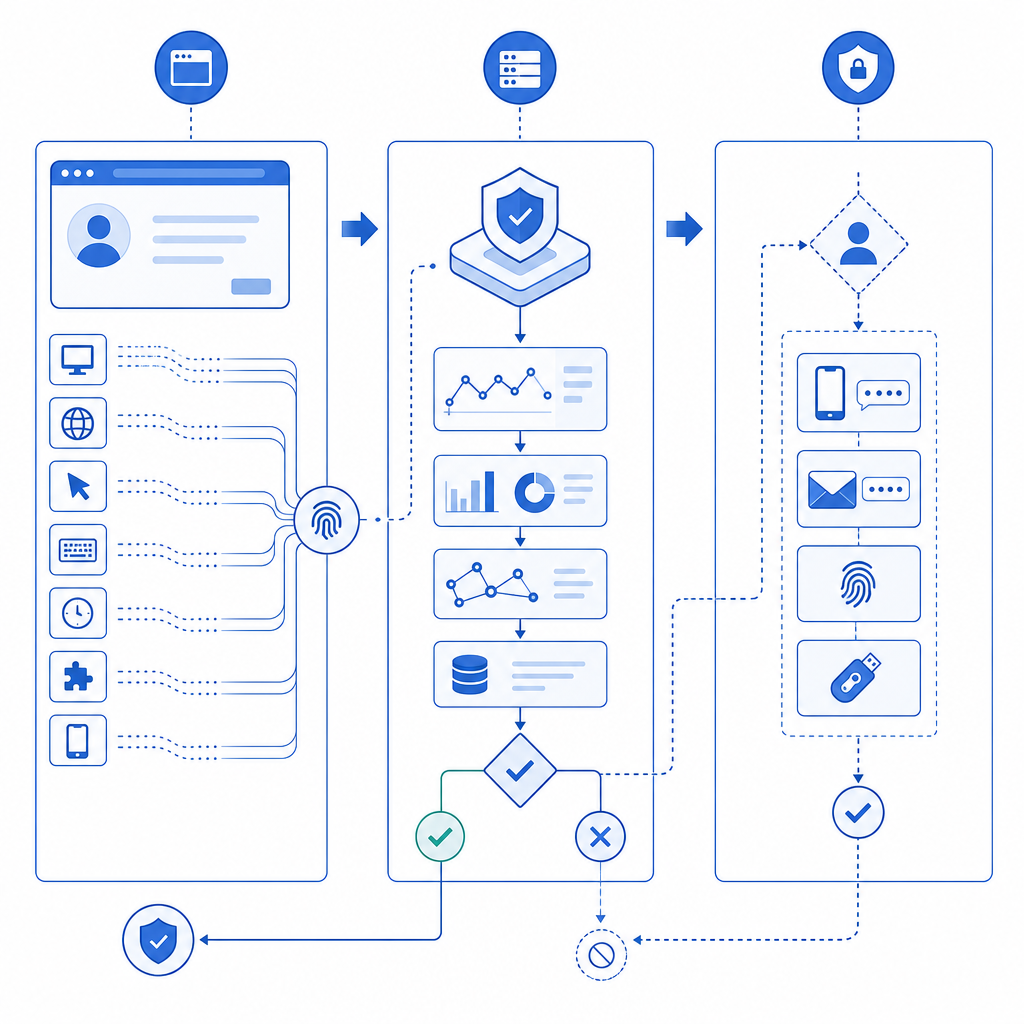
These try to score requests silently, using signals like browser integrity, session patterns, IP reputation, or interaction timing.Proof-of-work or challenge tokens
Instead of asking a user to identify traffic lights, the system issues a token or requires some client-side proof that the session is legitimate.Behavioral analysis
Mouse movement, keystroke cadence, focus changes, tap patterns, and navigation timing can indicate automation, though they should be treated carefully for privacy and accessibility.Network and rate controls
IP throttling, ASN filtering, geo rules, and request shaping won’t stop every bot, but they reduce volume and buy time.Server-side validation
Whatever happens in the browser, the real decision should happen on your backend. Otherwise, client-side checks are just a speed bump.
For many products, the right answer is a blend: use a challenge only when risk is elevated, and otherwise keep the interaction invisible.
Comparing the main options
Here’s a practical comparison of common approaches teams consider when they search for alternatives to captcha.
| Approach | User friction | Strengths | Tradeoffs | Good fit |
|---|---|---|---|---|
| reCAPTCHA | Low to medium | Familiar, broad adoption, strong ecosystem | Can still frustrate users; privacy/compliance concerns for some teams | General web forms |
| hCaptcha | Low to medium | Flexible, widely used, can replace reCAPTCHA in many flows | Still a visible challenge in some cases | Signup, login, checkout |
| Cloudflare Turnstile | Low | Friction-light, easy for many Cloudflare users | Works best inside Cloudflare-centric setups | High-traffic web apps |
| Invisible risk scoring | Very low | Minimal user impact | Requires tuning and backend logic | Login, abuse-prone endpoints |
| Rate limiting + reputation rules | None | Simple, fast, effective against volume attacks | Weak against distributed or low-and-slow abuse | APIs, auth, forms |
| Device/browser attestation | Very low | Useful for stronger trust signals | Platform-specific and more complex | Mobile and desktop apps |
A useful way to think about it: the more invisible the defense, the more important your telemetry and server-side validation become. You can’t rely on “it looked human enough” as a decision criterion if the endpoint is valuable to attackers.
A defender’s checklist for choosing an alternative
Before switching tools, define what you actually need to stop. Different threats call for different controls.
1. Identify the abuse pattern
Is the problem:
- credential stuffing on login?
- fake signups?
- payment abuse?
- scraping?
- spam submissions?
- automated ticket checks or inventory abuse?
Each one has different signals. For example, signup spam often benefits from email verification, IP heuristics, and frictionless scoring, while credential stuffing leans heavily on rate limiting, password breach checks, and device/session reputation.
2. Decide how much friction you can afford
A high-value checkout can justify more challenge than a newsletter form. If a step is business-critical and public-facing, even small delays can affect conversion. That’s why many teams use a risk-based approach: silent checks first, challenge only when something looks off.
3. Make sure you have backend enforcement
A client-side script can collect signals, but your server must make the final call. For example, a common pattern is:
1. Browser loads the verification script.
2. User completes the lightweight check, if needed.
3. Client receives a pass token.
4. Backend validates the token before allowing the action.
5. If validation fails, the request is denied or stepped up.
That approach matters because bots can tamper with front-end code, replay requests, or skip visual elements entirely.
4. Measure false positives
The real cost of bot-defense isn’t only missed attacks; it’s also blocked humans. Watch:
- conversion rate by device and country
- challenge completion rate
- form abandonment
- support tickets tied to access issues
- repeat attempts from legitimate users
If a defense saves spam but quietly harms signups, it may be too expensive.
Where CAPTCHA still fits, and where newer options help
CAPTCHA is not obsolete. It still has a place, especially when you need a simple gate on abuse-prone forms or a known control that many teams understand. But it’s no longer the only sane default.
Some teams move to alternatives because they want:
- less user interruption
- better mobile usability
- stronger accessibility posture
- easier localization
- more control over when a challenge appears
That last point is important. A lot of modern bot defense is about conditional friction. Instead of challenging everyone, you challenge only sessions that trigger suspicious signals. That can be more user-friendly and often more effective.
If you’re evaluating a new stack, look for these practical capabilities:
- multiple UI languages if you serve international traffic
- native SDKs for web and mobile
- server-side validation with explicit request signing
- token-based flows so the browser doesn’t decide trust on its own
- documentation that shows real integration steps, not just marketing claims
Products like CaptchaLa are built around that kind of implementation detail. It supports 8 UI languages, native SDKs for Web (JS/Vue/React), iOS, Android, Flutter, and Electron, plus server SDKs such as captchala-php and captchala-go. For teams that want a straightforward integration path, the docs are a good place to inspect the validation flow before you commit. The validation endpoint, for instance, is a backend POST to https://apiv1.captcha.la/v1/validate with pass_token and client_ip, authenticated by X-App-Key and X-App-Secret.
A practical implementation pattern
If you want something more robust than a visible puzzle, a common architecture is:
- Load a lightweight challenge or risk-scoring script in the browser.
- Collect only the signals you need.
- Issue a short-lived token when the session passes.
- Verify the token on your server before accepting the action.
- Add rate limits and anomaly detection around the same endpoint.
A setup like this can work well for signups, password resets, checkout, and high-volume API endpoints. CaptchaLa also provides a server-token issue flow via POST https://apiv1.captcha.la/v1/server/challenge/issue, which can be useful when the backend needs to initiate or coordinate a challenge.
If you’re integrating across platforms, the ecosystem matters. For example:
- Web apps can use the loader at
https://cdn.captcha-cdn.net/captchala-loader.js - Android teams may prefer the Maven artifact
la.captcha:captchala:1.0.2 - iOS teams can use
Captchala 1.0.2via CocoaPods - Flutter apps can use
captchala 1.3.2from pub.dev
That kind of coverage reduces the chance of shipping one defense for web and leaving mobile exposed.
Choosing the right path for your product
There is no universal winner among alternatives to captcha. The best option depends on your traffic, your threat model, and how much friction your users will tolerate.
A simple rule of thumb:
- use rate limiting and reputation rules for high-volume abuse
- use frictionless risk scoring for everyday requests
- use step-up challenges for suspicious sessions
- use server-side validation for anything that changes state or has business value
If you already have a CAPTCHA in place, you don’t necessarily need to rip it out. You may just need to make it one tool in a broader defense strategy. That’s often the most realistic path: less friction for real users, more friction for bots, and more confidence in the decision point.
Where to go next: review the integration details in the docs or compare plans on the pricing page if you’re sizing traffic for your app.