
Adding CAPTCHA to a PHP website is essential to prevent spam, block malicious bots, and secure user interactions. The process involves integrating a challenge-response test in your forms or login pages, then validating the user's response on the server side. This post explains how to add captcha PHP the right way, including code examples and a comparison of popular CAPTCHA services.
Why Add CAPTCHA PHP to Your Site?
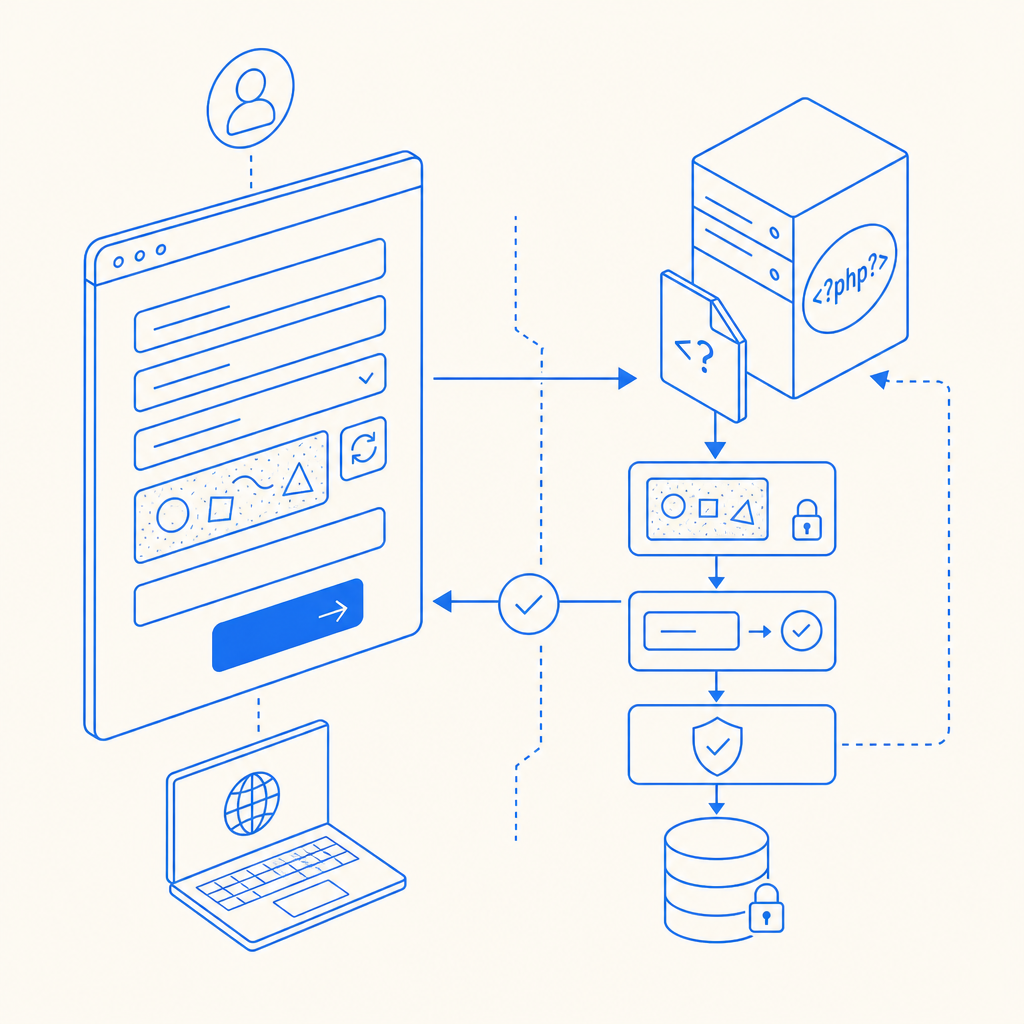
Bot attacks target websites to spam comments, brute-force login, and scrape content. CAPTCHA challenges help distinguish humans from automated scripts by requiring the user to pass a test that's typically easy for people but hard for bots. Adding CAPTCHA in PHP involves:
- Displaying the CAPTCHA on the client side (usually JavaScript-based)
- Receiving and validating the user’s CAPTCHA response on your PHP backend
- Taking action based on validation results (accept submission or reject bot)
Well-implemented CAPTCHA improves your site’s security and user trust while minimizing false positives and user friction.
Popular CAPTCHA Providers Compatible with PHP
When it comes to adding CAPTCHA PHP, several providers offer SDKs and APIs. Here’s a quick comparison focusing on PHP integration:
| Provider | PHP SDK Available | Client SDK Languages | Validation URL | Pricing Model | Notes |
|---|---|---|---|---|---|
| CaptchaLa | Yes (captchala-php) | JS, Vue, React, iOS, Android, Flutter, Electron | POST https://apiv1.captcha.la/v1/validate | Free tier 1000/mo; Pro & Business tiers | First-party data, flexible SDK |
| Google reCAPTCHA | Yes | JS, Android, iOS | POST https://www.google.com/recaptcha/api/siteverify | Free | Widely deployed, sometimes intrusive UI |
| hCaptcha | Yes | JS, PHP SDK | POST https://hcaptcha.com/siteverify | Free & Paid | Focus on privacy, ad revenue sharing |
| Cloudflare Turnstile | Yes | JS SDK, supports PHP | POST https://challenges.cloudflare.com/turnstile/v0/siteverify | Free | Lightweight, privacy-first design |
Each provider has a different approach in SDK and validation flow, but all support PHP server-side checks that are critical to preventing CAPTCHA bypass.
Step-by-Step Guide: How to Add CAPTCHA PHP Using CaptchaLa
Here’s a simple example of adding a CAPTCHA to a PHP form with CaptchaLa, including client-side display and server-side validation:
- Include CaptchaLa loader script on your form page
<script src="https://cdn.captcha-cdn.net/captchala-loader.js" async defer></script>- Insert the CAPTCHA widget into your HTML form
<form method="POST" action="submit.php">
  <!-- Your input fields here -->
  <div id="captchala-container"></div>
  <button type="submit">Submit</button>
</form>

<script>
  CaptchaLa.render('captchala-container', {
    siteKey: 'your-site-key-here'
  });
</script>- Validate CAPTCHA response in your PHP backend (
submit.php)
<?php
$pass_token = $_POST['pass_token'] ?? '';
$client_ip = $_SERVER['REMOTE_ADDR'] ?? '';

if (!$pass_token) {
    die('CAPTCHA token missing.');
}

$validationPayload = json_encode([
    'pass_token' => $pass_token,
    'client_ip' => $client_ip,
]);

$ch = curl_init('https://apiv1.captcha.la/v1/validate');
curl_setopt($ch, CURLOPT_HTTPHEADER, [
    'Content-Type: application/json',
    'X-App-Key: your-app-key',
    'X-App-Secret: your-app-secret',
]);
curl_setopt($ch, CURLOPT_POST, true);
curl_setopt($ch, CURLOPT_POSTFIELDS, $validationPayload);
curl_setopt($ch, CURLOPT_RETURNTRANSFER, true);

$response = curl_exec($ch);
curl_close($ch);

$result = json_decode($response, true);
if ($result && $result['success'] === true) {
    // Passed CAPTCHA — proceed with form processing
} else {
    die('CAPTCHA validation failed.');
}
?>- Process your form data securely after successful CAPTCHA verification.

Captchala’s PHP SDK simplifies this process further by wrapping API calls and managing server challenges.
Tips for a Smooth CAPTCHA PHP Integration
- Always perform server-side validation; client-side CAPTCHA output alone is not secure.
- Use your server secret keys carefully; never expose them in frontend code.
- Customize CAPTCHA difficulty or appearance to match your user base, if provider supports.
- Handle validation failures gracefully; provide clear user messaging to retry.
- Monitor CAPTCHA analytics for suspicious activity patterns.
Comparing CaptchaLa with Alternatives for PHP Integration
Here’s how CaptchaLa stacks up objectively versus some competitors regarding PHP use cases:
- CaptchaLa provides native PHP and other server SDKs, making backend validation straightforward. It also supports multiple UI languages and first-party data privacy models, which are useful for compliance-focused sites.
- reCAPTCHA enjoys broad familiarity and generous free usage but can add friction with visible challenges or accessibility issues.
- hCaptcha focuses on privacy and monetization but may require extra configuration for PHP projects.
- Cloudflare Turnstile is an emerging alternative favoring lightweight, invisible challenges but currently has fewer PHP integration resources.
Choosing the right CAPTCHA depends on your project’s traffic volume, user experience goals, and security requirements.
Conclusion: Where to Go Next with Adding CAPTCHA to PHP
Adding CAPTCHA in PHP is an important step to defend your site against bots with minimal development hassle. CaptchaLa makes this easy with straightforward APIs, SDKs, and flexible pricing if your needs grow beyond the generous free tier. Explore the CaptchaLa docs to get started, or check the pricing plans to find what works best for your site.
Taking these steps enhances your site’s security posture while maintaining smooth user interactions.