
Adding CAPTCHA in Laravel is an effective way to protect your web forms from automated abuse by bots. This post will guide you through the process of integrating a CAPTCHA solution in your Laravel app, covering how to set up CaptchaLa as a secure, privacy-respecting alternative to other common CAPTCHA providers.
Why Add CAPTCHA to Your Laravel App?
CAPTCHAs serve as a first line of defense against spam and malicious bot activity targeting login forms, registration pages, and comment sections. Without CAPTCHA, attackers can use automated scripts to overload your system, create fake accounts, or scrape data. Laravel apps are popular targets due to their widespread use, so integrating CAPTCHA strengthens your overall security posture.
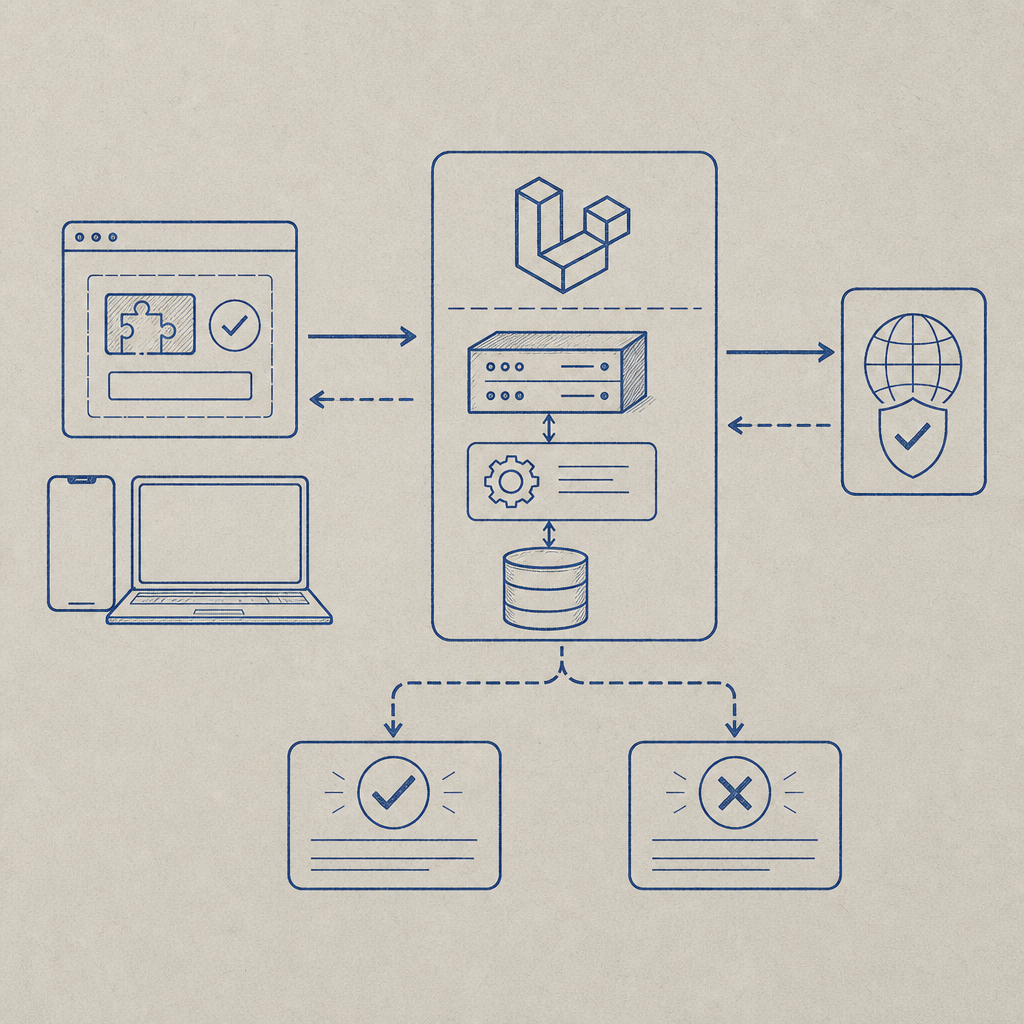
Popular CAPTCHA services include Google’s reCAPTCHA, hCaptcha, Cloudflare Turnstile, and CaptchaLa. Each offers unique features, pricing models, and privacy policies. CaptchaLa provides native SDKs for Laravel via captchala-php and supports multiple UI languages. It processes verification server-side by validating tokens against their API, keeping your form interactions secure.
Setting Up CaptchaLa in Laravel
Here’s a straightforward workflow to add CaptchaLa in a Laravel project:
1. Install the CaptchaLa PHP SDK
You can include the CaptchaLa SDK in your Laravel project via Composer:
composer require captchala/captchala-phpThis package simplifies generating challenges and validating CAPTCHA tokens.
2. Add CaptchaLa Keys to Your Environment
Create a CaptchaLa account to get your X-App-Key and X-App-Secret. Add these to your .env file:
CAPTCHALA_APP_KEY=your_app_key_here
CAPTCHALA_APP_SECRET=your_app_secret_here
Then, add these to config/services.php:
'captchala' => [
    'app_key' => env('CAPTCHALA_APP_KEY'),
    'app_secret' => env('CAPTCHALA_APP_SECRET'),
],
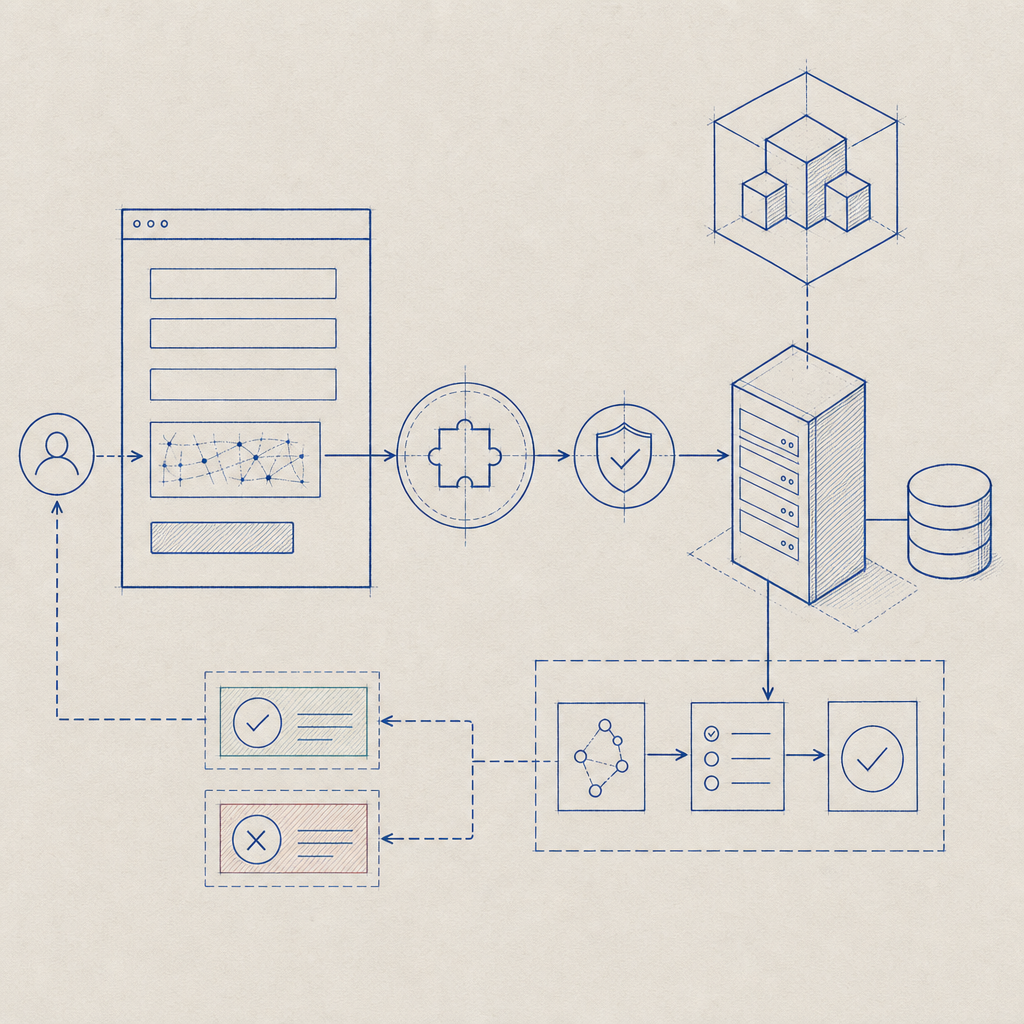
3. Create the CAPTCHA Challenge on the Frontend
Load the CaptchaLa JavaScript loader in your Blade template where the form resides:
<script src="https://cdn.captcha-cdn.net/captchala-loader.js" defer></script>
<div id="captchala-container"></div>
<script>
  window.addEventListener('load', function () {
    Captchala.render('captchala-container', {
      appKey: '{{ config("services.captchala.app_key") }}',
      language: 'en',  // Supports 8 UI languages
    });
  });
</script>
This will embed an interactive CAPTCHA challenge for users to complete.
4. Validate the CAPTCHA Response Server-Side
After the user submits the form, validate the CAPTCHA token with CaptchaLa’s API in your form controller:
use Captchala\Captchala;

public function submitForm(Request $request)
{
    $request->validate([
        'captchala_token' => 'required|string',
    ]);

    $captcha = new Captchala(config('services.captchala.app_key'), config('services.captchala.app_secret'));
    $response = $captcha->validate($request->input('captchala_token'), $request->ip());

    if (!$response->success) {
        return back()->withErrors(['captcha' => 'CAPTCHA validation failed. Please try again.']);
    }

    // Continue processing form data...
}
This process uses the POST https://apiv1.captcha.la/v1/validate endpoint internally and verifies the submitted token along with client IP.
Comparing CaptchaLa with Other CAPTCHA Providers
| Feature | CaptchaLa | reCAPTCHA | hCaptcha | Cloudflare Turnstile |
|---|---|---|---|---|
| Privacy Focus | First-party data, no tracking | Google tracking involved | Third-party data sharing | Privacy-focused |
| SDK Support | PHP, Go, Flutter, Mobile SDKs | Limited client SDKs | Multiple SDKs available | Limited SDK support |
| UI Languages | 8 | Multiple | Multiple | Limited |
| Free Tier Limits | 1,000/mo | Unlimited free | Free tier with limits | Free |
| Pricing | Pro/business tiers available | Pay-as-you-go enterprise | Pay-as-you-go enterprise | Included with Cloudflare |
Each solution has merits depending on your app’s scale, privacy preferences, and integration needs. CaptchaLa emphasizes easy SDK integration, privacy, and multilanguage support.
Tips for Optimizing CAPTCHA in Laravel
- Place CAPTCHA selectively: Include CAPTCHA only on high-risk forms (login, registration) to minimize user friction.
- Use native SDKs: Leveraging CaptchaLa’s PHP SDK improves error handling and reduces development time.
- Localize UI: Make sure to specify your app’s user language when rendering the CAPTCHA widget.
- Store minimal data: Respect user privacy by avoiding unnecessary data collection beyond the CAPTCHA token and client IP.
- Monitor usage: Use dashboard analytics or logs to understand CAPTCHA load and avoid false positives.
Conclusion
Adding CAPTCHA in Laravel is a crucial step in defending your application against bots and spam. CaptchaLa offers a developer-friendly PHP SDK, easy frontend integration, and server-side token validation that fits naturally within Laravel’s architecture. While alternatives like reCAPTCHA and hCaptcha are popular, CaptchaLa stands out for privacy-conscious developers wanting multilanguage support and flexible pricing.
For detailed API references, implementation guidance, and pricing details, visit the CaptchaLa docs and explore their pricing page. With these tools, securing your Laravel forms against bots becomes manageable and transparent.
Where to go next? Check out the CaptchaLa SDK documentation to start integrating today.