
A WAF (Web Application Firewall) and a bot detection system are not the same thing, and treating them as interchangeable leaves real gaps in your defenses. A WAF primarily filters traffic by inspecting HTTP headers, IP reputation, rate limits, and request signatures. Bot detection goes a layer deeper — it evaluates behavioral signals: how a user moves through a page, whether a browser environment looks genuine, and whether interaction patterns match human timing. You need both, and understanding what each does well tells you exactly where to put them.
What a WAF Catches — and What It Misses
Modern WAFs (Cloudflare, AWS WAF, Imperva, and others) are excellent at blocking known-bad IP ranges, enforcing rate limits per endpoint, and rejecting malformed requests. A rule that drops any request exceeding 200 POST calls per minute from a single IP is cheap to evaluate and effective against naive scrapers.
The problem is that sophisticated bots don't look like naive scrapers. They:
- Rotate residential proxy IPs so no single address trips a rate limit.
- Space requests to mimic human pacing (1–3 seconds between actions).
- Send browser-accurate
User-AgentandAcceptheaders. - Use headless browsers (Playwright, Puppeteer) that pass basic TLS fingerprint checks.
Against these techniques, IP-based and header-based WAF rules produce a lot of false negatives. The bot succeeds; the WAF sees nothing unusual.

Where Bot Detection Fills the Gap
Client-side bot detection adds a challenge that requires proof of a real browser context — not just a syntactically correct HTTP request. Approaches include:
- JavaScript environment probes — checking for headless browser artifacts (
navigator.webdriver, missing plugins, inconsistent screen metrics). - Interaction entropy — mouse movement curves, keystroke timing, and scroll patterns that differ statistically between humans and automation scripts.
- Cryptographic proof-of-work tokens — the client browser solves a puzzle; the resulting token is verified server-side, confirming the request originated from a real session.
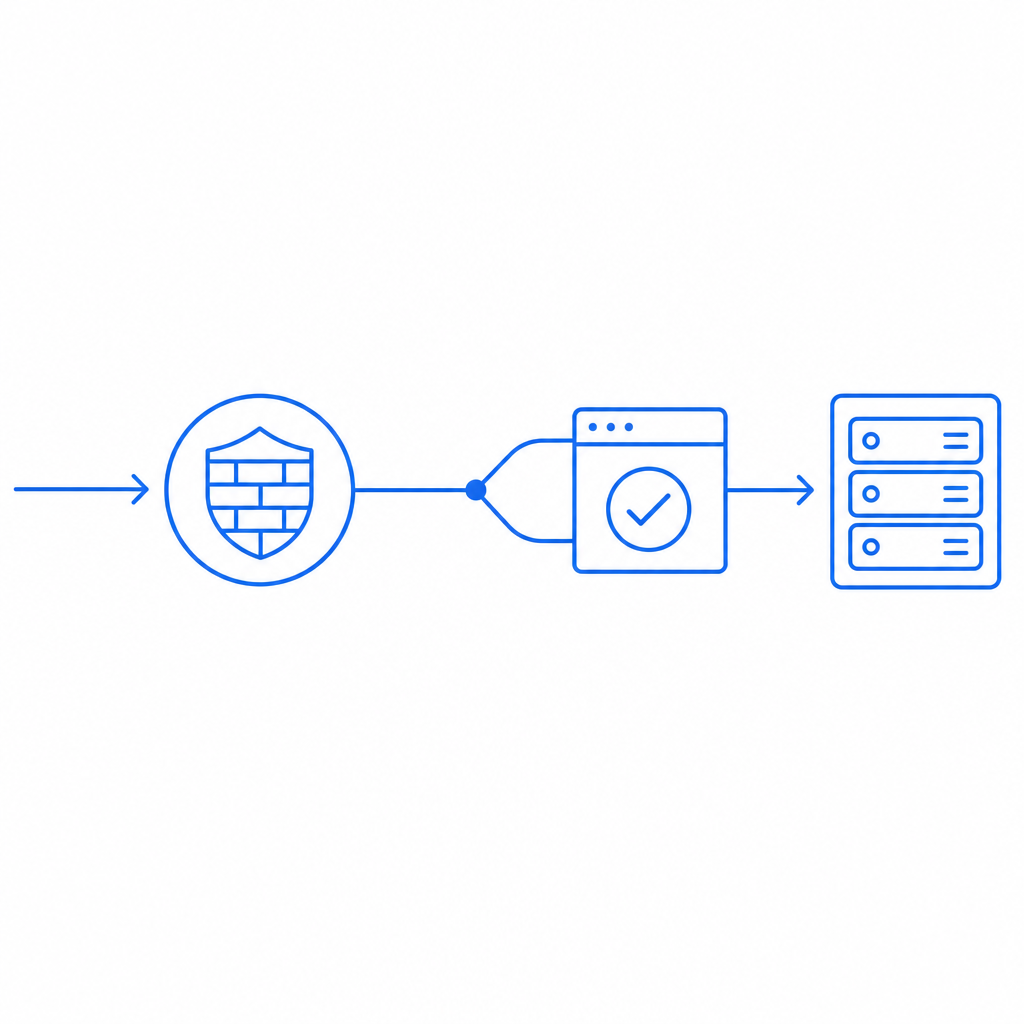
Services like CaptchaLa, reCAPTCHA (Google), hCaptcha, and Cloudflare Turnstile all sit at this layer. They don't replace a WAF — they run after the WAF passes a request, adding a second gate that requires browser-side proof.
Comparison: WAF vs. Bot Detection
| Capability | WAF | Bot Detection |
|---|---|---|
| Block known bad IPs | ✅ Strong | ⚠️ Partial (IP not primary signal) |
| Rate limiting | ✅ Strong | ❌ Not the primary tool |
| Headless browser detection | ❌ Weak | ✅ Strong |
| Human behavioral analysis | ❌ Not applicable | ✅ Core feature |
| Credential stuffing protection | ⚠️ Partial | ✅ Strong |
| DDoS volumetric mitigation | ✅ Strong | ❌ Not applicable |
| False positives on legitimate users | Low | Varies by provider |
The takeaway: run your WAF upstream for volumetric and signature-based threats, then use a bot detection challenge on sensitive endpoints (login, registration, checkout, API entry points).
Integrating a Bot Detection Challenge Server-Side
Once a client completes a challenge, your backend needs to verify the result before allowing the protected action to proceed. Here is a minimal verification flow using CaptchaLa's validation endpoint:
import requests

def verify_captcha_token(pass_token: str, client_ip: str) -> bool:
    """
    Verify the pass_token issued after the client completes the challenge.
    Called server-side before processing the protected form submission.
    """
    response = requests.post(
        "https://apiv1.captcha.la/v1/validate",
        headers={
            "X-App-Key": "YOUR_APP_KEY",
            "X-App-Secret": "YOUR_APP_SECRET",
        },
        json={
            "pass_token": pass_token,  # token sent from the browser
            "client_ip": client_ip,   # forwarded IP from your request context
        },
    )
    data = response.json()
    return data.get("success") is True
The pass_token is what the browser sends after solving the challenge. Your form or API client attaches it to the submission; your server validates before doing any meaningful work (database writes, authentication lookups, email sends). The WAF has already filtered volumetric noise upstream — this check closes the behavioral gap.
For server-initiated flows (API endpoints without a user-facing browser, or mobile apps), CaptchaLa also exposes a server-side challenge issuance endpoint at POST https://apiv1.captcha.la/v1/server/challenge/issue. Mobile SDKs are available via CocoaPods (Captchala 1.0.2), Maven (la.captcha:captchala:1.0.2), and pub.dev (captchala 1.3.2) for iOS, Android, and Flutter respectively.
Choosing Between Bot Detection Providers
reCAPTCHA v3 is invisible and scores sessions continuously — useful for low-friction flows, though score tuning requires some experimentation and it sends data to Google's infrastructure. hCaptcha is a common choice for teams that prefer not to route behavioral data through Google. Cloudflare Turnstile is tightly integrated if you're already using Cloudflare's network and want a no-puzzle UX.
CaptchaLa takes a first-party data approach — challenge telemetry is not shared or resold to third parties. It covers eight UI languages and has native SDKs for Web (JS, Vue, React), iOS, Android, Flutter, and Electron, which reduces integration overhead for teams shipping across multiple platforms. The free tier covers 1,000 challenges per month; paid tiers start at 50K (Pro) and scale to 1M+ (Business). See pricing for current numbers.
None of these providers is a substitute for a WAF, and no WAF is a substitute for a behavioral challenge — the stacks complement each other.
Structuring Your Defense Stack in Practice
A practical deployment looks like this:
- WAF (network edge) — Block IP blocklists, apply rate limits per endpoint, enforce TLS and header sanity rules.
- Bot detection challenge (application layer) — Gate login, registration, password reset, and any endpoint that triggers a meaningful backend action.
- Server-side token validation — Never trust the client's self-reported challenge result; always POST the token to the validation API before proceeding.
- Monitoring and anomaly alerts — Track challenge failure rates by endpoint. A sudden spike in failures usually signals a new automation campaign, not a UX problem.
- Review False Positive Rate — Periodically audit whether legitimate users are getting stuck. Behavioral thresholds may need adjustment as your user demographics change.
Skipping step 3 is the most common mistake: teams add a CAPTCHA widget but forget to validate the token server-side, which means any bot that knows to POST a fake token bypasses the check entirely.
Where to Go Next
If you're evaluating how to slot bot detection into an existing WAF setup, the CaptchaLa docs include integration guides for common frameworks and a walkthrough of the server-side validation flow. The free tier is enough to test on a staging endpoint without committing to a plan.